Lighting / Stage Lighting
User Manual for Beamz Multibox Lighting Effect
Quick start guide for the Beamz Multibox lighting effect. Includes essential laser safety instructions, installation requirements, and a full 19-channel DMX control table.
Table of contents
Manual images
Click an image to enlargeQuick Start Guide
This document provides essential safety, installation, and operational instructions for the Beamz Multibox lighting effect. Always read the full manual before commissioning the device to ensure safe operation.
Laser Safety
The Multibox contains laser components. Failure to follow these instructions can result in hazardous radiation exposure or eye injury.
- Never look directly into the laser aperture or beams.
- Do not point lasers at people, animals, aircraft, or into the sky.
- Avoid pointing lasers at highly reflective surfaces like mirrors, windows, or shiny metal, as reflections can be hazardous.
- Do not use the device if the housing is damaged, open, or if optics appear compromised.
- The device must only be operated by a skilled and well-trained operator.
- Always test the laser units before the public is present.
Installation
Proper installation is critical for safety. The installation must be carried out by an authorized employee or dealer.
- Mounting: The fixture must be installed using the supplied mounting bracket. The structure must be able to hold 10 times the weight of the fixture for 1 hour without deformation.
- Safety: Always use a secondary safety attachment (e.g., a safety cable or catch net) to prevent the fixture from falling if the main attachment fails.
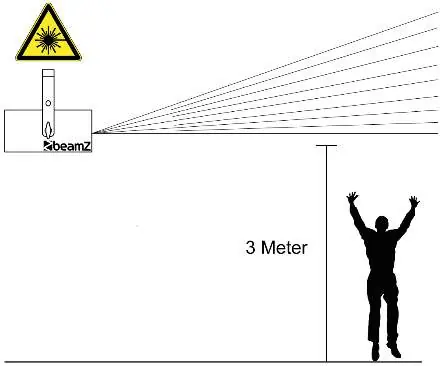
- Height: Install the laser units so that beams move above the audience (minimum 3 meters height recommended).
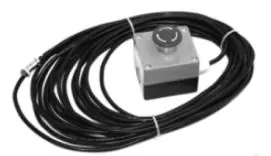
- Emergency Stop: It is strongly recommended to use a laser emergency kill switch (ref.no: 152.958).
- Clearance: Ensure a minimum distance of 0.5 meters from highly inflammable materials.
- Access: Install the fixture in a position where it cannot be reached by unauthorized persons.
DMX Channel Configuration
The Multibox operates using 19 DMX channels to control various effects:
- Channel 1: Master Dimmer (0-100%)
- Channel 2: Strobe Wash (Rate 0-100%)
- Channels 3-6: Colour Wash (Red, Green, Blue, UV)
- Channel 7: Effect Stroboscope
- Channels 8-13: Colour Derby (Red, Green, Blue, White, Amber, Pink)
- Channel 14: Rotation Derby (Clockwise/Un-clockwise rotation)
- Channel 15: Laser (Red, Green, Red+Green, Rainbow effect)
- Channel 16: Rotation Laser (Clockwise/Un-clockwise rotation)
- Channel 17: SMD Strobe
- Channel 18: Mode (Auto programs 1-6, Sound programs 1-6)
- Channel 19: Program Speed (Slow to fast)
Official resources from the manual
Manufacturer information
beamZ
Practical help
Common problems
Laser not activating
Ensure the emergency kill switch is connected and not engaged. Verify DMX channel 15 settings.
Hazardous reflections
Ensure the laser is not pointed at mirrors, windows, or shiny metal surfaces.
Safety concerns during rigging
Ensure the area below the installation is clear of persons and a secondary safety cable is attached.
Before use
- Inspect housing for damage or open parts.
- Verify the mounting structure can support 10x the fixture weight.
- Attach a secondary safety cable.
- Ensure the laser beam path is at least 3 meters above the audience.
- Check for inflammable materials within 0.5 meters.
- Connect the emergency kill switch (recommended).
Specs in practice
- 19 DMX Channels
- Provides full control over dimming, strobing, color mixing, laser patterns, and motor rotation.
- Laser Safety
- Requires strict adherence to height and audience-avoidance rules to prevent eye injury.
Images and diagrams
- The laser safety diagram illustrates the requirement to keep laser beams at least 3 meters above the audience.
- The emergency kill switch is a critical safety accessory for immediate laser shutdown.
Model compatibility
- Requires DMX controller for full functionality.
- Compatible with laser emergency kill switch (ref.no: 152.958).

Manual page author
Emily Carter
User documentation editor
Prepares concise manual descriptions and highlights the most useful setup, operation, and maintenance information for readers.