Electronics / Audio
Behringer 000-E9500-00010 Mix-Sequencer Module 1050 User Guide
Quick start guide for the Behringer Mix-Sequencer Module 1050, covering power connection, Eurorack installation, control functions, and technical specifications.
Table of contents
Quick guide from the manual
The Behringer Mix-Sequencer Module 1050 is an 8-channel mixer and sequencer designed for Eurorack systems. This guide provides essential information for power connection, installation, and operation of the module's controls.
Power Connection
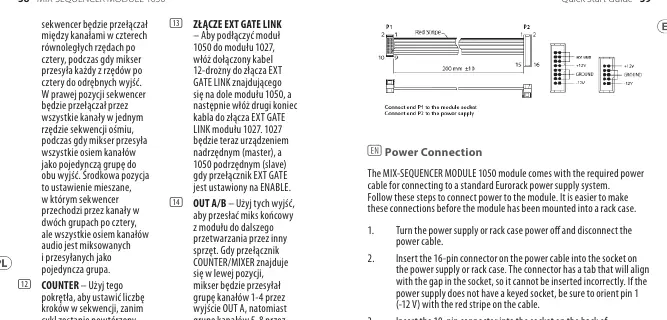
The module includes a power cable for standard Eurorack power supplies. It is recommended to connect the power cable before mounting the module in a rack case.
- Turn off the power supply and disconnect the power cable.
- Insert the 16-pin connector into the power supply socket. The connector is keyed to prevent incorrect insertion. If the socket is not keyed, ensure pin 1 (-12 V) aligns with the red stripe on the cable.
- Insert the 10-pin connector into the socket on the back of the module, ensuring correct orientation using the tab.
- Once both ends are securely attached, mount the module and turn on the power.
Installation
The module requires 24 HP of rack space. Use the included screws to mount the module into your Eurorack case. If your case uses sliding threaded plates, position them roughly before attaching the module. Start by tightening the screws partially to allow for alignment adjustments, then fully tighten once the final position is set.
Controls and Operation
- Channel Level Knobs: Control the mix level for each of the 8 channels.
- Channel On/Off Buttons: Select and indicate active channels.
- Exclusive-On Buttons: Used for soloing channels (requires COUNTER switch set to OFF).
- Pulse Gen/Off/Manual Advance: Determines if the module sequences automatically (PULSE GEN), acts as a standard mixer (OFF), or advances manually.
- Counter/Mixer Switch: Sets the sequencing logic (4/2 or 8/1) and audio routing logic.
- EXT GATE (ENABLE/DISABLE): Controls whether the sequencer follows an external master module (e.g., 1027) via the rear EXT GATE LINK connector.
Technical Specifications
The module features 8 x 3.5 mm TS jack inputs (DC coupled) and 2 x 3.5 mm TS jack outputs (DC coupled). It operates within a temperature range of 5°C to 40°C and consumes 110 mA (+12 V) and 20 mA (-12 V).
Manufacturer information
Behringer
Practical help
Common problems
Sequencer not advancing as expected
Ensure the PULSE GEN/OFF/MANUAL ADVANCE switch is set to PULSE GEN or use the EXT ADV input for external clocking.
External gate control not working
Ensure the EXT GATE switch is set to ENABLE and the 12-way cable is correctly connected to the EXT GATE LINK connector on the module underside.
Solo function not working
The COUNTER switch must be set to the OFF position to use the Exclusive-On (Solo) buttons.
Before use
- Ensure your Eurorack power supply is turned off.
- Verify the 16-pin power connector is oriented correctly (red stripe to -12 V).
- Check that you have 24 HP of available space in your rack.
- Ensure all audio cables use 3.5 mm TS connectors.
Specs in practice
- Current draw
- 110 mA (+12 V), 20 mA (-12 V) - ensure your power supply can handle this load.
- Max input level
- +20 dBu for audio inputs; signals exceeding this may distort.
Images and diagrams
- The module front panel features 8 channel level knobs, 8 on/off buttons, and 8 red exclusive-on (solo) buttons.
- The right side of the panel contains the master controls: Pulse Rate, Counter/Mixer switch, and Pulse Gen/Manual Advance switch.
- Input/Output jacks are located at the bottom of the front panel.
Model compatibility
- Designed for standard Eurorack power supply systems.
- Compatible with CLOCKED SEQUENTIAL CONTROL MODULE 1027 for master/slave operation via the rear EXT GATE LINK connector.

Manual page author
Emily Carter
User documentation editor
Prepares concise manual descriptions and highlights the most useful setup, operation, and maintenance information for readers.