Music / Bass Amplifiers
Owner's Manual for Blackstar Debut Bass 15 and 25 Amplifiers
Quick guide for the Blackstar Debut Bass 15 and 25 amplifiers. Includes setup instructions, control panel explanations, safety warnings, and technical specifications.
Quick answers from the manual
Quick answer
- The Blackstar Debut Bass 15 and 25 are bass amplifiers featuring volume control, 3-band EQ, a switchable Drive channel, a Line In for backing tracks, and a 3.5mm output for headphones or recording. p. 5, 6
Key actions
- Connect your bass p. 6
- Use silent practice p. 6
Problems and fixes
Amplifier does not operate normally
Refer the product to a qualified service engineer.
p. 4Technical specifications
| Parameter | Value | Meaning | Pages |
|---|---|---|---|
| Debut Bass 15 Power | 15 Watt | RMS Power output | p. 6 |
| Debut Bass 25 Power | 25 Watt | RMS Power output | p. 6 |
Where to find it in the PDF
- Front Panel Controls p. 2
- Technical Specifications p. 6
Table of contents
Quick guide from the manual
The Blackstar Debut Bass 15 and 25 are compact, powerful bass amplifiers designed for home rehearsal and practice. This manual covers both the 15-watt and 25-watt variants, detailing their controls, safety requirements, and technical specifications.
Front Panel Controls
The front panel layout is identical for both the Debut Bass 15 and 25 models:
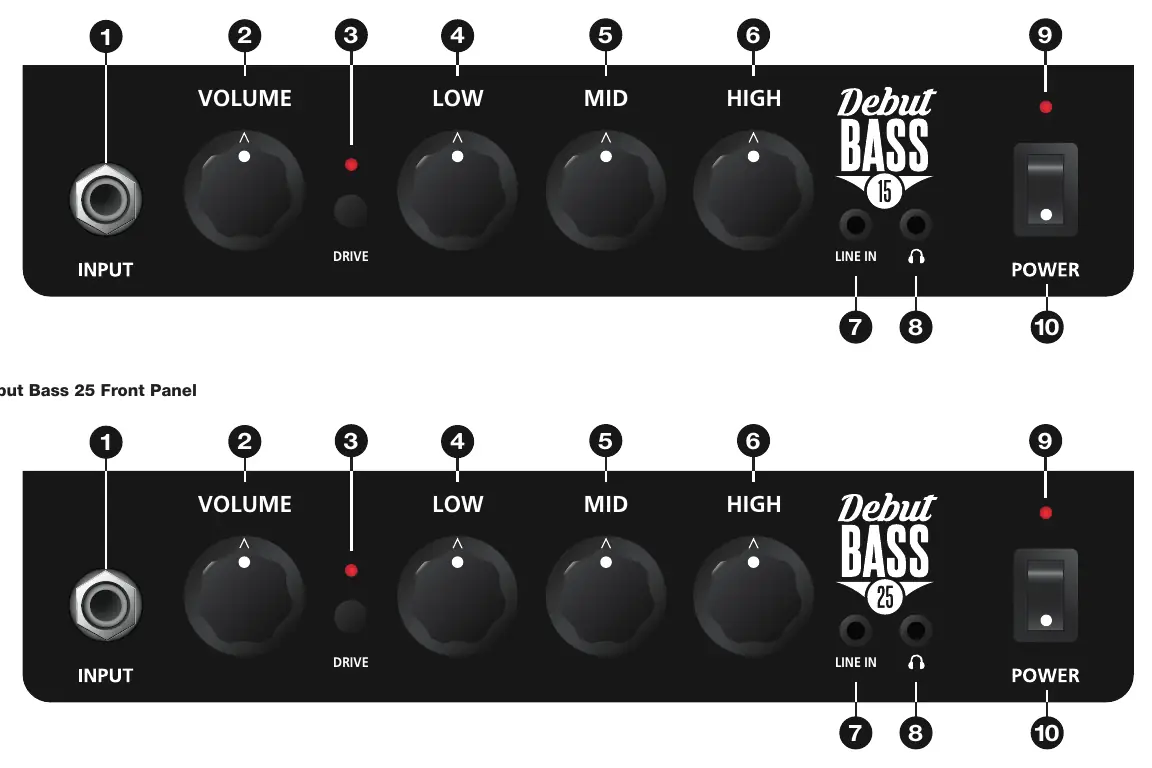
- 1. Input: Connect your bass guitar here using a high-quality screened lead.
- 2. Volume: Adjusts the overall output volume. Turn clockwise to increase.
- 3. Drive: Press this switch to engage the Drive channel (pushed in). When the switch is out, the Clean channel is active.
- 4. Low: Adjusts bass frequencies. Center position is flat; turn clockwise to boost, counter-clockwise to cut.
- 5. Mid: Adjusts middle frequencies. Center position is flat; turn clockwise to boost, counter-clockwise to cut.
- 6. High: Adjusts treble frequencies. Center position is flat; turn clockwise to boost, counter-clockwise to cut.
- 7. Line In: Connect external audio devices (phone, tablet, laptop) to play along with backing tracks. The source is summed to mono through the amp speaker and stereo through headphones.
- 8. Line Output / Headphones: 3.5mm output for silent practice or direct recording. Connecting a lead here disconnects the internal speaker.
- 9. Power Indicator Light: Illuminates when the amplifier is switched on.
- 10. Power: Main switch to turn the amplifier on and off.
Rear Panel
- Mains Input: Connect the power lead to a compatible power outlet as specified on the rear panel.
Important Safety Instructions
- Do not open the equipment case; there are no user-serviceable parts inside.
- Keep the amplifier away from water, moisture, and rain.
- Ensure the amplifier is used in a well-ventilated area; do not block ventilation slots.
- Do not place the unit near heat sources like radiators or stoves.
- If moving the unit from a cold to a warm environment, allow it to reach room temperature before switching on to prevent condensation.
- Always use the supplied power cord and ensure the mains plug remains accessible.
Manufacturer information
Blackstar Amplification
Practical help
Common problems
No sound from the amplifier
Check that the power switch is on, the volume is turned up, the guitar cable is securely connected, and no headphones are plugged into the Line Output jack (which disconnects the speaker).
Distorted or 'gritty' sound
Check if the Drive switch is engaged (pushed in). If you want a clean sound, ensure the Drive switch is in the 'out' position.
Condensation inside the unit
If the amp was moved from a cold to a warm environment, wait for it to reach room temperature before switching it on.
Before use
- Ensure the power outlet matches the voltage and frequency requirements on the rear panel.
- Use a high-quality screened guitar lead.
- Ensure the amplifier is placed on a stable surface.
- Check that ventilation slots are not blocked.
- Ensure the power switch is off before connecting the power cord.
Specs in practice
- Drive Channel
- Adds grit and growl to the tone, suitable for rock and heavier styles.
- Line Output / Headphones
- 3.5mm jack for silent practice; automatically disconnects the internal speaker when in use.
Images and diagrams
- The front panel features 10 controls: Input, Volume, Drive switch, Low EQ, Mid EQ, High EQ, Line In, Line Output/Headphones, Power Indicator, and Power Switch.
Model compatibility
- The Line In jack is compatible with phones, tablets, PCs, and laptops.
- The Line Output/Headphones jack is a 3.5mm connection.

Manual page author
Emily Carter
User documentation editor
Prepares concise manual descriptions and highlights the most useful setup, operation, and maintenance information for readers.