Electronics / Amplifiers Receivers
User Manual for Blackstar Debut Bass Amplifier
Quick guide for the Blackstar Debut Bass amplifier. Learn how to set up your amp, adjust volume, overdrive, and EQ settings, and connect external devices like phones or headphones.
Table of contents
Manual images
Click an image to enlargeQuick Start Guide
The Blackstar Debut Bass amplifier is designed for bass players seeking a compact unit with versatile tone. It features two channels (Clean and Overdrive) and a 3-band EQ. To get started, connect the mains lead to the amplifier, plug your bass into the Input socket, and switch the power on.
Amplifier Controls
The front panel allows you to shape your sound:
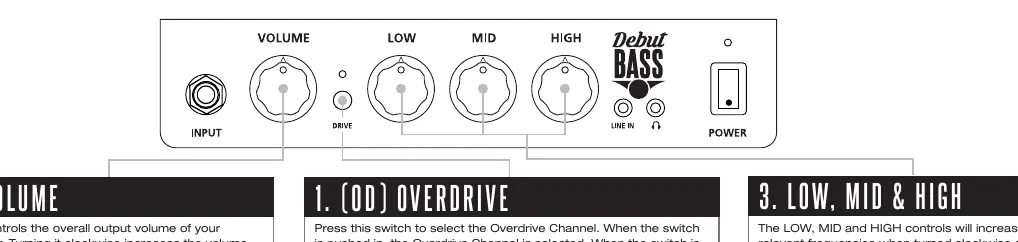
- Volume: Controls the overall output volume. Turn clockwise to increase.
- Overdrive (OD) Switch: Press the switch in to engage the Overdrive channel. When the switch is out, the Clean channel is active.
- 3-Band EQ (Low, Mid, High): Adjust these controls to boost or cut specific frequencies. Turning clockwise increases the frequency; turning counter-clockwise decreases it.
Connections
The amplifier supports external audio playback and silent practice:
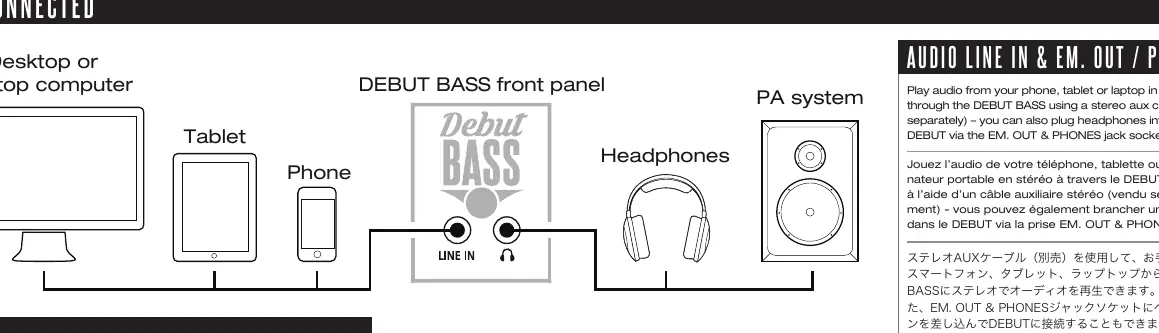
- Audio Line In: Connect your phone, tablet, or laptop using a stereo aux cable (sold separately) to play audio through the amplifier. Adjust the player's volume to match your guitar volume for backing tracks.
- EM. Out & Phones: Connect headphones to this jack for silent practice.
Safety and Maintenance
To ensure safe operation and longevity of your amplifier:
- Environment: Do not expose the unit to rain, liquids, or moisture. Use only in non-tropical climate regions at an altitude not exceeding 2000m.
- Temperature: The equipment must be used at a maximum ambient temperature of 35°C. If moved from a cold to a warm environment, allow the unit to reach room temperature before switching on.
- Ventilation: Do not block ventilation slots or place the unit in confined spaces like bookcases.
- Hearing Protection: Avoid listening at high volume levels for long periods to prevent permanent hearing damage.
Manufacturer information
Blackstar Amplification
Practical help
Common problems
No sound from the amplifier
Check that the mains lead is connected, the power switch is ON, and the volume control is turned up.
Sound is distorted when playing clean
Ensure the Overdrive (OD) switch is in the 'out' position.
External audio device is too quiet
Adjust the volume on your playback device (phone/tablet/laptop) to match the level of your guitar.
Before use
- Ensure the amplifier is at room temperature if moved from a cold environment.
- Check that the mains lead is securely connected to the Mains Input.
- Ensure ventilation slots are not obstructed.
- Set the volume to a low level before switching the unit on.
Specs in practice
- Overdrive Channel
- Adds gain and distortion to the signal for rock tones.
- EM. OUT & PHONES
- Output jack for headphones or recording devices.
Images and diagrams
- The front panel diagram illustrates the layout of the Volume, Low, Mid, High, Overdrive switch, Input, Line In, and Power switch.
- The connection diagram shows how to route audio from a phone, tablet, or laptop into the Line In and how to connect headphones to the EM. Out jack.
Model compatibility
- Requires a stereo aux cable (sold separately) for audio playback.
- Compatible with standard bass guitars.

Manual page author
David Miller
Documentation analyst
Organizes user manual content into clear summaries, with attention to model details, product context, and everyday usability.