Music / Guitar Amplifiers
Owner's Manual for Blackstar FLY 3 CHARGE Mini Amplifier
Quick guide for the Blackstar FLY 3 CHARGE mini amplifier. Learn how to use the ISF tone control, pair Bluetooth devices, charge the battery, and connect an extension cabinet.
Quick answers from the manual
Quick answer
- The FLY 3 CHARGE is a portable mini guitar amplifier with Bluetooth, ISF tone shaping, and delay effects. It is powered by an internal battery charged via USB-C. p. 6, 7
Key actions
- Pairing Bluetooth p. 5
- Charging the battery p. 6
Problems and fixes
Bluetooth not connecting
Ensure the amplifier is in Discoverable Mode (slow LED flash) by pressing and holding the Bluetooth switch.
p. 5Show 3 more answers Show less
Maintenance and reset
- Battery maintenance p. 6
Technical specifications
| Parameter | Value | Meaning | Pages |
|---|---|---|---|
| Charger Requirement | 5V 1.0A | Maximum power input for charging. | p. 6 |
| Extension Cabinet | FLY 103 | Compatible extension cabinet for stereo sound. | p. 6 |
Where to find it in the PDF
- Front Panel Controls p. 7
- Rear Panel Connections p. 7
Table of contents
Manual images
Click an image to enlargeQuick guide from the manual
The Blackstar FLY 3 CHARGE is a portable mini guitar amplifier featuring Bluetooth connectivity, the patented Infinite Shape Feature (ISF) for tone shaping, and a built-in delay effect. This document provides essential instructions for charging, operation, and safety.
- Charging: Use a USB charger delivering a maximum of 5V 1.0A. Do not use high-powered laptop USB-C chargers.
- Bluetooth: Use the Bluetooth switch to toggle between Discoverable Mode (pairing) and Scanning Mode (reconnecting).
- Tone: Use the ISF control to shift between American (tight, aggressive) and British (woody, less aggressive) tonal characteristics.
- Extension: Connect a FLY 103 cabinet to create a 6W stereo setup.
Front Panel Controls
The front panel contains the following controls:
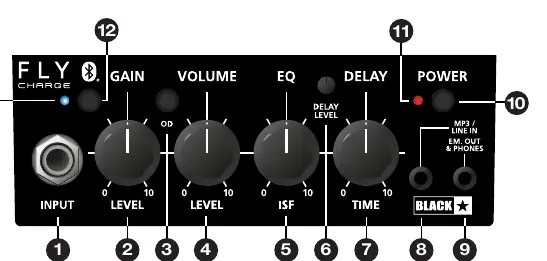
- Input: Connect your guitar using a high-quality screened lead.
- Gain: Adjusts the amount of overdrive or distortion.
- OD (Overdrive): Selects between Clean and Overdrive channels.
- Volume: Controls the overall output volume.
- ISF (Infinite Shape Feature): Adjusts the tonal signature.
- Delay Level & Time: Controls the intensity and duration of the delay effect.
- MP3 / Line In: Connect external audio devices for jamming.
- Speaker Emulated Output: Connect headphones or recording devices. Note: Connecting a lead here disconnects the internal speaker.
- Power: Turns the unit on/off.
Bluetooth Operation
The amplifier uses two Bluetooth modes:
- Discoverable Mode (Slow LED flash): Press and hold the Bluetooth switch until the LED flashes slowly. Search for 'FLY CHARGE' in your device's Bluetooth settings to pair.
- Scanning Mode (Fast LED flash): Press the Bluetooth switch once to reconnect to previously paired devices.
Rear Panel and Charging
The rear panel features the USB-C power input and the extension speaker jack.

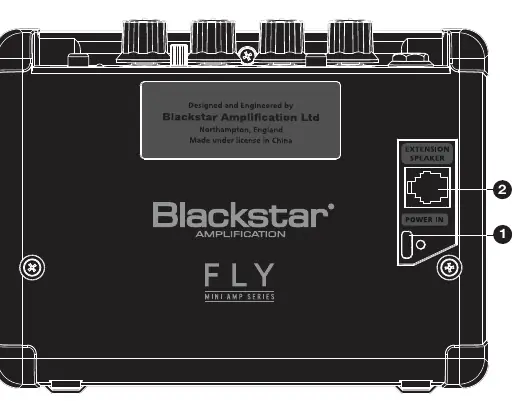
- Charging: Plug a USB-C cable into the POWER IN port. A solid red LED indicates charging, LED off indicates fully charged, and a flashing red LED indicates low power.
- Battery Health: Unplug the unit when fully charged. It is best practice to deplete the battery before recharging rather than topping it up frequently.
- Optimal Tone: Unplug the charging cable during use to avoid potential interference with guitar tone.
Safety Information
Follow these precautions to ensure safe operation:
- Do not expose the unit to rain, liquids, or moisture.
- Do not open the equipment case; there are no user-serviceable parts inside.
- Do not place the unit on unstable surfaces.
- Keep the unit away from heat sources like radiators or stoves.
- High headphone levels can cause permanent hearing damage; use caution.
Manufacturer information
Blackstar Amplification
Practical help
Common problems
Bluetooth device not connecting
Ensure the amplifier is in Discoverable Mode (slow flash) by pressing and holding the Bluetooth switch.
Poor guitar tone while charging
Unplug the charging cable from the amplifier before playing.
No sound from the speaker
Check if a cable is plugged into the Speaker Emulated Output, as this automatically disconnects the internal speaker.
Before use
- Charge the unit using a 5V 1.0A USB charger.
- Ensure the power switch is off before connecting.
- Use a high-quality screened guitar lead.
- Verify the Bluetooth device is within range.
Show more Show less
Specs in practice
- Speaker Emulated Output
- Allows connection to headphones or recording devices; disconnects internal speaker.
- USB Power In
- USB-C port for charging the internal battery.
Images and diagrams
- Front Panel: Shows input, gain, volume, ISF, delay, and power controls.
- Rear Panel: Shows USB-C power input and extension speaker jack.
Model compatibility
- Extension Cabinet: Compatible with FLY 103.
- Charger: Use 5V 1.0A max. Do not use high-powered laptop USB-C chargers.

Manual page author
Michael Turner
Technical manual editor