Music / Guitar Amplifiers
Owner's Manual for Blackstar ID:Core Stereo V4 Guitar Amplifier
Comprehensive user guide for the Blackstar ID:Core Stereo V4 series (10, 20, 40). Learn about voice settings, ISF control, effects, USB recording, CabRig Lite, and power reduction.
Quick answers from the manual
Quick answer
- The ID:CORE V4 is a programmable digital guitar amplifier featuring 6 voice settings, patented ISF tone shaping, built-in effects, USB audio interface capabilities, and CabRig Lite speaker simulation. p. 4, 7
Key actions
- Factory Reset p. 5
- Store Patch p. 8
- Engage Tuner p. 7
Problems and fixes
Amplifier unresponsive during firmware update
Force power up in Update Mode by holding Manual and MOD switches while switching on.
p. 9Show 3 more answers Show less
Maintenance and reset
- Factory Reset p. 5
Technical specifications
| Parameter | Value | Meaning | Pages |
|---|---|---|---|
| ID:CORE STEREO 10 V4 Power | 10 Watts | Output power | p. 10 |
| ID:CORE STEREO 20 V4 Power | 20 Watts | Output power | p. 10 |
| ID:CORE STEREO 40 V4 Power | 40 Watts | Output power | p. 10 |
Where to find it in the PDF
- Front Panel Controls p. 5, 6
- USB Audio & Recording p. 8, 9
- Technical Specifications p. 10
Table of contents
Quick Guide
The Blackstar ID:Core Stereo V4 series is a range of programmable digital guitar amplifiers designed for versatility and ease of use. These amps combine traditional, intuitive controls with advanced features like patented ISF tone shaping, built-in effects, and USB audio interface capabilities.
Front Panel Controls
- Input: Connect your guitar here using a high-quality screened lead.
- Voice: Select from six preamp voicings: Clean Warm, Clean Bright, Crunch, Super Crunch, OD 1, and OD 2.
- Gain: Adjusts the amount of overdrive or distortion.
- Volume: Controls the preamp volume.
- ISF: The Infinite Shape Feature allows you to blend between American (tight, aggressive) and British (woody, less aggressive) tonal characteristics.
- Effects (MOD, DLY, REV): Press to toggle effects on/off or focus them for editing.
- Type & Level: Use these to select effect types and adjust parameters.
- Tap: Sets the rate/time of the focused effect.
- Power: Turns the amplifier on and off.
Modes of Operation
Manual Mode: The sound reflects the current physical position of the knobs. The Manual LED is lit.
Patch Mode: The amplifier uses stored settings. The Manual LED is unlit. You can store 6 patches (1 per Voice setting) by holding the Manual switch for two seconds.
Tuner Mode: Hold the Reverb switch for one second to engage. The amplifier output is muted. Voice LEDs indicate the note, and MOD/DLY/REV LEDs indicate tuning accuracy.
Advanced Features
- Power Reduction: Switch between full power and 1W for lower volume practice without sacrificing tone.
- USB Audio: Connect via USB-C to use as an audio interface. The amp provides four independent channels for recording and reamping.
- CabRig Lite: Advanced speaker simulation for direct recording or headphones.
- Independent Music Playback Volume: Hold Tap and turn Volume to adjust external music playback volume.
- USB Recording Level: Hold Tap and turn Gain to adjust USB output level independently of speaker volume.
Technical Specifications
The ID:Core Stereo V4 series is available in three power configurations:
- ID:CORE STEREO 10 V4: 10 Watts, 2x5W speakers.
- ID:CORE STEREO 20 V4: 20 Watts, 2x10W speakers.
- ID:CORE STEREO 40 V4: 40 Watts, 2x20W speakers.
Safety Information
Always use the supplied power cord. Do not block ventilation openings. Do not expose the unit to rain or moisture. Refer all servicing to qualified personnel. High loudspeaker levels can cause permanent hearing damage; use hearing protection if exposed to high levels for extended periods.
Manufacturer information
Blackstar Amplification
Practical help
Common problems
No sound from speakers
Check if a cable is connected to the CabRig/Phones jack (this mutes the speakers). Also, ensure the amplifier is not in Tuner mode.
Firmware update fails
Ensure the amplifier is connected directly to a main USB port on the rear of your computer, not a front-mounted port, USB hub, or extension cable.
Controls do not match sound
You are likely in Patch mode. Switch to Manual mode to have the sound reflect the current physical knob positions.
Before use
- Ensure the Power Switch is in the OFF position before connecting the power supply.
- Use a high-quality screened guitar lead.
- Allow the unit to reach room temperature if moved from a cold environment.
- Connect to a main USB port on your computer for firmware updates.
Show more Show less
Specs in practice
- Power Reduction
- Reduces output to 1W for lower volume practice and recording.
Images and diagrams
- Front Panel: Identifies all knobs and switches including Input, Voice, Gain, Volume, ISF, Effects, and Power.
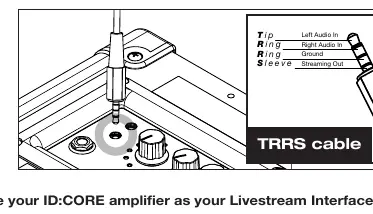
- TRRS Cable: Diagram shows the pinout for the Line In/Streaming jack (Left Audio In, Right Audio In, Ground, Streaming Out).
Model compatibility
- Footswitch (FS-11, FS-18, FS-22) is supported only on ID:CORE STEREO 20 and 40 models.
- Windows users require the Blackstar USB Audio Driver.
- Mac users do not require additional audio drivers.

Manual page author
Emily Carter
User documentation editor