Automotive / Phone Holders
User Manual for Bluestone Mag Charge Mount MCW22
Quick guide for the Bluestone Mag Charge Mount MCW22. Learn how to assemble, install on your car air vent, and charge your iPhone and Apple Watch efficiently.
Quick answers from the manual
Quick answer
- The Bluestone MCW22 is a 2-in-1 magnetic charging mount for cars, featuring a 15W wireless charger for phones and an integrated dock for Apple Watch. p. 1
Key actions
- Assemble the mount by attaching the air vent clip to the back of the charging unit. p. 1
- Connect the mount to a Quick Charge 3.0 or higher car charger using the included USB-C cable. p. 1
Problems and fixes
Charging not starting
Check cable connection and ensure the power source is Quick Charge 3.0 or higher.
p. 1Maintenance and reset
- Wipe with a soft, dry cloth. Avoid harsh chemicals, alcohol, or abrasive cleaners. p. 1
Technical specifications
| Parameter | Value | Meaning | Pages |
|---|---|---|---|
| Charging Power | 15W | Wireless charging output | p. 1 |
Where to find it in the PDF
- Product Overview and Usage p. 1
Table of contents
Quick guide from the manual
The Bluestone Mag Charge Mount MCW22 is a 2-in-1 magnetic charging solution designed for vehicles. It provides 15W wireless charging for MagSafe-compatible phones and includes an integrated dock for Apple Watch. The mount features a 360-degree adjustable head and a secure air vent clip.
Product Overview
The device consists of the following main components:
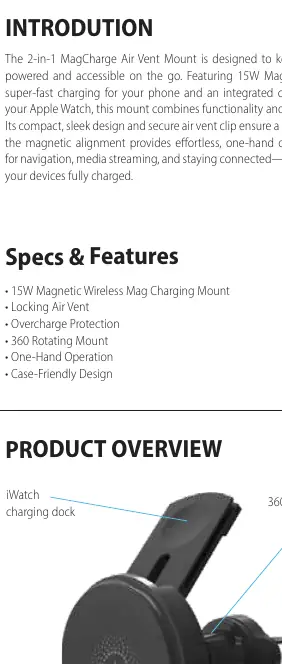
- iWatch charging dock: Located on the top arm of the mount.
- Magnetic pad: The main surface for attaching your MagSafe-compatible phone.
- 360° Adjustable Head: Allows for rotation to switch between portrait and landscape modes.
- Hook Mount: The clip mechanism that attaches to the car air vent.
How to Use
Follow these steps to set up and use your mount:
- Assemble the Mount: Attach the air vent clip securely to the back of the main charging unit until it clicks into place.
- Install on Air Vent: Choose a compatible air vent (horizontal, vertical, or angled). Squeeze the clip and attach it to the vent slats. Adjust the clip to ensure a wobble-free fit.
- Connect Power: Plug the included USB-C cable into the charging port on the mount. Connect the other end to a car charger (Quick Charge 3.0 or higher is recommended) or a vehicle USB port.
- Attach Devices: Align your MagSafe-compatible phone with the magnetic pad. Place your Apple Watch on the integrated charging dock.
Operation and Adjustments
Once devices are mounted, charging will begin automatically. You can rotate the adjustable head to set your desired viewing angle, allowing you to switch between portrait and landscape modes for navigation or media playback. Check your phone and Apple Watch for the charging indicator to confirm that charging has started.
Care and Safety
To maintain the device, wipe the mount with a soft, dry cloth to keep it free from dust and smudges. Avoid using harsh chemicals, alcohol, or abrasive cleaners, as these may damage the materials. Handle the USB-C cable carefully to prevent fraying or damage, and avoid pulling or bending the cable excessively.
Package Includes
- Wireless Charging Mount Head
- Locking Air Vent Clip
- Type-C Charging Cable
Practical help
Common problems
Charging does not start automatically.
Ensure you are using a Quick Charge 3.0 or higher car charger. Verify that the USB-C cable is securely connected to both the mount and the power source.
Mount is unstable or wobbling on the vent.
Adjust the clip mechanism on the air vent slats to ensure a tighter, wobble-free fit.
Before use
- Verify your car air vent is compatible (horizontal, vertical, or angled).
- Ensure you have a Quick Charge 3.0 or higher car charger for optimal performance.
- Check that the USB-C cable is included in the package.
- Ensure your phone is MagSafe-compatible.
Specs in practice
- 15W Wireless Charging
- Provides fast wireless charging capability for compatible devices.
- 360° Rotating Mount
- Allows the user to adjust the viewing angle and switch between portrait and landscape modes.
Images and diagrams
- The mount features a dedicated iWatch charging dock on the upper arm.
- The main circular magnetic pad is designed for MagSafe-compatible iPhones.
- The hook mount is located at the rear for attachment to vehicle air vents.
Model compatibility
- Compatible with MagSafe-enabled iPhones.
- Compatible with Apple Watch.
- Requires a Quick Charge 3.0 or higher car charger for best results.

Manual page author
Michael Turner
Technical manual editor
Reviews PDF manuals for structure, safety notes, and practical product details so readers can find the right information quickly.