Electronics / USB Hubs & Docking
User Manual for Baseus Milky Way Pro Series Wireless Charging Electric Car Mount Phone Holder
Quick guide for the Baseus Milky Way Pro Series Wireless Charging Electric Car Mount Phone Holder (BS-CM023). Learn how to install, use, and troubleshoot your device.
Table of contents
Manual images
Click an image to enlargeQuick guide from the manual
This guide covers the installation and operation of the Baseus Milky Way Pro Series Wireless Charging Electric Car Mount Phone Holder. Ensure you use a compatible car charger adapter (5V-2A, 9V-2A, or 12V-1.67A) to achieve optimal charging speeds. Keep the device within the operating temperature range of 0°C to 35°C for best performance.
Product Overview
The device consists of the following main components:
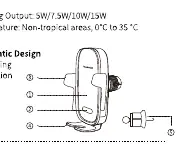
- Wireless Charging Area: The surface where the phone is placed.
- Infrared Induction: Sensor for automatic clamping.
- Clamping Arm: Holds the phone securely.
- Clamp Feet: Provides bottom support for the phone.
- Tail Hook: Used to attach the mount to the vehicle's air vent.
Installation
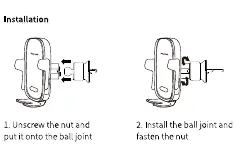
- Prepare the mount: Unscrew the nut from the back of the main unit.
- Attach the ball joint: Place the nut onto the ball joint of the tail hook, then insert the ball joint into the socket on the back of the main unit. Fasten the nut securely.
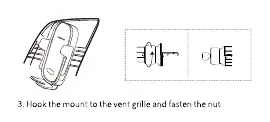
- Mount to vehicle: Hook the tail hook onto the air vent grille and tighten the nut to secure the position.
Usage Tips
- Ensure there are no metal objects between the wireless charging area and the phone, as this will prevent charging.
- The coupling distance for wireless charging is 6mm. If your phone case is thicker than this, it may affect charging efficiency.
- If the mount becomes loose after long-term use, please reinforce the installation on the air vent.
Specifications
- Model No.: BS-CM023
- Input (Type-C): 5V-2.4A, 9V-2.23A, 12V-1.67A (Max)
- Wireless Charging Output: 5W / 7.5W / 10W / 15W
- Working Temperature: 0°C to 35°C
Manufacturer information
Baseus
Practical help
Common problems
Wireless charging is not working.
Ensure there are no metal objects between the phone and the charging area. Check that your phone case is not thicker than 6mm.
The mount feels loose on the air vent.
After long-term use, check the connection and reinforce the mount on the air vent grille.
Charging is slow or inefficient.
Verify that you are using a compatible adapter (5V-2A, 9V-2A, or 12V-1.67A) and that the ambient temperature is within 0°C to 35°C.
Before use
- Verify package contents: Main Unit, USB-A to Type-C cable, Air vent tail hook, User Manual.
- Ensure you have a compatible car charger adapter (5V-2A, 9V-2A, or 12V-1.67A).
- Check that the air vent in your vehicle is compatible with the tail hook design.
- Ensure the phone case thickness does not exceed 6mm.
Specs in practice
- Input (Type-C)
- Requires a car charger capable of 5V-2.4A, 9V-2.23A, or 12V-1.67A for full performance.
- Wireless Output
- Supports 5W, 7.5W, 10W, and 15W charging depending on the connected device's capabilities.
- Coupling Distance
- The maximum distance (6mm) between the charger and the phone for effective wireless power transfer.
Images and diagrams
- The schematic illustrates the assembly of the ball joint and the tail hook to the main unit.
- The diagram identifies the infrared induction sensor and clamping arms for automatic operation.
Model compatibility
- Compatible with devices supporting Qi wireless charging.
- Requires a car charger adapter with specific power output (QC/PD recommended).

Manual page author
David Miller
Documentation analyst
Organizes user manual content into clear summaries, with attention to model details, product context, and everyday usability.