Power / Power Banks
User Manual for Green Lion Duo Mag 2-in-1 Car Cup Holder
Quick guide for the Green Lion Duo Mag 2-in-1 Car Cup Holder (GX-68). Learn how to install, adjust, maintain, and safely use your magnetic car phone mount.
Quick answers from the manual
Quick answer
- The Green Lion Duo Mag 2-in-1 Car Cup Holder (GX-68) is an adjustable magnetic mount. To install, assemble the magnetic head to the base, squeeze the base to fit your car's cup holder (3.0"-4.3"), and attach your phone. Use the included magnetic ring for non-MagSafe devices. p. 3, 4, 5
Key actions
- Install the holder by squeezing the base and inserting it into the car cup holder. p. 5
- Use the included magnetic ring for non-Apple MagSafe phones. p. 6
First start
- Assemble the ball head to the magnetic head, attach the dual magnetic head to the base, and insert into the cup holder. p. 5
Problems and fixes
Holder shifts or detaches
Ensure secure installation in the cup holder by squeezing the base properly.
p. 7Maintenance and reset
- Wipe with a soft, damp cloth. Clean magnets with a dry cloth. Periodically check the gooseneck arm for wear. p. 6
Technical specifications
| Parameter | Value | Meaning | Pages |
|---|---|---|---|
| Magnetic Force | 2.5 kg | Holding capacity | p. 3 |
| Cup Holder Fit | 3.0" - 4.3" | Compatible cup holder diameter | p. 3 |
Where to find it in the PDF
- Product Overview and Specifications p. 2, 3
- Installation Instructions p. 4, 5
- Cleaning and Safety p. 6, 7
Table of contents
Manual images
Click an image to enlargeQuick guide from the manual
The Green Lion Duo Mag 2-in-1 Car Cup Holder (GX-68) is a hands-free mounting solution for vehicles. It features a flexible gooseneck arm, 360° rotating magnetic heads, and an adjustable base that fits cup holders between 3.0" and 4.3". The device uses 17 N50 magnets to provide a secure hold for phones and small devices.
Product Overview
The holder is constructed from ABS and silicone. It provides a magnetic force of 2.5 kg. The design is compact and space-efficient, intended to keep your vehicle organized while allowing for safe, hands-free device operation.
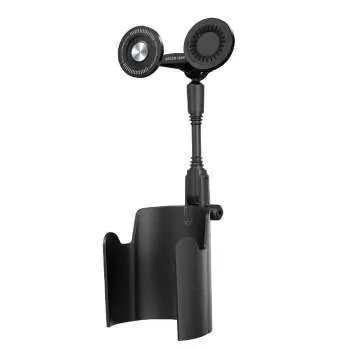
Installation
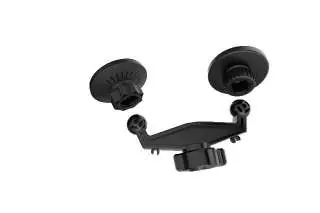
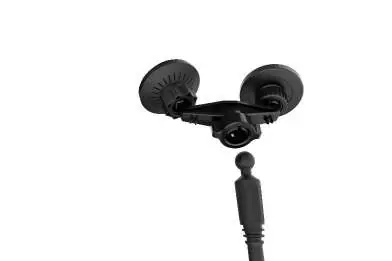
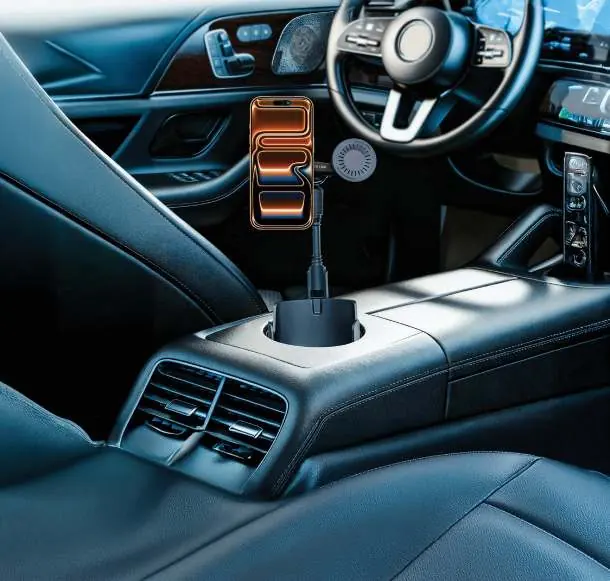
- Attach the Ball Head: Connect the ball head to the magnetic head. Adjust the angle to your preference and tighten the locking nut to secure it.
- Attach the Dual Magnetic Head: Connect the dual magnetic head to the base of the holder. Adjust the angle as needed and tighten the locking nut.
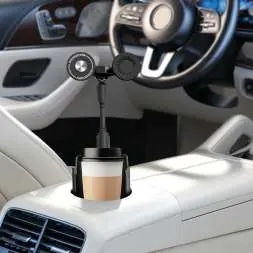
- Insert into Cup Holder: Squeeze the bottom of the holder and insert it into your car's cup holder. Release the base to allow it to adjust automatically to the cup holder size.
- Mount Device: Place your phone on the magnetic heads. If using a non-Apple MagSafe phone, use the included magnetic ring to ensure a secure attachment.
Cleaning and Maintenance
- Regular Cleaning: Wipe the surface with a soft, damp cloth to remove dust or spills. Avoid harsh chemicals or abrasive materials.
- Magnetic Head Care: Clean with a dry cloth. Do not use water or cleaning solutions directly on the magnets to prevent damage.
- Cup Holder Area: Use a soft brush or cloth to remove dust or residues. If dampening the cloth, ensure no water enters the mechanism.
- Gooseneck Arm: Periodically check the arm for signs of wear or loosening. Tighten screws or connections if necessary.
- Storage: Store in a cool, dry place away from direct sunlight or extreme temperatures when not in use.
Safety Precautions
- Ensure the holder is securely installed before placing any devices on it.
- Position the holder to avoid obstructing your view of the road or vehicle controls.
- Do not overload the holder with heavy or oversized objects.
- Avoid using the holder during sudden maneuvers or in rough driving conditions.
- Regularly inspect the holder for wear and tear, especially the gooseneck arm and magnetic heads.
- Keep the holder and its components out of reach of children.
- Do not apply excessive force when adjusting the holder or magnetic heads.
Warranty
Products purchased directly from the Green Lion website or shop come with a 24-month warranty. Products purchased from approved sellers come with a 12-month warranty. You can apply for a warranty extension at https://www.greenlion.net/warranty.
Official resources from the manual
Manufacturer information
Green Lion
Practical help
Common problems
Holder shifts or detaches during use
Ensure the holder is securely installed in the cup holder. Squeeze the base firmly before insertion to allow it to expand and fit the cup holder size correctly.
Phone does not attach securely
Ensure your device is compatible. If using a non-Apple MagSafe phone, you must use the included magnetic ring.
Magnetic head feels loose
Check the locking nut on the ball head and the dual magnetic head connection. Tighten the nut to secure the desired angle.
Before use
- Verify your car cup holder diameter is between 3.0" and 4.3".
- Ensure the gooseneck arm is tightened and stable.
- Confirm phone compatibility (MagSafe or use included magnetic ring).
- Clean the mounting surface of the cup holder.
- Inspect the magnetic heads for debris.
Specs in practice
- Magnetic Force
- 2.5 kg; the maximum holding capacity for devices.
- Cup Holder Fit Size
- Compatible with cup holders ranging from 3.0" to 4.3" in diameter.
Images and diagrams
- The manual provides visual steps for assembling the ball head to the magnetic head.
- Illustrates the squeezing mechanism of the base for insertion into the cup holder.
Model compatibility
- Fits most car cup holders (3.0" - 4.3").
- Supports Apple MagSafe natively.
- Non-MagSafe phones require the included magnetic ring for secure attachment.

Manual page author
Emily Carter
User documentation editor
Prepares concise manual descriptions and highlights the most useful setup, operation, and maintenance information for readers.