Electronics / Wireless Audio Adapters
User Manual for AV:Link Bluetooth 2-in-1 Transmitter & Receiver BTTR2
Quick guide for the AV:Link Bluetooth 2-in-1 Transmitter & Receiver (BTTR2). Learn how to pair, switch between transmitter and receiver modes, charge, and troubleshoot connection issues.
Quick answers from the manual
Quick answer
- The AV:Link BTTR2 is a 2-in-1 Bluetooth transmitter and receiver. Use the TX/RX switch to select the mode, then hold the multi-functional button to enter pairing mode. p. 1, 2
Key actions
- Powering on/off p. 1
- Charging the device p. 2
First start
- Charge fully before first use. p. 2
Problems and fixes
Bluetooth unit cannot pair
Check that the unit is in pairing mode and that the Bluetooth mode is enabled on your device.
p. 2Technical specifications
| Parameter | Value | Meaning | Pages |
|---|---|---|---|
| Bluetooth version | v4.2 | With multipoint support | p. 1 |
| Battery | 200mAh | Internal rechargeable battery | p. 1 |
Where to find it in the PDF
- Technical Specifications and Overview p. 1
- Pairing, Charging, and Troubleshooting p. 2
Table of contents
Quick guide from the manual
The AV:Link Bluetooth 2-in-1 Transmitter & Receiver (BTTR2) allows you to add Bluetooth functionality to devices with a 3.5mm or RCA audio connection. It can function as a transmitter (sending audio from a TV/projector to Bluetooth headphones) or a receiver (sending audio from a smartphone/tablet to wired speakers/amplifiers). The device supports multi-point pairing for two devices simultaneously and has a built-in rechargeable battery.
Overview
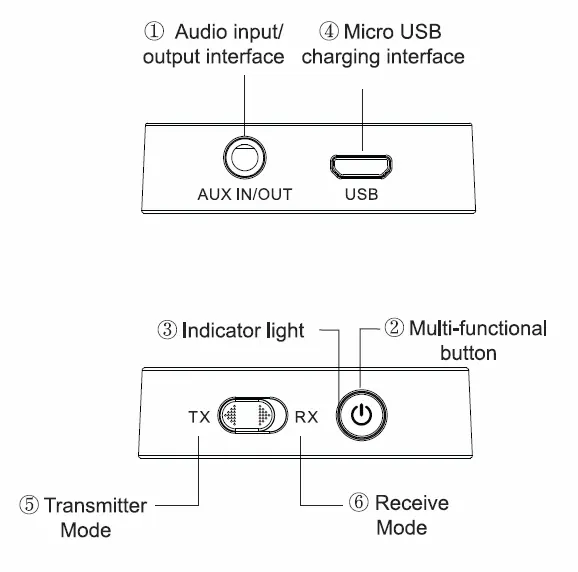
The device features an audio input/output interface (AUX IN/OUT), a Micro USB charging port, a multi-functional button, and a TX/RX switch to toggle between modes.
Powering on and off
Press and hold the multi-functional button until the LED light turns blue to power on. To power off, press and hold the button again until the LED light turns red.
Pairing in Transmission Mode
- Connect the 3.5mm audio lead to the device and the audio source (e.g., TV, projector, MP3 player).
- Set the TX/RX switch to the transmitter mode (TX).
- Press and hold the multi-functional button until the LED blinks blue quickly.
- Set your Bluetooth headphones or speakers to pairing mode and wait for the connection.
Pairing in Receiving Mode
- Connect the 3.5mm audio lead to the device and the audio output equipment (e.g., stereo system, amplifier).
- Set the TX/RX switch to the receive mode (RX).
- Press and hold the multi-functional button until the LED blinks red and blue alternately.
- Search for the device on your smartphone, tablet, or PC; the pairing name is AV:Link BTTR2. If prompted for a code, use 0000.
Multi-point Pairing
To connect a second device, press the multi-functional button again after the initial pairing is successful. The red light will blink, and once paired, both red and blue lights will blink intermittently.
Charging
Use the supplied USB cable to charge the device. A red LED indicates charging, which turns blue when fully charged. Charging takes approximately 2 hours. The device can be kept connected to a USB port on a TV or PC for continuous power.
Troubleshooting
- Cannot pair: Ensure the unit is in pairing mode, Bluetooth is enabled on your device, and devices are close together.
- Disconnection: Ensure a clear line of sight between the unit and your device. Avoid large metallic objects or other wireless interference.
- Won't switch on: Ensure the unit is sufficiently charged.
Safety and Disposal
Do not attempt to service the product yourself. Keep away from water, high humidity, direct sunlight, and high temperatures. This product is electronic equipment and must be disposed of according to local council guidelines.
Practical help
Common problems
Bluetooth unit cannot pair with your device
Ensure the unit is in pairing mode, Bluetooth is enabled on your device, and devices are in close proximity.
Unit disconnects within the 10m range
Ensure a clear line of sight between the unit and your device. Remove large metallic objects or other wireless signal sources.
Unit will not switch on
Check that the unit is charged sufficiently before operation.
Before use
- Charge the device fully before first use.
- Ensure you have the correct audio cable (3.5mm or RCA) for your equipment.
- Identify whether you need Transmitter (TX) or Receiver (RX) mode.
- Ensure the device is within 10m of the paired equipment.
Specs in practice
- Bluetooth Version
- v4.2 with multipoint support.
- Operating Time
- Up to 8 hours in transmit mode, 6 hours in receive mode.
- Bluetooth Range
- Up to 10m in a clear line of sight.
Images and diagrams
- The device features a TX/RX switch to toggle between modes.
- The multi-functional button controls power and pairing.
- The AUX IN/OUT port handles audio connections.
- The Micro USB port is used for charging.
Model compatibility
- Compatible with devices having 3.5mm or RCA audio connections.
- Supports multi-point connection for up to 2 devices simultaneously.
- Default pairing code is 0000 if requested.

Manual page author
David Miller
Documentation analyst
Organizes user manual content into clear summaries, with attention to model details, product context, and everyday usability.