Electronics / Camera Lenses
User Manual for Aukey BT-C6 2-in-1 Wireless Transmitter and Receiver
Quick guide for the Aukey BT-C6 2-in-1 Wireless Transmitter and Receiver. Learn how to set up TX/RX modes, pair devices, understand LED indicators, and troubleshoot connectivity.
Quick answers from the manual
Quick answer
- The Aukey BT-C6 is a 2-in-1 Bluetooth adapter. Use TX mode to send audio from non-Bluetooth devices (like TVs) to headphones. Use RX mode to receive audio from phones to wired speakers. p. 2
Key actions
- Power On/Off: Hold multi-function button for 3 seconds. p. 4
- Clear Pairing List: Hold pairing button for 8 seconds while in TX or RX mode. p. 6
First start
- Charge fully before first use (approx 2.5 hours). Red LED turns off when charged. p. 4
Problems and fixes
Device disconnects
Ensure within 10m range. Re-enter range within 5 minutes to auto-reconnect.
p. 6Maintenance and reset
- Clear pairing list by holding the pairing button for 8 seconds. p. 6
Technical specifications
| Parameter | Value | Meaning | Pages |
|---|---|---|---|
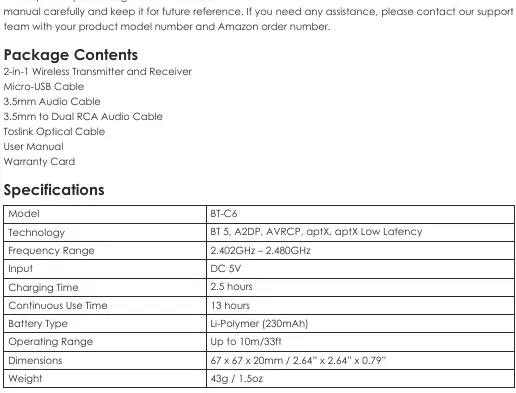
| Battery | 230mAh | Li-Polymer battery capacity | p. 2 |
| Operating Range | 10m/33ft | Maximum wireless range | p. 2 |
| Charging Time | 2.5 hours | Time to fully charge | p. 2 |
| Continuous Use | 13 hours | Battery life per charge | p. 2 |
Where to find it in the PDF
- Product Diagram p. 3
- Getting Started p. 4
- LED Indicators p. 7
Table of contents
Quick guide from the manual
The Aukey BT-C6 is a 2-in-1 Bluetooth adapter that functions as either a Transmitter (TX) to send audio from non-Bluetooth devices to headphones, or a Receiver (RX) to stream audio from phones to wired speakers. Always fully charge the device before first use. Ensure the correct mode (TX/RX) and input/output (OPT/AUX) switches are set before powering on.
Product Overview
The device features a multi-function button on top, with an LED status indicator. The side panel contains the OPT/AUX switch and the TX/RX mode switch. The back panel houses the charging input, optical output, optical input, 3.5mm audio jack, pairing button, and volume controls.
Getting Started
Charging: Connect the micro-USB cable to a USB charging port and the device input port. The red LED indicates charging; it turns off when fully charged. Charging takes approximately 2.5 hours.
Powering On/Off: Press and hold the multi-function button for 3 seconds. The LED will flash green (TX mode) or blue (RX mode) when on.
Transmitter Mode (TX Mode)
Use this mode to send audio from a TV, computer, or CD player to wireless headphones or speakers.
- Connect the audio source to the BT-C6 using the 3.5mm or optical cable.
- Set the OPT/AUX switch to match your cable type.
- Set the TX/RX switch to TX.
- Power on the device; it will enter pairing mode (green LED flashing rapidly).
- Activate pairing on your wireless headphones/speaker.
- Once paired, the LED will turn solid green.
Receiver Mode (RX Mode)
Use this mode to receive audio from a smartphone to wired headphones or stereo systems.
- Connect your wired audio equipment to the BT-C6 using the 3.5mm or optical cable.
- Set the OPT/AUX switch to match your cable type.
- Set the TX/RX switch to RX.
- Power on the device; it will enter pairing mode (blue LED flashing rapidly).
- Activate Bluetooth on your smartphone and select AUKEY BT-C6.
- Once paired, the LED will turn solid blue.
Music Control
In Receiver Mode, you can control playback directly from the device:
- Play/Pause: Press the multi-function button.
- Adjust Volume: Press volume + / -.
- Skip Track: Press and hold volume + / - for 3 seconds.
LED Status Indicators
- Green flashing slowly: TX mode, standby.
- Green flashing rapidly: TX mode, pairing.
- Solid Green: TX mode, connected.
- Blue flashing slowly: RX mode, standby.
- Blue flashing rapidly: RX mode, pairing.
- Solid Blue: RX mode, connected.
- Red flashing: Low battery.
- Red solid: Charging.
Care & Use
Keep the device away from liquids and extreme heat. Do not use headphones or speakers at high volume for extended periods to prevent hearing damage.
Manufacturer information
AUKEY
Practical help
Common problems
Device not pairing
Ensure the device is in pairing mode (flashing LED), keep your audio device close to the BT-C6, and try pressing the pairing button to manually trigger pairing.
Connection drops
Ensure you are within the 10m/33ft operating range. If you exceed the range, the device will disconnect; re-enter the range within 5 minutes to auto-reconnect.
No audio output
Verify that the OPT/AUX switch matches the cable used (3.5mm or Optical) and that the TX/RX switch is set to the correct mode.
Before use
- Fully charge the device using the included micro-USB cable.
- Identify if your audio source requires TX (Transmitter) or RX (Receiver) mode.
- Check if your audio equipment uses 3.5mm or Optical connection.
- Ensure the device is powered off before switching modes.
Specs in practice
- aptX Low Latency
- High-quality audio codec that minimizes audio delay, ideal for video.
Images and diagrams
- Top: LED indicator and Multi-Function button.
- Side: OPT/AUX switch and TX/RX mode switch.
- Back: Charging port, Optical In/Out, 3.5mm jack, Pairing button, Volume controls.
Model compatibility
- Compatible with devices having 3.5mm or Optical audio ports.
- Supports dual-device connection in both modes.

Manual page author
Michael Turner
Technical manual editor
Reviews PDF manuals for structure, safety notes, and practical product details so readers can find the right information quickly.