Electronics / USB Hubs & Docking
User Manual for UGREEN U6 2-in-1 Bluetooth Audio Receiver and Transmitter
Quick guide for the UGREEN U6 2-in-1 Bluetooth Audio Receiver and Transmitter. Learn how to switch between TX and RX modes, pair devices, manage audio controls, and troubleshoot connection issues.
Quick answers from the manual
Quick answer
- The UGREEN U6 is a 2-in-1 Bluetooth adapter. Use the side switch to select TX mode to send audio from a TV to headphones, or RX mode to receive audio from a phone to speakers. p. 1
Key actions
- Switching Modes p. 1
- Resetting the device p. 1
First start
- Charging p. 1
Problems and fixes
Interference/Humming
Ensure both ends of the audio cable are fully inserted.
p. 1Maintenance and reset
- Factory Reset p. 1
Technical specifications
| Parameter | Value | Meaning | Pages |
|---|---|---|---|
| Bluetooth Version | V5.0 | Wireless connectivity standard | p. 1 |
| Battery Capacity | 200mAh | Internal battery size | p. 1 |
Where to find it in the PDF
- User Manual p. 1
Table of contents
Manual images
Click an image to enlargeQuick guide from the manual
The UGREEN U6 is a 2-in-1 Bluetooth adapter that functions as either a Transmitter (TX) or a Receiver (RX). Before using, ensure the device is fully charged (approximately 2 hours). Use the side switch to select the desired mode (TX, RX, or OFF). The device features a multi-function button for pairing, playback control, and volume adjustment.
Product Overview
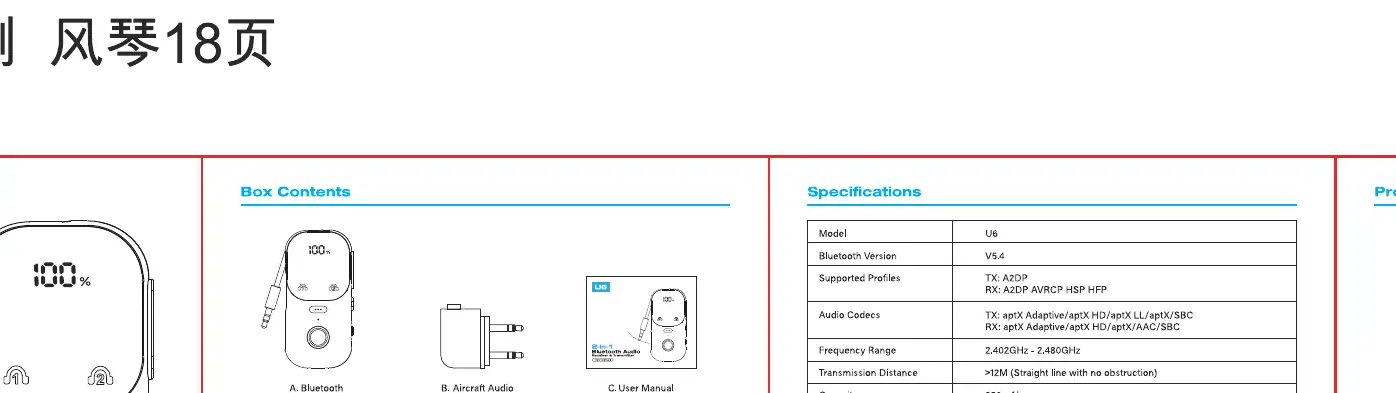
The device includes a side switch for mode selection, a multi-function button, and LED indicators to show connection status and audio codecs. The package includes the U6 adapter, a 3.5mm audio cable, and a USB-C charging cable.
Mode Selection
TX Mode (Transmitter): Used to transmit audio from non-Bluetooth devices like TVs or PCs to Bluetooth headphones or speakers. Set the side switch to TX.
RX Mode (Receiver): Used to receive audio from Bluetooth devices like smartphones to wired speakers or headphones. Set the side switch to RX.
Setup Instructions


TX Mode Setup
- Set the side switch to TX mode and power on the device.
- Set your Bluetooth headphones to pairing mode.
- The U6 will automatically pair with the headphones.
RX Mode Setup
- Set the side switch to RX mode and power on the device.
- Open your phone's Bluetooth settings and connect to the U6.
- Once connected, play audio from your phone to the connected speakers.
Troubleshooting
- Interference or Humming: Ensure all audio cables are fully inserted.
- Audio Delay: Ensure your connected devices support aptX Low Latency.
- Pairing Issues: If the device fails to pair, perform a factory reset by holding the pairing button for 8 seconds.
- Missing Interface: If your device only has RCA outputs, use the included RCA adapter.
Technical Specifications
- Bluetooth Version: V5.0
- Battery Capacity: 200mAh
- Charging Time: Approximately 2 hours
- Supported Codecs: aptX, aptX LL, aptX HD, SBC, AAC
Manufacturer information
UGREEN
Practical help
Common problems
Interference or humming noise
Ensure that both ends of the audio cable are fully inserted into the ports.
Audio delay
Ensure that your Bluetooth headphones or speakers support aptX Low Latency.
Device fails to pair
Perform a factory reset by pressing and holding the pairing button for 8 seconds.
Before use
- Charge the device fully (approx. 2 hours).
- Identify the correct mode (TX for transmitting, RX for receiving).
- Ensure the side switch is set to the desired mode before powering on.
- Check that audio cables are securely connected.
Specs in practice
- Bluetooth V5.0
- The wireless standard used for connection.
Images and diagrams
- The side switch toggles between TX, RX, and OFF positions.
- The multi-function button is used for pairing, play/pause, and volume control.
Model compatibility
- Supports aptX, aptX LL, aptX HD, SBC, and AAC codecs.

Manual page author
Emily Carter
User documentation editor
Prepares concise manual descriptions and highlights the most useful setup, operation, and maintenance information for readers.