Electronics / Cameras
User Guide for IPEVO 2-VOCAL DONGLE
Quick setup guide for the IPEVO 2-VOCAL DONGLE. Learn how to pair your speakerphones, connect to your PC, and manage audio settings for your conference setup.
Quick answers from the manual
Quick answer
- The IPEVO 2-VOCAL DONGLE is a wireless adapter used to connect two IPEVO VOCAL Speakerphones to a computer for conference calls. p. 1, 2
Key actions
- Connect the dongle to your PC, pair the speakerphones using the pin, and select the dongle as the audio device in your meeting software. p. 2
First start
- Plug the dongle into the PC, use the pin to enter pairing mode (if not pre-paired), and select the device in your meeting app. p. 2
Problems and fixes
Devices not connecting
Follow the pairing procedure in Step 2 using the pin.
p. 2, 3Maintenance and reset
- The device has a memory function and auto-reconnects. If it fails, re-pair using the pin. p. 3
Technical specifications
| Parameter | Value | Meaning | Pages |
|---|---|---|---|
| Input | DC 5V 100mA | Power input requirements | p. 4 |
Where to find it in the PDF
- Setup and Pairing p. 2
- Usage Instructions p. 3
Table of contents
Manual images
Click an image to enlargeQuick guide from the manual
The IPEVO 2-VOCAL DONGLE is designed to wirelessly connect two IPEVO VOCAL Speakerphones to your computer. If you purchased the IPEVO DUET set, the devices are pre-paired, and you can skip the pairing step. Otherwise, follow the instructions below to set up your conference audio system.
Installation and connection
Follow these steps to set up your device:
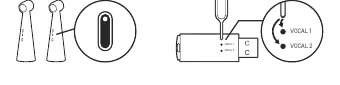

- Step 1: Connect the IPEVO 2-VOCAL DONGLE directly to your PC or laptop USB port. Use the included USB Type-A to Type-C adapter if necessary.
- Step 2 (Pairing): If your devices are not pre-paired, insert the provided pin into the first pairing hole (Vocal 1) and press and hold for 3 seconds to enter pairing mode. The LED will flash. Pair the IPEVO VOCAL speakerphone. Once the indicator on the dongle stays solid and you hear the prompt, pairing is successful. Repeat this process for the second pairing hole (Vocal 2) to pair the second speakerphone.
- Step 3: Select "IPEVO 2-VOCAL DONGLE" in your meeting application settings as both the microphone and speaker device.
LED indicators
- Rapid flashing: Pairing in progress.
- Solid light: Paired successfully.
- Slow flashing: Not paired.
Usage and settings
For optimal performance, it is recommended to set the speaker volume to maximum, enable the AI MIC, and use the OMNI omnidirectional reception mode on your IPEVO VOCAL speakerphones.
- Mute/Unmute single unit: Press the mute button on one IPEVO VOCAL speakerphone.
- Mute all units: Press and hold the mute button on one IPEVO VOCAL speakerphone for 3 seconds to mute all connected units.
Important notes
- The maximum connection distance between the dongle and the speakerphone is 15 meters (ensure no large objects like walls are between them).
- The optimal reception range for each IPEVO VOCAL is 180 cm. It is recommended to place another VOCAL within a radius of 150 to 180 cm to prevent audio interference.
- The dongle has a memory function and will automatically re-pair when powered on. If it fails to connect, perform the pairing process again.
- Do not use or store the product near heat sources, in high humidity, or in sandy/dusty environments.
Manufacturer information
IPEVO
Practical help
Common problems
Speakerphones do not connect automatically
Perform a new pairing process using the pin in the pairing hole (Step 2).
Audio interference between units
Ensure other VOCAL units are placed within a radius of 150 to 180 cm from each other.
Before use
- Ensure you have the IPEVO 2-VOCAL DONGLE and the included pin.
- Check if you have the IPEVO DUET set (pre-paired).
- Ensure your PC or laptop is powered on.
- Verify that you have the necessary USB Type-A to Type-C adapter if your computer lacks a Type-A port.
Specs in practice
- Connection Range
- Up to 15 meters (clear line of sight required).
- Optimal Unit Distance
- 150-180 cm between speakerphones to avoid interference.
Images and diagrams
- Pairing holes are located on the side of the dongle, labeled Vocal 1 and Vocal 2.
- Use the provided pin to press the button inside the pairing hole.
Model compatibility
- This product must be used with IPEVO VOCAL Speakerphones.

Manual page author
Michael Turner
Technical manual editor
Reviews PDF manuals for structure, safety notes, and practical product details so readers can find the right information quickly.