Electronics / Networking
User Guide for Sandberg Bluetooth Audio Link 2-in-1 TxRx 450-12
Quick guide for the Sandberg Bluetooth Audio Link 2-in-1 TxRx (450-12). Learn how to set up transmitter and receiver modes, charge the device, and understand LED indicators.
Quick answers from the manual
Quick answer
- The Sandberg 450-12 is a 2-in-1 Bluetooth adapter. Use Rx-mode to receive audio on non-Bluetooth speakers/headphones, and Tx-mode to transmit audio from non-Bluetooth sources (like TVs) to Bluetooth headphones. p. 1, 5, 6
Key actions
- Power On p. 3
- Enter Pairing Mode p. 5, 6
- Reset Pairing p. 3
First start
- Charge the device using the provided USB-C cable. Select mode (Tx/Rx) using the side switch. Hold the power button for 3 seconds to turn on and enter pairing mode. p. 4, 5, 6
Problems and fixes
Battery low
Charge the device; LED blinks red 3 times every 30 seconds.
p. 3
Disconnect device
Short press the reset button.
p. 3Maintenance and reset
- Hold the reset button for 5 seconds to reset pairing. p. 3
Where to find it in the PDF
- Product Overview p. 2
- Charging p. 4
- Rx Mode Setup p. 5
- Tx Mode Setup p. 6
Table of contents
Manual images
Click an image to enlargeQuick guide from the manual
The Sandberg Bluetooth Audio Link 2-in-1 TxRx (450-12) is a versatile adapter that allows you to add Bluetooth functionality to non-Bluetooth audio devices. It operates in two modes: Receiver (Rx) to receive audio on speakers or headphones, and Transmitter (Tx) to send audio from devices like TVs to Bluetooth headphones.
Product overview
The device features the following components:
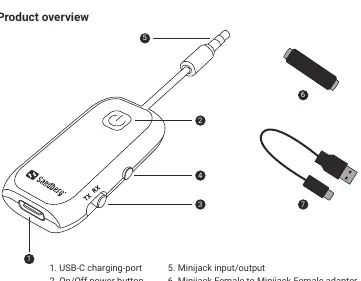
- USB-C charging port: For powering the device.
- On/Off power button: Used to turn the device on/off and initiate pairing.
- Tx/Rx button: Switches between Transmitter and Receiver modes.
- Reset button: Used to disconnect or reset pairing.
- Minijack input/output: For connecting audio cables.
- Included accessories: Minijack female-to-female adapter and USB-C to USB-A charging cable.
Charging the device
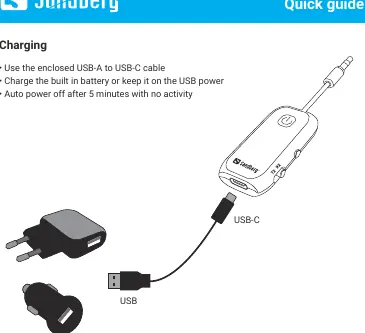
To charge the device, use the enclosed USB-A to USB-C cable. You can charge the built-in battery or keep the device connected to USB power for continuous operation. The device will automatically power off after 5 minutes of inactivity.
Setting up as a Bluetooth receiver (Rx-mode)
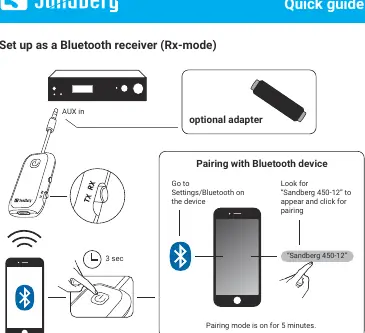
- Set the mode switch to Rx.
- Connect the device to your audio equipment (e.g., speakers) using the minijack port.
- Hold the power button for 3 seconds to turn on and enter pairing mode.
- On your smartphone or audio source, go to Bluetooth settings and select "Sandberg 450-12" to pair.
- Pairing mode remains active for 5 minutes.
Setting up as a Bluetooth transmitter (Tx-mode)
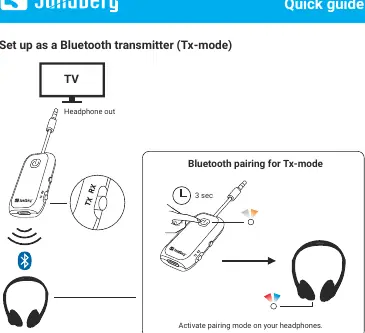
- Set the mode switch to Tx.
- Connect the device to your audio source (e.g., TV headphone output) using the minijack port.
- Hold the power button for 3 seconds to turn on and enter pairing mode.
- Activate pairing mode on your Bluetooth headphones.
- The devices will automatically connect.
LED indicators and button functions
The power button LED provides status updates:
- Blinking white/orange: Pairing mode.
- Off after pairing: Connected.
- Blinking x3 every 30 seconds: Battery low.
- Constant red: Charging.
- Off when charging: Fully charged.
Button functions:
- Power button (3 sec press): Turns device ON when OFF.
- Reset button (5 sec press): Resets pairing.
- Reset button (short press): Disconnects current connection.
Manufacturer information
Sandberg A/S
Practical help
Common problems
Device not pairing
Ensure the device is in pairing mode (blinking white/orange) and within range of your Bluetooth device.
Battery low
The LED will blink red 3 times every 30 seconds. Connect the USB-C charging cable.
Need to switch devices
Short press the reset button to disconnect the current device, or hold for 5 seconds to reset pairing entirely.
Before use
- Charge the device fully using the provided USB-C cable.
- Identify if you need Rx (Receiver) or Tx (Transmitter) mode.
- Ensure your audio device has a 3.5mm jack or use the included adapter.
- Keep the device within range of the Bluetooth source/receiver.
Images and diagrams
- The product overview diagram identifies the USB-C port, power button, Tx/Rx switch, and reset button.
- Setup diagrams illustrate the physical connection to AUX-in (Rx) or Headphone-out (Tx) ports.
Model compatibility
- Compatible with any audio device featuring a 3.5mm jack.
- Requires a Bluetooth-enabled device for pairing.

Manual page author
Michael Turner
Technical manual editor
Reviews PDF manuals for structure, safety notes, and practical product details so readers can find the right information quickly.