Tools / Impact Wrenches
User Manual for Bosch GDR, GDS, GDX Professional Cordless Impact Screwdrivers
Quick guide for Bosch GDR, GDS, and GDX Professional cordless impact screwdrivers. Includes setup, battery charging, tool changing, operation, and maintenance instructions.
Table of contents
Manual images
Click an image to enlargeQuick guide from the manual
This manual covers the operation and maintenance of the Bosch GDR, GDS, and GDX Professional cordless impact screwdrivers. Before using the tool, ensure the battery is fully charged. Always set the rotational direction switch to the center position when transporting or storing the tool to prevent accidental activation. Wear appropriate personal protective equipment, including eye protection.
Product description
The Bosch Professional impact screwdrivers are designed for driving in and loosening screws and bolts, as well as tightening and loosening nuts. The series includes three main types:
- GDR: Features a 1/4 inch hexagon socket tool holder.
- GDS: Features a 1/2 inch square drive tool holder.
- GDX: Features a dual tool holder (1/4 inch hex and 1/2 inch square).
Assembly and battery charging
The battery is supplied partially charged. To ensure full capacity, charge the battery completely in a compatible Bosch charger before the first use. The Lithium-Ion battery can be charged at any time without reducing its service life. The tool is equipped with Electronic Cell Protection (ECP) to prevent deep discharging. To remove the battery, press the unlocking button and pull the battery forward.
Changing the tool
GDR models: Pull the locking sleeve forward, insert the screwdriver bit into the tool holder, and release the sleeve to lock it. Use bits with a ball catch.
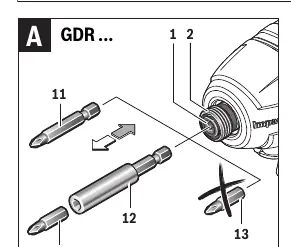
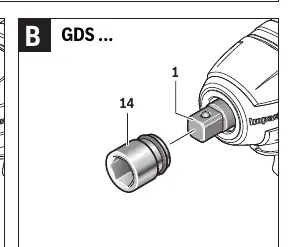
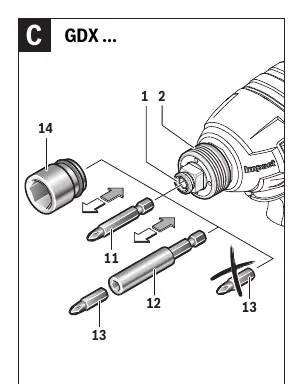
GDS and GDX models: Slide the application tool (e.g., impact socket) onto the square drive of the tool holder. Ensure the tool is securely connected.
Operation
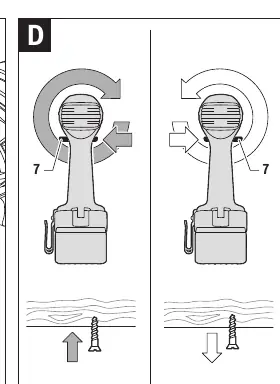
The tool is driven by an electric motor via a gear and impact mechanism. The impact mechanism activates automatically when the screw connection runs tight. To reverse the rotational direction, use the switch located above the handle. Press the On/Off switch to start the machine; the speed is variably adjustable depending on how far the switch is pressed. The integrated PowerLight illuminates the work area when the switch is pressed.
Working advice
The torque depends on the impact duration. The maximum torque is typically achieved after 6–10 seconds of impact. For hard seats (metal-to-metal), maximum torque is reached quickly. For soft seats (metal on wood or using washers), a longer impact duration is required. Always check the final tightening torque with a torque wrench.
Maintenance and cleaning
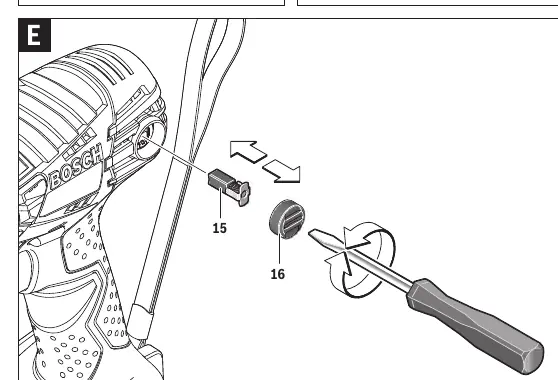
Regularly clean the air vents to prevent dust accumulation. Check the length of the carbon brushes every 2–3 months and replace them if necessary. Always use original Bosch carbon brushes. Before performing any maintenance, remove the battery from the tool.
Manufacturer information
Bosch
Practical help
Common problems
Tool does not start
Check if the battery is charged and properly inserted. Ensure the rotational direction switch is not in the center (locked) position.
Tool wobbles during operation
Ensure the application tool is securely connected. Note that some minor movement is normal for the GDS/GDX square drive system and does not affect safety.
Reduced working time after charging
The battery may be worn out and require replacement.
Before use
- Charge the battery fully before the first use.
- Ensure the rotational direction switch is in the center position for transport.
- Verify that the correct bit or socket is securely attached to the tool holder.
- Wear eye protection and appropriate safety gear.
- Ensure the work area is clean and well-lit.
Specs in practice
- No-load speed
- The rotational speed of the tool without any load (0–2800 min-1).
Images and diagrams
- Figure A: Changing bits for GDR models using the locking sleeve.
- Figure B: Changing sockets for GDS models using the square drive.
- Figure C: Changing tools for GDX models using the dual tool holder.
- Figure D: Operating the rotational direction switch.
- Figure E: Replacing the carbon brushes.
Model compatibility
- Use only original Bosch lithium-ion batteries.
- GDR models are compatible with 1/4 inch hex bits.
- GDS models are compatible with 1/2 inch square drive sockets.
- GDX models are compatible with both 1/4 inch hex and 1/2 inch square drive tools.

Manual page author
David Miller
Documentation analyst
Organizes user manual content into clear summaries, with attention to model details, product context, and everyday usability.