Lighting / Work Lights
User Manual for Bosch GLI 18V-1900 C Professional Cordless Worklight
Quick guide for the Bosch GLI 18V-1900 C Professional cordless worklight. Includes setup, battery installation, app control, maintenance, and troubleshooting.
PDF source: polski · summary: English
Table of contents
Manual images
Click an image to enlargeQuick guide from the manual
The Bosch GLI 18V-1900 C Professional is a portable cordless worklight designed for temporary illumination in indoor and outdoor areas. It features Bluetooth connectivity for remote control via the "Bosch Toolbox" app and is dustproof and splash-protected (IP 64).
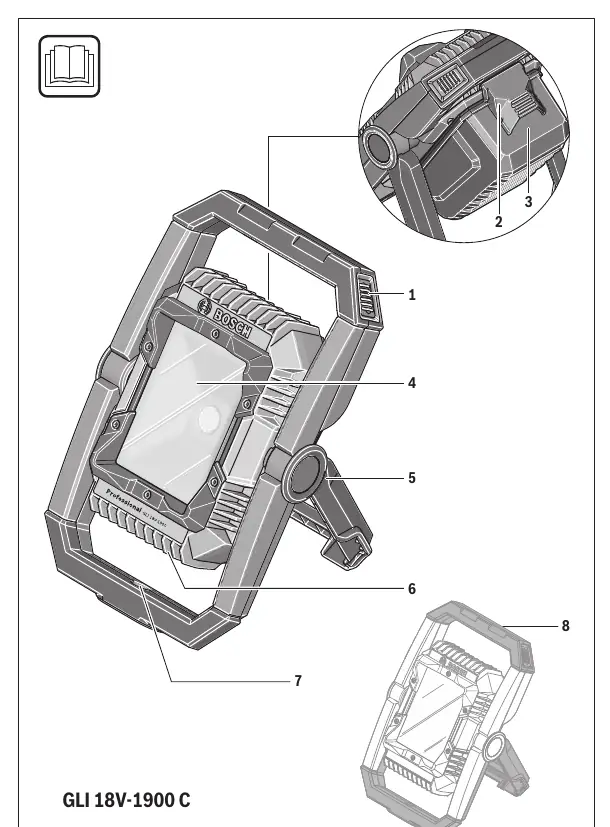
Assembly
Battery Charging: The battery is supplied partially charged. Charge it fully in a compatible Bosch charger before first use.
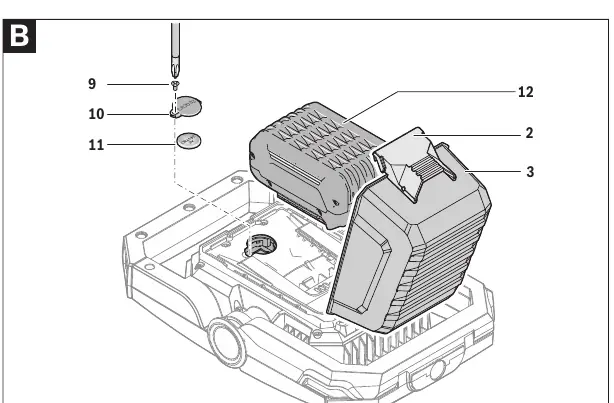
Inserting the Battery: Unlock the battery cover lock and fold up the cover. Insert the charged battery into the lamp head until it engages. Close the cover and lock it. Important: Ensure the rubber lip is seated correctly when closing the cover to maintain dust and splash-water protection.
Operation
Switching On/Off: Press the On/Off switch to turn the light on. Press it again to switch off.
Brightness Adjustment: Press the switch briefly for maximum brightness. Hold the switch down to adjust brightness in 2 stages until the desired level is reached.
App Control: Download the "Bosch Toolbox" app from the Apple App Store or Google Play Store. Select "Floodlight" in the app to connect via Bluetooth for remote control, timer functions, and grouping multiple lights.
Maintenance
The light source is non-replaceable. If the light source is defective, the entire worklight must be replaced. Clean the plastic lens only with a dry, soft cloth; do not use cleaning agents or solvents.
Safety
The worklight generates intense heat. Keep a minimum distance from illuminated surfaces to prevent overheating. Do not cover the lamp head during operation.
Manufacturer information
Bosch
Practical help
Common problems
Bluetooth connection cannot be established
Remove the button cell (CR2032) and the main battery pack for 10 seconds.
Worklight cannot be switched on after wireless charging
Remove the battery pack for 10 seconds to re-initialise the inductively chargeable battery.
Before use
- Ensure the battery pack is charged
- Check that the rubber lip on the battery cover is seated correctly
- Ensure visual contact with the worklight before operating via the app
- Ensure the worklight is placed on a stable, firm surface
- Remove the separating film between the button cell and battery holder before first use
Show more Show less
Specs in practice
- Bluetooth 4.1 (Low Energy)
- Wireless module for remote control via smartphone or tablet.
Images and diagrams
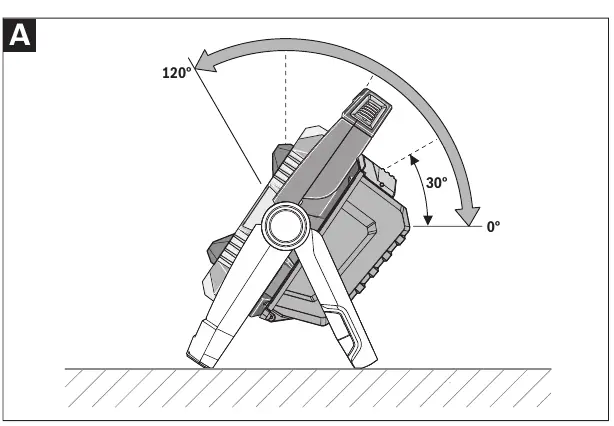
- Figure A: Swiveling the lamp head into five different positions using the handle.
- Figure B: Replacing the CR2032 button cell battery located under the battery cover.
Model compatibility
- Compatible with Bosch GBA 14.4V and GBA 18V battery packs.
- App control requires Android 4.3+ or iOS 9+.

Manual page author
Emily Carter
User documentation editor