Home Appliances / Vacuum Cleaners
Bosch EasyVac 3 Dry Vacuum Cleaner User Guide
Quick start guide for the Bosch EasyVac 3 dry vacuum cleaner, covering assembly, operation, filter maintenance, and troubleshooting.
Table of contents
Manual images
Jump to the sectionQuick guide from the manual
The Bosch EasyVac 3 is a dry vacuum cleaner designed for private use. It is particularly suitable for extracting dust and chips from power tools. This guide provides essential information for safe and efficient operation.
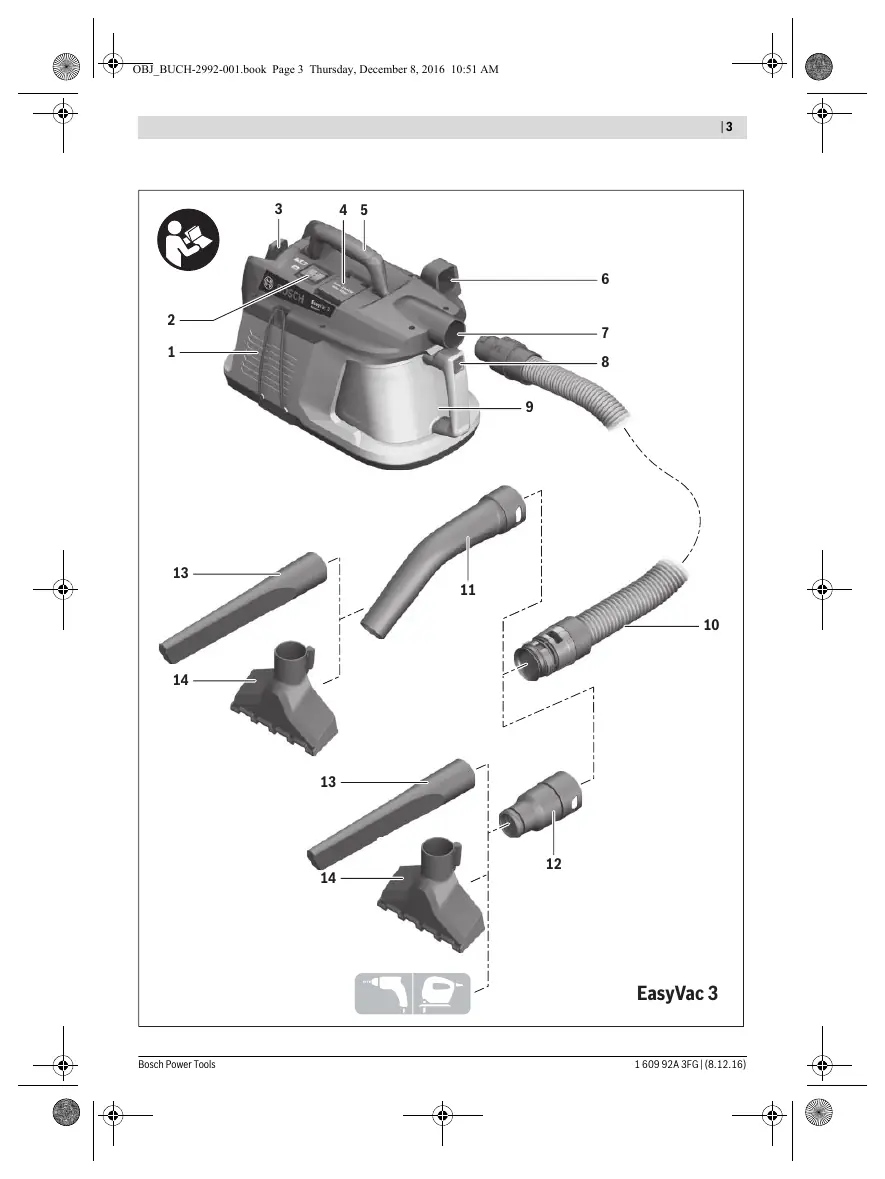
Device Description
The vacuum cleaner features a hose connection, a mode selector switch, a power tool socket for automatic start/stop, and a dust container with a multi-stage filter system (fabric filter, flat-pleated filter, and permanent filter).
Assembly
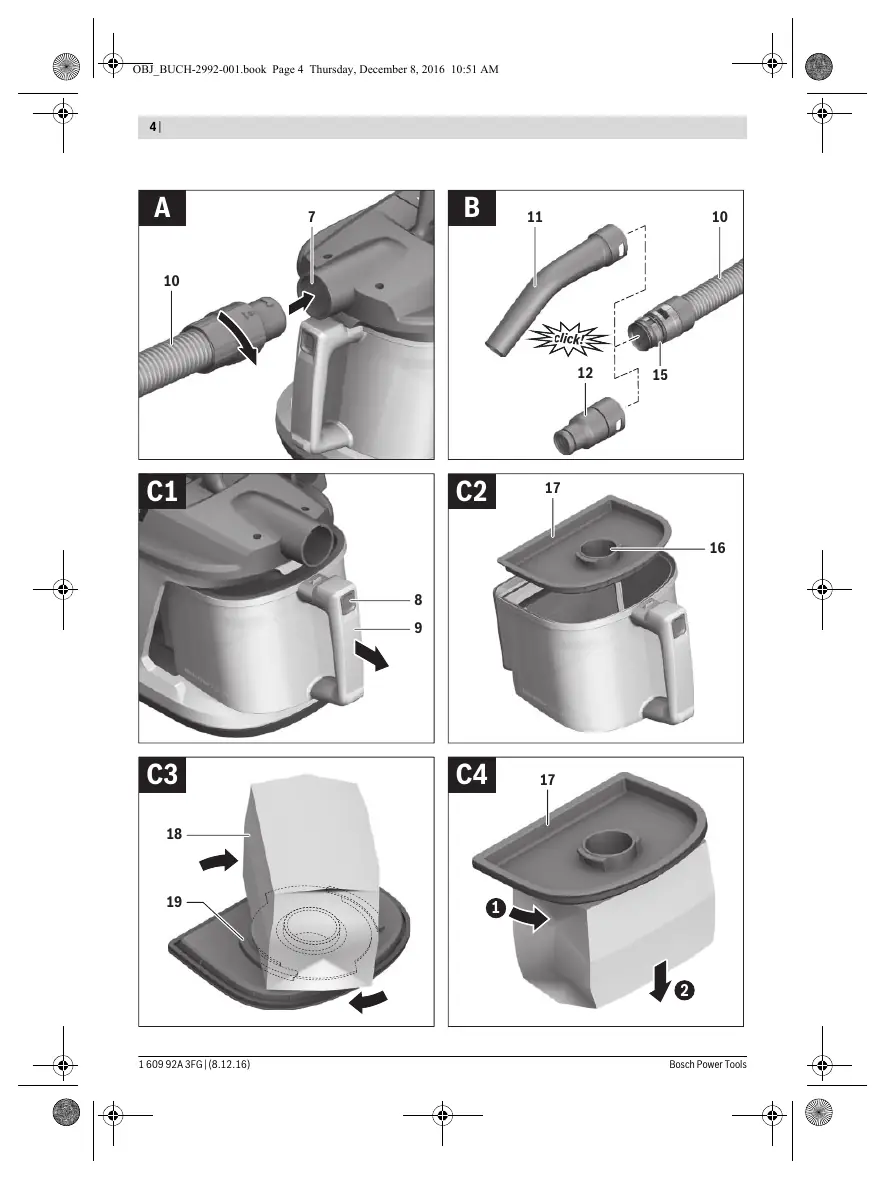
- Vacuum Hose: Insert the hose into the connection piece and turn it clockwise until it stops.
- Accessories: Attach the extraction adapter or curved nozzle to the hose until the snap fasteners click into place. Attach the desired nozzle (floor, crevice, etc.) to the adapter or curved nozzle.
- Dust Bag: For fine dust, insert a dust bag into the dust cup. For coarser dirt, you can use the vacuum without a bag, but clean the fabric filter regularly.
Operation
Modes: Use the mode selector switch to choose between 'Vacuuming' (manual) or 'Automatic Start/Stop' (for power tools). In automatic mode, the vacuum starts when the connected power tool is switched on and continues for about 6 seconds after the tool is switched off to clear the hose.
Airflow Adjustment: When using power tools with low airflow (e.g., jigsaws, sanders), open the air diffuser ring on the hose to improve overall performance.
Maintenance and Cleaning
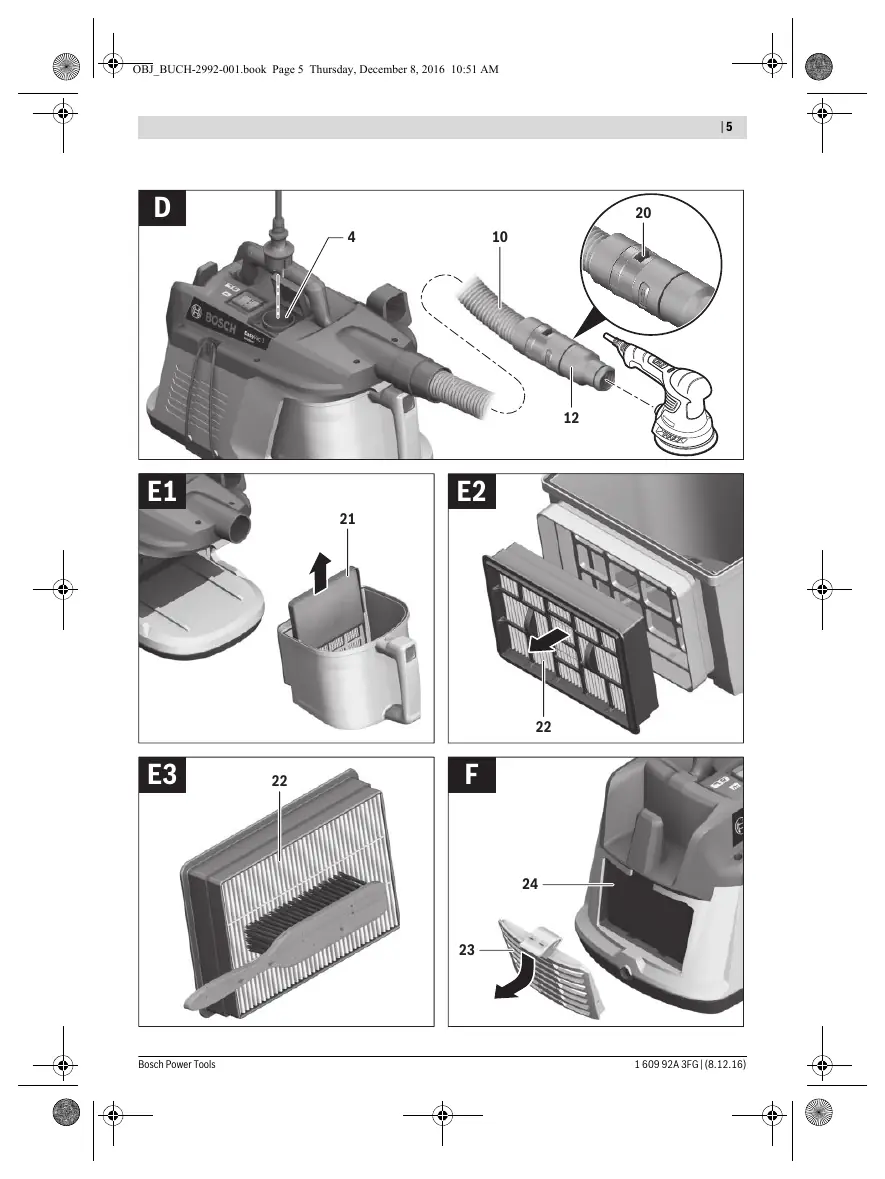
- Filter Assembly: Remove the dust cup, take out the fabric filter and flat-pleated filter. Brush them with a soft brush or rinse under running water and let them dry thoroughly.
- Permanent Filter: Open the exhaust air cover, remove the permanent filter, rinse under running water, and let it dry.
- Dust Cup: Wipe occasionally with a non-abrasive detergent.
Troubleshooting
If suction performance is insufficient, check if the hose is clogged, filters are full, or the dust cup/bag is full. If the unit overheats, it will switch off. Let it cool for 60 minutes, unplug and replug, and ensure all filters and the hose are clear.
Manufacturer information
Bosch
Practical help
Common problems
Insufficient suction performance
Check if the hose system is clogged, filters are clogged with dust, or the dust cup/bag is full.
Vacuum switches off due to overheating
Let the vacuum cool down for 60 minutes, unplug and replug, and ensure the container, dust bag, hose, and filters are not blocked.
Before use
- Check that the mains voltage matches the rating plate.
- Ensure the filter is undamaged (no cracks or holes).
- Always fully unwind the vacuum hose from the top of the unit for optimal performance.
- Ensure the dust cup and dust bag are empty if needed.
Specs in practice
- Rated power input
- 700 W
- Container volume (gross)
- 2.1 liters
- Max. vacuum (turbine)
- 240 mbar
- Max. airflow (turbine)
- 35 l/s
Images and diagrams
- Figure A: Mounting the vacuum hose.
- Figure B: Mounting the extraction adapter or curved nozzle.
- Figure C1-C4: Replacing/inserting the dust bag.
- Figure D: Connecting a power tool for automatic start/stop.
- Figure E1-E3: Cleaning the filter assembly.
Model compatibility
- The vacuum cleaner is intended for dry materials only.
- Not for professional use.
- Automatic start/stop feature is compatible with power tools within the specified power range (EU/AUS: 100-2000W, UK: 100-1800W).

Manual page author
David Miller
Documentation analyst
Organizes user manual content into clear summaries, with attention to model details, product context, and everyday usability.