Lighting / Work Lights
User Manual for Bosch GLI 18V-4000 C Cordless Worklight
Quick guide for the Bosch GLI 18V-4000 C cordless worklight. Includes setup, operation, Bluetooth app control, maintenance, and troubleshooting.
PDF source: polski · summary: English
Quick answers from the manual
Quick answer
- The Bosch GLI 18V-4000 C is a cordless worklight designed for mobile, temporary illumination of indoor areas. It features Bluetooth connectivity for remote control via the 'Bosch Toolbox' app. p. 6, 11
Key actions
- Insert battery p. 7, 12
- Adjust brightness p. 7, 12
- Mount on tripod p. 7, 12
First start
- Activate button cell p. 7, 11
- Charge battery p. 7, 12
Show 4 more answers Show less
Problems and fixes
Bluetooth connection cannot be established
Remove the button cell (12) and battery (8) for 10 seconds.
p. 8, 13
Cannot operate via Bluetooth
Press the on/off switch (7) repeatedly until the cordless worklight can be operated via Bluetooth.
p. 8, 13
Cannot switch on after wireless charging
Remove the battery (8) for 10 seconds to re-initialize.
p. 8, 13
PIN for Bluetooth connection not working
Reset PIN to factory settings by removing the button cell (12) and battery (8) for 10 seconds.
p. 8, 13Maintenance and reset
- Cleaning p. 9, 13
- Reset PIN p. 8, 13
Technical specifications
| Parameter | Value | Meaning | Pages |
|---|---|---|---|
| Rated voltage | 18 V | Operating voltage | p. 6, 11 |
| Max. rated power input | 30 W | Maximum power consumption | p. 6, 11 |
| Total luminous flux | 1000 lm (Level 1), 2000 lm (Level 2), 4000 lm (Level 3) | Light output levels | p. 6, 11 |
| Permitted ambient temperature | -20 to +50 °C | Operating and storage temperature range | p. 6, 11 |
Where to find it in the PDF
- Safety information p. 5, 9
- Technical data p. 6, 11
- Operation p. 7, 12
- Troubleshooting p. 8, 13
Table of contents
Manual images
Click an image to enlargeQuick guide from the manual
The Bosch GLI 18V-4000 C is a professional cordless worklight designed for mobile, temporary illumination of indoor areas. It features three brightness levels and Bluetooth connectivity for remote control via the Bosch Toolbox app.
Product Description
The worklight consists of the following main components:
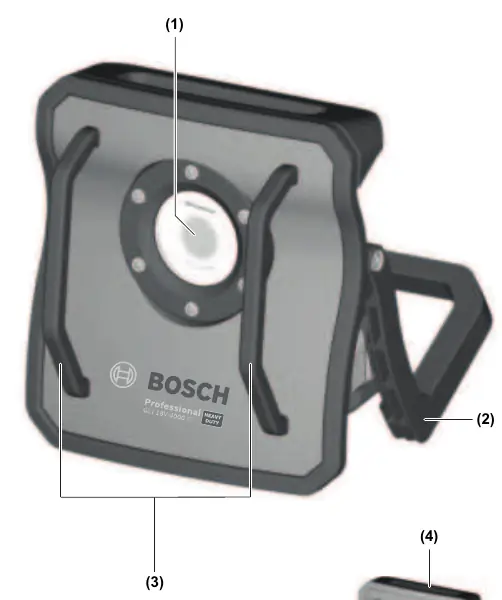
- (1) Light (LED)
- (2) Supporting leg
- (3) Safety bracket
- (4) Carrying handle
- (7) On/off switch
- (9) Tripod mount
- (14) Battery holder
Assembly
Button Cell Operation: The worklight includes a button cell (12) to allow detection by mobile devices even when the main battery is not inserted. Before first use, remove the separating film between the button cell and its contact. To access, turn the battery compartment cover (11) counter-clockwise with a screwdriver.
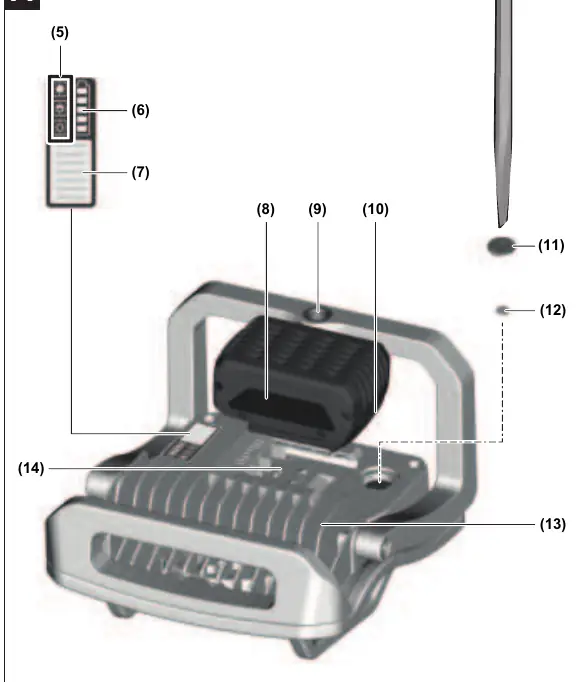
Battery Charging: Use only the chargers listed in the technical data. The lithium-ion battery is protected against deep discharge by Electronic Cell Protection (ECP).
Operation
Setup: Place the worklight on a stable, level surface. The safety brackets (3) protect the light (1) if the unit is accidentally knocked over. You can also mount the light on a tripod using the tripod mount (9).
Brightness Settings: Use the on/off switch (7) to cycle through brightness levels:
- Press once: Level 1 (dimmed, 1000 lm)
- Press twice: Level 2 (dimmed, 2000 lm)
- Press three times: Level 3 (full brightness, 4000 lm)
- Press four times: Switch off
If the light has been on for approx. 5 minutes, the next press will switch it off immediately.
Bluetooth Control
The worklight features a Bluetooth module for wireless control via the Bosch Toolbox app. Once connected and authorized, you can use remote control, timer functions, group multiple lights, and check status/warnings.
Maintenance and Troubleshooting
The worklight is maintenance-free. Clean the glass only with a dry, soft cloth. If the Bluetooth connection fails, remove the button cell (12) and battery (8) for 10 seconds to reset. If the worklight does not turn on after wireless charging, remove the battery (8) for 10 seconds to re-initialize.
Manufacturer information
Bosch
Practical help
Common problems
Bluetooth connection cannot be established
Remove the button cell (12) and battery (8) for 10 seconds.
Cannot operate via Bluetooth despite battery being inserted
Press the on/off switch (7) repeatedly until the worklight can be operated via Bluetooth.
Worklight won't turn on after wireless charging
Remove the battery (8) for 10 seconds to re-initialize.
Bluetooth PIN not working
Reset the PIN to factory settings by removing the button cell (12) and battery (8) for 10 seconds.
Before use
- Ensure the battery (8) is fully charged.
- Remove the separating film from the button cell (12) before first use.
- Ensure the worklight is placed on a stable, level surface.
- Download the 'Bosch Toolbox' app for Bluetooth control.
- Check that the worklight is within range of your mobile device.
Show more Show less
Specs in practice
- Rated voltage
- 18V
- Max. rated power input
- 30W
- Total luminous flux
- Level 1: 1000 lm, Level 2: 2000 lm, Level 3: 4000 lm
Images and diagrams
- (2) Supporting leg
- (3) Safety bracket
- (7) On/off switch
- (9) Tripod mount
Model compatibility
- Compatible with GBA 18V and ProCORE18V batteries.
- Bluetooth 4.2 (Low Energy) module included.

Manual page author
David Miller
Documentation analyst