Home Appliances / Cooktops Hobs
User Manual for Bosch Induction Cooktop NIT5660UC
Quick guide and user manual for the Bosch NIT5660UC induction cooktop. Learn about installation, operation, cleaning, troubleshooting, and warranty information.
Quick answers from the manual
Quick answer
- The Bosch NIT5660UC is an induction cooktop. Operation involves using the touch-sensitive control panel to select cooking zones and adjust power levels. It features SpeedBoost for rapid heating and a panel lock for safety. p. 10, 11
Key actions
- Turn on the cooktop p. 11
- Set power level p. 11
- Activate SpeedBoost p. 13
First start
- Remove packaging, wipe surface with damp cloth. p. 11
Show 4 more answers Show less
Problems and fixes
F2 error
Electronics overheated. Wait for cooling.
p. 18
F4 error
Electronics overheated. All zones off. Wait for cooling.
p. 18
F5 error
Hot cookware near control panel. Remove cookware.
p. 18Error codes
| Code | Meaning | Action | Pages |
|---|---|---|---|
| F2 | Electronics overheated | Wait for cooling | p. 18 |
| F4 | Electronics overheated | Wait for cooling | p. 18 |
| F5 | Hot cookware near control panel | Remove cookware | p. 18 |
Maintenance and reset
- Daily cleaning with recommended agents. p. 15, 16
Where to find it in the PDF
- Operation p. 11, 12, 13, 14
- Cleaning p. 15, 16, 17
- Troubleshooting p. 18, 19
Table of contents
Manual images
Click an image to enlargeQuick guide from the manual
This manual provides essential information for the safe and efficient operation of your Bosch induction cooktop. Key features include touch-sensitive controls, multiple cooking zones, SpeedBoost for rapid heating, and a panel lock for safety. Always ensure you are using induction-compatible cookware for optimal performance.
Safety Instructions
- Fire Safety: Never leave the cooktop unattended while in use. Keep a fire extinguisher nearby. Never use water on grease fires; use a lid or dry chemical extinguisher.
- Child Safety: Do not allow children to play with the appliance or packaging materials.
- Installation: Must be installed and grounded by a qualified technician.
- General: Do not use the cooktop as a storage surface. Keep the area clean and dry.
Suitable Cookware
Induction cooktops require cookware with a ferromagnetic base (attracted by a magnet). For best results, use cookware with a flat, smooth bottom that matches the size of the cooking zone.
- Recommended: Stainless steel with a sandwich design, enameled steel, cast iron.
- Not Suitable: Thin steel, glass, clay, copper, or aluminum.
- Note: Do not use adapter plates between the cooktop and the cookware.
Operation
Control Panel
The control panel allows you to configure all functions. Use the touch keys to select cooking zones and adjust power levels. Keep the control panel clean and dry to ensure proper function.
Cooking Zones
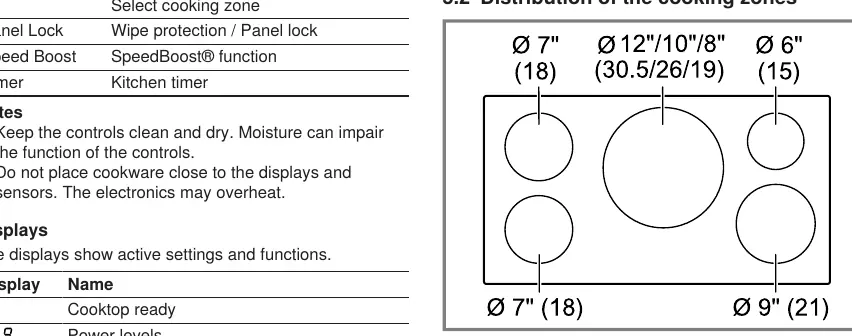
Place cookware on the zone that best matches its size. When active, the corresponding display lights up.
Functions
- SpeedBoost: Temporarily increases the power of a cooking zone for faster heating.
- Kitchen Timer: Independent timer up to 99 minutes.
- Panel Lock: Prevents accidental activation.
- Wipe Protection: Locks the control panel for 35 seconds to allow cleaning while cooking.
Cleaning and Maintenance
Regular cleaning keeps the appliance efficient.
- Daily: Wipe with a damp cloth and use a glass ceramic cleaner.
- Spills: Remove sugar, syrup, milk, or melted plastic immediately with a glass scraper while the surface is still hot.
- Avoid: Do not use abrasive cleaners, metal scouring pads, or chlorine-based cleaners.
Troubleshooting
Before calling customer service, check the troubleshooting table for common issues like flashing displays, error codes, or noises. Most minor issues can be resolved by checking the power supply, cleaning the control panel, or ensuring the cookware is suitable.
Manufacturer information
Bosch
Practical help
Common problems
Cooktop won't turn on
Check if the panel lock is activated.
Displays flashing and signal sounding
Clean the control panel of any liquids or food residue, or remove objects covering it.
Noises during cooking
Humming or whistling is normal for induction technology and depends on the cookware base and power level.
Cookware not heating
Ensure the cookware is induction-compatible and centered on the correct cooking zone.
Before use
- Remove all packaging materials
- Clean the cooktop surface with a damp cloth
- Verify the circuit breaker is on
- Ensure cookware is induction-compatible
Show more Show less
Specs in practice
- Wipe Protection
- Locks the control panel for 35 seconds to allow cleaning during operation.
Images and diagrams
- Control panel layout shows touch keys for On/Off, settings, timer, and lock.
- Cooking zone distribution diagram shows sizes in cm.
Model compatibility
- Requires induction-compatible cookware with a ferromagnetic base.
- Do not use adapter plates between the cooktop and cookware.

Manual page author
Michael Turner
Technical manual editor