Automotive / Car Audio
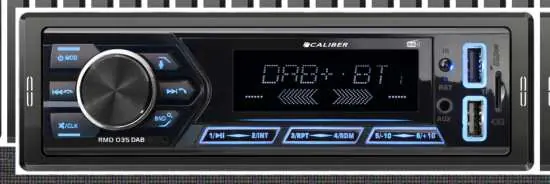
User Manual for Caliber RMD 035DAB Car Radio
Quick start guide for the Caliber RMD 035DAB car radio. Learn how to install the unit, set up DAB+ and FM radio, pair Bluetooth devices, and use USB/SD playback features.
Table of contents
Manual images
Click an image to enlargeQuick guide from the manual
The Caliber RMD 035DAB is a car radio featuring DAB+ and FM reception, Bluetooth connectivity for hands-free calls and music streaming, and USB/SD playback. This guide provides essential steps for installation and operation.
Installation
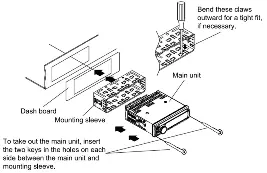
The unit is designed for standard DIN mounting. To install, slide the mounting sleeve into the dashboard and bend the claws outward for a tight fit. To remove the unit, insert the two provided keys into the holes on each side between the main unit and the mounting sleeve.
DAB+ Antenna Installation
For optimal DAB+ reception, the antenna must be installed correctly:
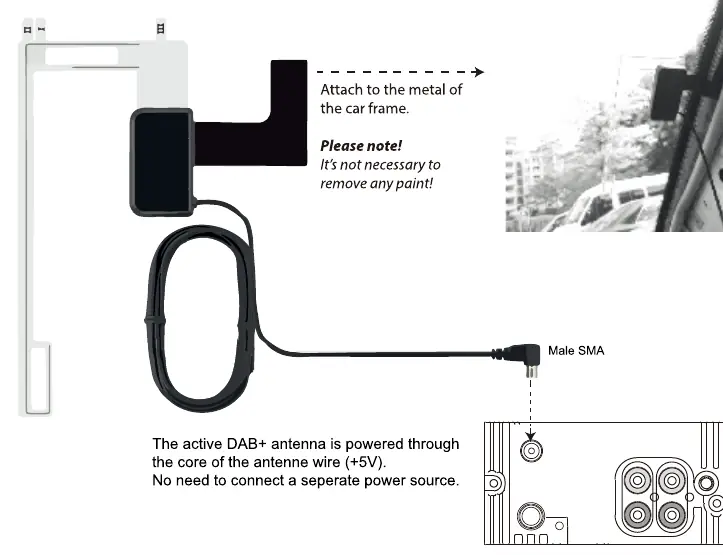
- Place the antenna on the windshield near the 'A' post.
- Remove the cover of the A-post.
- Stick the transparent part of the antenna on the windshield and attach the black part to the metal frame.
- Connect the antenna cable to the unit. The active antenna is powered through the core of the antenna wire (+5V), so no separate power source is needed.
Wiring
The unit uses a standard ISO connector. Ensure the following connections are made:
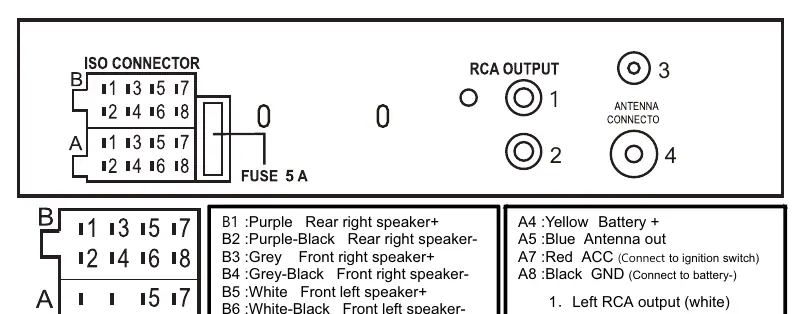
- A4 (Yellow): Battery +
- A5 (Blue): Antenna out
- A7 (Red): ACC (Connect to ignition switch)
- A8 (Black): GND (Connect to battery-)
Basic Operation
Use the [MOD] button to switch between FM radio, USB/SD, AUX, Bluetooth, and DAB+ modes. Press the [VOL] knob to access the menu for audio settings, including Bass, Treble, Balance, Fader, Equalizer, and Loudness. Rotate the knob to adjust values and press to confirm.
Radio Operation
FM Radio: Press the [<<] or [>>] buttons to search for stations. Long press to search manually. Save stations by holding buttons 1-6. Use the [BND] button to switch between F1-F3 bands.
DAB+ Radio: Long press the [BND] button to perform an automatic search and store stations. Use buttons 1-6 to recall saved stations and [BND] to cycle between DAB, DAB2, and DAB3 bands.
Bluetooth Operation
To pair your phone:
- Press the [MOD] button to enter Bluetooth mode.
- Enable Bluetooth on your phone and search for 'CALIBER_RMD035DAB'.
- Enter password '0000' if prompted.
- 'LINKED' will appear on the screen upon successful connection.
Use the [5] button to answer calls or redial the last number. Use the [1] button to hang up or reject calls.
USB/SD Playback
Insert a USB or SD card to start playback automatically. Use the [17] button to play/pause, [1] and [5] for track navigation, and [13]/[12] to skip 10 tracks or select folders.
Voice Assistant
With the phone paired via Bluetooth, press the [4] button to activate your phone's voice assistant function.
Specifications
- Power Supply: 12VDC
- Max Power Output: 55Wx4
- Bluetooth Version: 5.0
- FM Frequency Range: 87.5-108.0 MHz
- DAB+ Frequency Range: 174-240 MHz
- USB Charge Output: 5.0VDC, Max 1.5A
Manufacturer information
Caliber Europe
Practical help
Common problems
DAB+ reception is poor
Ensure the DAB+ antenna is installed correctly on the windshield. Weather conditions may also affect signal quality.
Bluetooth connection fails
Ensure Bluetooth is enabled on your phone and search for 'CALIBER_RMD035DAB'. Use the password '0000' if required.
Sound from AUX device is too quiet
Increase the volume on the external device (phone/MP3 player) before connecting to the radio.
Before use
- Verify the vehicle power supply is 12VDC.
- Ensure the DAB+ antenna is mounted on the windshield.
- Check that speaker impedance is between 4-8 Ohm.
- Connect the red ACC wire to the ignition switch.
- Connect the black GND wire to the battery negative terminal.
Images and diagrams
- Wiring Diagram: Details the ISO connector pinout for speakers and power connections.
- DAB Antenna Installation: Illustrates the correct placement on the A-post and windshield.
- Unit Removal: Shows how to use the provided keys to release the unit from the mounting sleeve.
Model compatibility
- Supports USB and SD cards for music playback.
- Compatible with Bluetooth-enabled mobile phones.
- Requires an active DAB+ antenna (included).

Manual page author
Emily Carter
User documentation editor
Prepares concise manual descriptions and highlights the most useful setup, operation, and maintenance information for readers.