Electronics / Audio
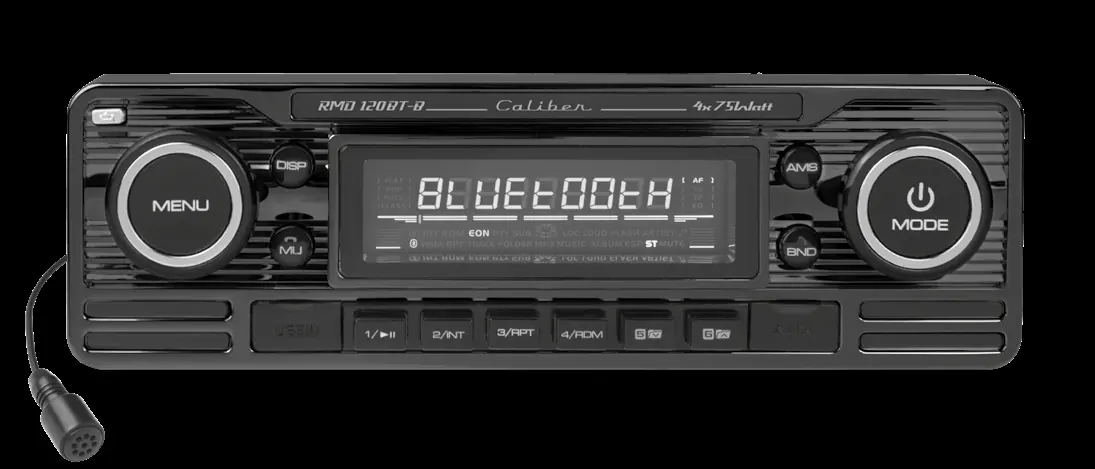
User Manual for Caliber RMD 120BT-B Car Radio
Quick guide for the Caliber RMD 120BT-B car radio. Includes wiring diagrams, control functions, Bluetooth pairing instructions, and technical specifications.
Table of contents
Manual images
Click an image to enlargeQuick guide from the manual
This document provides essential information for the Caliber RMD 120BT-B car radio. It covers installation, wiring, Bluetooth pairing, and daily operation. Always ensure the vehicle's electrical system is 12V negative ground before installation.
Installation and Wiring
The unit uses two main connectors (A and B) on the rear panel:
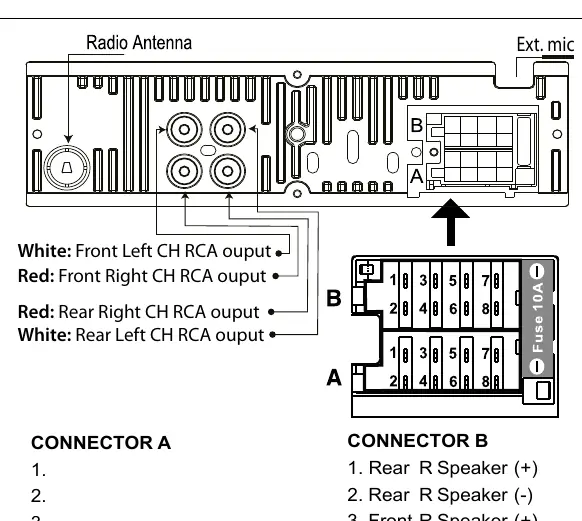
- Connector A (Power): Includes connections for Memory (+12V yellow), Remote output (blue), Ignition key (+12V red), and Ground (black).
- Connector B (Speakers): Includes connections for Front Left/Right and Rear Left/Right speakers.
The unit also features RCA outputs for Front Left/Right and Rear Left/Right channels, as well as an external microphone input.
Bluetooth Operation
To pair your mobile phone with the radio:
- Open the Bluetooth menu by pressing and holding the MENU button for more than 3 seconds.
- Activate Bluetooth on your mobile phone and search for available devices.
- Select "Car Audio" from the list.
- Enter the password "8888".
- Upon successful connection, the display will show "BT ON".
To transfer audio back to your mobile phone during a call, press and hold the BND (Transfer) button.
Controls and Functions
The radio features a detachable front panel. Key controls include:
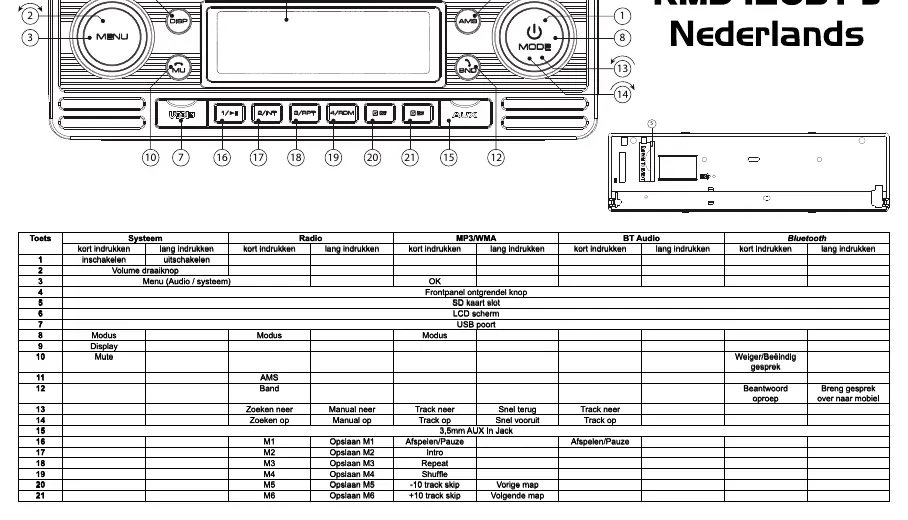
- Power: Press to turn on; press and hold for 3 seconds to turn off.
- Volume: Use the rotary knob to adjust volume levels.
- Menu: Press the VOL/SEL button for several seconds to access system settings (AF, TA, PTY, etc.).
- Mode: Switch between sources (Radio, SD, USB, AUX).
- AMS: Automatically stores the 6 strongest radio stations (M1-M6).
- Reset: If the unit malfunctions, use a non-metallic pointed object to press the reset button (behind the panel) for 5 seconds.
Technical Specifications
- Power Supply: DC 11-15V
- Load Impedance: 4 Ohm
- Power Output: 4 x 75W (Max)
- Bluetooth Frequency: 2402-2480 Mhz
- SD Card: Max 16GB capacity
Manufacturer information
Caliber Europe
Practical help
Common problems
Unit will not turn on
Check the wiring connections, specifically the yellow (Memory +12V) and red (+12V ignition) wires.
Bluetooth pairing fails
Ensure you are using the correct password '8888' and that the unit is in pairing mode.
SD card not recognized
Ensure the card is formatted correctly and does not exceed 16GB. Ensure it is inserted into the correct slot behind the front panel.
Before use
- Verify the vehicle has a 12V negative ground electrical system.
- Ensure all speaker wires are connected to Connector B.
- Ensure power wires are connected to Connector A.
- Remove the front panel to access the SD card slot.
- Keep the volume at a safe level to maintain awareness of traffic.
Specs in practice
- Power Supply
- Requires DC 11-15V input.
- Load Impedance
- Compatible with 4 Ohm speakers.
- Max Power Output
- Delivers up to 4 x 75W.
Images and diagrams
- Connector A handles power and ignition signals.
- Connector B handles all speaker channel outputs.
- The front panel must be removed to access the SD card slot and Reset button.
Model compatibility
- SD Card: Maximum capacity 16GB.
- Bluetooth Password: 8888.
- Only use for 12V mobile applications.

Manual page author
Emily Carter
User documentation editor
Prepares concise manual descriptions and highlights the most useful setup, operation, and maintenance information for readers.