Automotive / Car Audio
User Manual for Caliber RCD 125BT Car Stereo
Quick start guide and user manual for the Caliber RCD 125BT car stereo. Includes installation, Bluetooth pairing, playback controls, and safety instructions.
Table of contents
Manual images
Click an image to enlargeQuick guide from the manual
The Caliber RCD 125BT is a car stereo system supporting CD, USB, SD, and Bluetooth playback. To pair your phone, press the MODE button to enter the Bluetooth menu, activate Bluetooth on your mobile device, search for available devices, and select RCD125BT CALIBER using the password 0000. Successful connection is indicated by BT ON on the display.
Device controls and operation
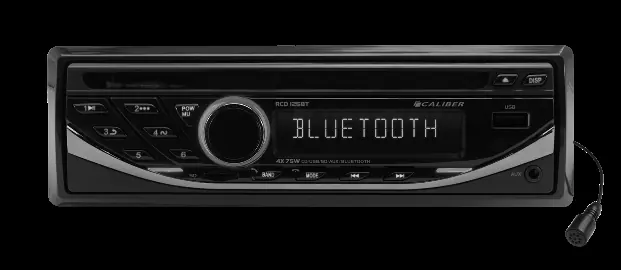
The unit features a rotary volume knob, a mode button for switching sources, and preset buttons M1-M6 for radio stations. The front panel includes a disc slot, USB port, 3.5mm AUX input, and a removable front panel to access the Micro SD card slot.
Bluetooth connectivity
Bluetooth functionality allows for hands-free calling and audio streaming. To reject an incoming call, press the MODE button. To transfer audio back to your mobile phone during a call, press and hold the Transfer (BND) button.
Playback and media
The unit supports CD, USB, and SD card playback. USB and SD cards are supported up to 32GB. When a USB stick or SD card is inserted, the unit automatically switches to the respective mode. Use the Pause/Play button to control playback. The Intro function plays 10 seconds of each track, while Repeat and Shuffle functions are available for continuous or random playback.
Audio settings
Access the audio menu to adjust Bass, Treble, Balance, Fader, Loudness (ON/OFF), EQ (Classic, Pop, Rock, Off), DX/Local, and Stereo/Mono settings. You can also change the illumination color by navigating to the BLUE setting and rotating the volume knob to cycle through available colors (Auto, Red, Green, Blue, Orange, Cyan, Purple, White).
Safety and installation
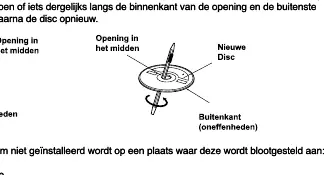
Ensure the system is installed in a location not exposed to direct sunlight, heat, high humidity, water, excessive dust, or vibrations. The unit requires a 12V negative ground system. Do not use irregular-shaped discs, as they may damage the mechanism. If a disc is inserted incorrectly or has an irregular surface, a Disc Error message may appear. If a new disc is ejected immediately, check for burrs on the center hole or outer edge and smooth them with a pen.
Technical specifications
The FM tuner frequency range is 87.5 to 107.9 MHz. The unit operates on DC 11-15V and has a power output of 4 x 75W (Max). Bluetooth frequency range is 2402-2480 MHz.
Manufacturer information
Caliber Europe
Practical help
Common problems
Disc Error message
Ensure the disc is inserted with the label side up. If the error persists, press the RESET button with a pointed object.
Disc jamming or ejecting immediately
Check for small bumps or irregularities on the center hole or outer edge of the disc. Smooth them with a pen or similar instrument.
Bluetooth not connecting
Ensure Bluetooth is active on your phone and you have selected 'RCD125BT CALIBER' with the password '0000'.
Before use
- Ensure the vehicle has a 12V negative ground system.
- Check that the disc is round and not an irregular shape.
- Ensure the disc label is facing up when inserting.
- Remove the front panel to insert an SD card.
- Ensure the installation location is free from excessive dust and moisture.
Specs in practice
- Power Supply
- DC 11-15V
- Load Impedance
- 4 Ohm
- Power Output
- 4 x 75W (Max)
- Bluetooth Freq
- 2402-2480 MHz
Images and diagrams
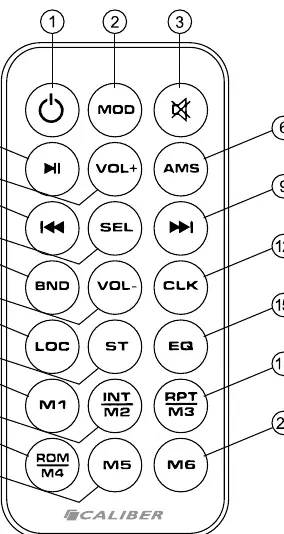
- The remote control diagram shows buttons for power, mode, mute, volume, track selection, and presets.
- The front panel diagram illustrates the location of the disc slot, USB port, SD slot, AUX input, and control buttons.
Model compatibility
- Supports USB sticks and SD cards up to 32GB.
- Only use standard 12cm round CDs.

Manual page author
Emily Carter
User documentation editor
Prepares concise manual descriptions and highlights the most useful setup, operation, and maintenance information for readers.