Home Appliances / Washing Machines
User Manual for Candy 18M R54 DC CLASS E Basic Refrigerator
Quick guide for the Candy 18M R54 DC CLASS E Basic refrigerator. Includes setup, temperature control, modes (Super Cool, Eco), defrosting, and troubleshooting.
Table of contents
Manual images
Click an image to enlargeQuick guide from the manual
This refrigerator is designed for efficient food storage. Upon plugging in, the appliance turns on automatically with the temperature set to 2. Wait at least 2-3 hours before adding food to ensure the internal temperature has stabilized.
Product description
The appliance consists of the following main components:
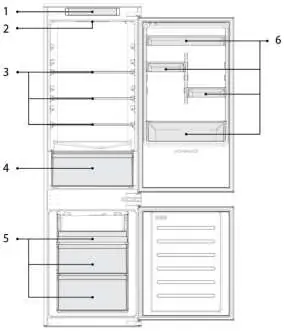
- 1. Control Panel
- 2. Lighting
- 3. Shelves
- 4. Crisper
- 5. Freezer Boxes
- 6. Door Rack
Space requirements
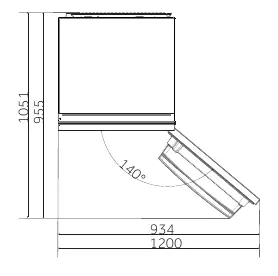
Ensure the door can open fully as shown in the manual. Maintain a distance of at least 50 mm between the side walls of the product and adjacent parts.
Control panel
The control panel features:
- ON/OFF key: Used to switch the appliance on/off.
- Mode key: Used to adjust temperature or select Super Cool or Eco functions.
- Cooling levels: Indicates the selected cooling level.
- Super Cool icon: Shows if the function is activated.
- Eco icon: Shows if the function is activated.
Using the appliance
To change the temperature, press the Mode key. The setting increases with each press, accompanied by an acoustic signal. After 5 seconds without pressing any key, the setting is confirmed. Note: 1 is the highest temperature, 4 is the lowest.
Fine tuning
Press the Mode key for 8 seconds to enter fine-tuning mode. Use short presses of the Mode key within 5 seconds to increase the setting. The system exits automatically if no key is pressed for 5 seconds.
Super Cool function
Activate this function when storing a large quantity of food. It accelerates cooling and protects stored goods. It automatically ends after 24 hours.
Eco mode
Activate Eco mode to optimize performance and achieve the best combination of fridge and freezer temperatures.
Defrosting
If the frost layer in the freezer exceeds 3mm, defrost the appliance. Switch off, remove food, leave the door open, and collect water at the bottom. Dry thoroughly before restarting.
Demo mode
To enter or exit demo mode, with the door open, long press the ON/OFF key and simultaneously quick press the MODE key 5 times within 5 seconds.
Wi-Fi connection
Download the hOn app, create an account, and follow the in-app pairing instructions.
Troubleshooting
If the appliance does not work, check the power supply, door closure, and temperature settings. If the motor runs continuously, check if the ambient temperature is too high or if the appliance was recently powered on. For noises, ensure the appliance is level and not touching surrounding objects.
Manufacturer information
Candy
Practical help
Common problems
Inside light does not turn on
Check power supply, ensure the appliance is not switched off, and verify the socket is working.
Internal temperature not cold enough
Check if doors are closed, opened frequently, or if the appliance is too full. Adjust temperature setting.
Motor runs continuously
Ensure doors are closed, check ambient temperature, or wait 8-12 hours if the appliance was recently powered on.
Strong ice and frost in freezer
Ensure food is packed well, doors are closed, and gaskets are clean and intact.
Before use
- Check power cable connection
- Wait 2-3 hours before adding food
- Ensure appliance is on level ground
- Check door gaskets for proper seal
Specs in practice
- Temperature 1
- Highest temperature setting
- Temperature 4
- Lowest temperature setting
Images and diagrams
- 1: Control Panel
- 5: Freezer Boxes
Model compatibility
- Requires hOn app for Wi-Fi features

Manual page author
David Miller
Documentation analyst
Organizes user manual content into clear summaries, with attention to model details, product context, and everyday usability.