Home Appliances / Washing Machines
Candy RapidÓ 1486DWMCE/1-S Washing Machine User Manual
Quick guide for the Candy RapidÓ 1486DWMCE/1-S washing machine. Includes installation, operation, maintenance, Wi-Fi setup, and troubleshooting.
Table of contents
Manual images
Click an image to enlargeQuick guide from the manual
This manual provides essential instructions for the safe and efficient operation of your Candy RapidÓ washing machine. Always keep this manual accessible for future reference.
Installation
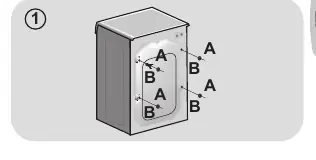
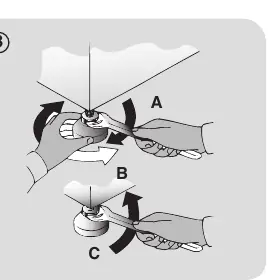
Before using the machine, ensure all transit bolts are removed to prevent damage. Remove the 2 or 4 transportation screws (A) on the back and remove the flat washers, rubber bungs, and plastic spacer tubes (B). Cover the holes with the provided plastic caps. Level the machine by adjusting the feet until it is stable on the floor.
Water and Electrical Connections
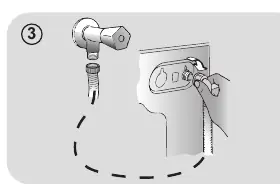
Connect the water inlet hose only to the cold water supply using the provided hose. Do not reuse old hoses. Ensure the electrical system is earthed and the socket is compatible with the plug. Do not use adapters or extension cords.
Detergent Drawer
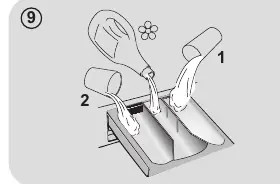
The drawer has three compartments: 1 for prewash, the middle compartment for softeners/additives, and 2 for main wash detergent. If using liquid detergent, use the provided cup in compartment 2.
Operation and Wi-Fi
Turn the SMART RING to select a program. The display will show the program details. To use Wi-Fi, download the Candy simply-Fi app, create a profile, and follow the instructions to enroll the appliance. Turn the SMART RING to the REMOTE CONTROL (Wi-Fi) position to enable app control.
Maintenance
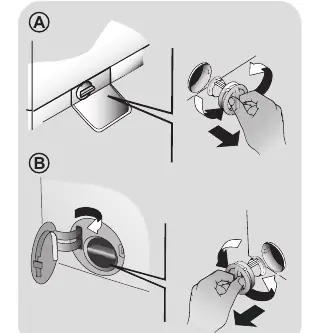
Clean the detergent drawer regularly to prevent residue buildup. Clean the pump filter 5 or 6 times a year to remove debris like coins or buttons. Always disconnect the power supply before cleaning.
Troubleshooting
If the machine displays an error (e.g., E2, E3, E4, E7), refer to the troubleshooting section. For example, E2 indicates a water loading issue, while E3 indicates a drainage issue. Ensure the filter is clean and hoses are not kinked.
Manufacturer information
Candy
Practical help
Common problems
Machine does not start
Check if the plug is connected, the power is on, the door is closed, and the machine is not in pause or delay mode.
Water leak on the floor
Check the seal between the tap and the supply hose; ensure the front filter is closed correctly.
Machine does not spin
Check if the load is balanced, the 'no spin' option is not selected, or if excessive detergent is preventing the cycle.
Strong vibrations/noise
Ensure the machine is leveled, transit bolts are removed, and no foreign objects are in the drum.
Before use
- Remove all transit bolts and spacers from the back of the machine.
- Ensure the water supply tap is open.
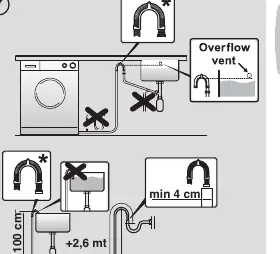
- Check that the drain hose is at the correct height (50-85 cm).
- Level the machine using the adjustable feet.
- Plug in the machine.
- Ensure the door is properly closed.
Specs in practice
- Water pressure
- Must be between 0.05 MPa and 0.8 MPa for proper operation.
Images and diagrams
- Figure 1: Removing transit bolts and spacers.
- Figure 3: Connecting the water supply hose.
- Figure 7: Correct installation of the drain hose.
- Figure 8: Leveling the machine using the feet.
- Figure 9: Detergent drawer compartments.
Model compatibility
- Wi-Fi control requires the Candy simply-Fi app.
- Some models include a liquid detergent cup for compartment 2.

Manual page author
Michael Turner
Technical manual editor
Reviews PDF manuals for structure, safety notes, and practical product details so readers can find the right information quickly.