Home Appliances / Washing Machines
User Manual for Candy CIW 100T Washer Dryer
Quick guide for the Candy CIW 100T washer dryer. Learn how to operate the control panel, select wash and dry programmes, manage drying times, and follow safety procedures.
Table of contents
Manual images
Click an image to enlargeQuick Guide
This guide provides essential operating instructions for the Candy CIW 100T washer dryer. Always observe the following safety and operational rules:
- Safety Lock: A safety device prevents the door from opening immediately after a cycle. Wait 2 minutes after the wash cycle finishes before attempting to open the door.
- Knob Direction: Never turn the drying timer or programme selector knobs anti-clockwise. Always turn them clockwise. The wash temperature selector can be turned in either direction.
- Drying Stop: You can stop the drying cycle while the machine is running by turning the drying timer clockwise to the cooling symbol and waiting for the cycle to end.
Control Panel Overview
The control panel features several buttons and selectors to manage your laundry:
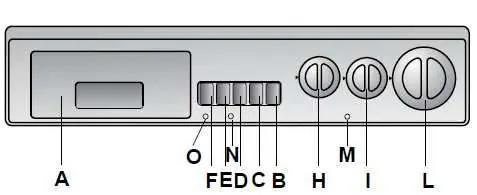
- Door Open Button (B): Releases the door lock.
- On/Off Button (C): Starts the appliance and resets/switches it off at the end of the cycle.
- Extra Rinse Button (D): Removes detergent residue, recommended for delicate skin.
- Quick Wash Button (E): Reduces programme time by up to 50 minutes (for 1-5kg loads of cottons or synthetics).
- High Dry Button (F): Enables an extra intense drying cycle for hard-wearing fabrics like towels and jeans.
- Wash Temperature Selector (H): Sets the desired wash temperature.
- Drying Time Mins (I): Sets the drying duration up to 120 minutes.
- Programme Selector (L): Used to select the wash programme.
Drying Operation
To perform a drying cycle, follow these steps:
- Turn the wash temperature control (H) to 0.
- Press the On/Off button (C).
- The warning lights (M-N-O) will illuminate.
- The drying time (I) will rotate automatically to zero.
- Drying will start with the programme dial (L) stationary on the designated symbol until the cycle ends and rotates to Stop.
- Press the On/Off button (C) again to finish.
- The warning lights will go off; you may now open the door.
Programme Settings
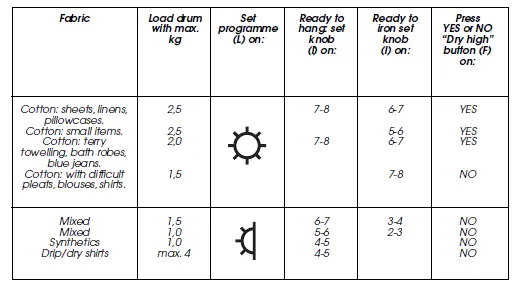
Refer to the programme table to determine the correct settings for your laundry. The table specifies the maximum load in kg, the programme dial position, the drying time knob setting, and whether the High Dry button should be used based on the fabric type (e.g., cottons, mixed, synthetics).
Manufacturer information
Candy
Practical help
Common problems
Door will not open
Wait 2 minutes after the wash cycle has finished for the safety lock to release.
Knob damage
Never turn the drying timer or programme selector knobs anti-clockwise; always turn them clockwise.
Before use
- Check garment labels to ensure you do not exceed the recommended wash temperature.
- Ensure the load weight does not exceed the maximum capacity for the selected programme.
- Turn the wash temperature control to '0' before starting a drying cycle.
- Ensure the On/Off button is pressed to start the appliance.
Specs in practice
- Drying Time (I)
- Sets drying duration up to 120 minutes. The symbol represents a 10-minute cool tumble.
- Quick Wash (E)
- Reduces programme time by up to 50 minutes; usable only for cotton and synthetic programmes with 1-5kg loads.
Images and diagrams
- The control panel diagram identifies all buttons and selectors (A-L) used for operation.
- The drying table provides a quick reference for load weights and knob settings based on fabric type.
Model compatibility
- Quick Wash button is only compatible with cotton and synthetic programmes.

Manual page author
Michael Turner
Technical manual editor
Reviews PDF manuals for structure, safety notes, and practical product details so readers can find the right information quickly.