HVAC / Evaporative Coolers
User Manual for Champion 10DD Evaporative Cooler
Official user manual for the Champion 10DD evaporative cooler. Includes detailed installation instructions, electrical wiring diagrams, maintenance procedures, troubleshooting guide, and replacement parts lists for various models.
Table of contents
Manual images
Click an image to enlargeQuick Guide
This manual provides installation, operation, and maintenance instructions for Champion evaporative coolers, including models 75/85, 95, 10/12, and 14/21 (DD and SD versions). Before installation, ensure the mounting surface can support the operating weight of the unit. Always disconnect electrical power before performing any installation or maintenance. Do not use water from a water softener. For optimal cooling, ensure proper exhaust ventilation (at least 2 square feet of opening per 1000 CFM).
Safety Rules
- Disconnect all electrical service before beginning installation.
- Electrical hookup must be performed by a qualified electrician in accordance with local standards.
- Ensure the cooler cabinet is properly grounded.
- Connect to the correct line current, voltage, and cycle as stamped on the motor specification plate.
- Do not allow the pump to tip over or become submerged.
- Always disconnect power before performing maintenance.
Installation
Ductwork
Consult the General Specification table for duct opening dimensions. For down discharge units (10/12DD and 14/21DD), the duct must go inside the opening. For side discharge units, the duct should fit over the 1-inch flange.
Water Connection
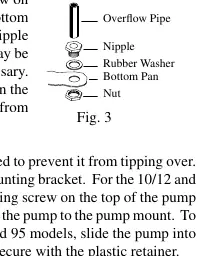
Install the overflow assembly by placing the nipple through the pan hole with the rubber washer between the pan and the nipple head. Secure with the nut. Connect a 3/8-inch water supply line to the float valve. Secure the pump to the mounting bracket to prevent tipping.
Motor and Electrical
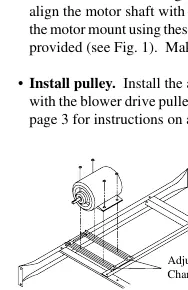
Mount the motor using the provided carriage bolts in the adjustable channels. Align the motor shaft with the blower pulley. Ensure the cooler is supplied with the correct voltage and frequency. Motors require switches or contactors of proper current capacity, installed by a competent electrician.
Operation
For best performance, pre-wet the pads by running the pump for a few minutes before starting the blower. The unit can be used for ventilation without water when outside air is cool or humidity is high. To cool efficiently, exhaust stale air from the building by opening windows or doors away from the cooler.
Maintenance
Spring Start-Up
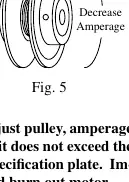
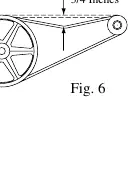
- Check and adjust belt tension.
- Oil blower bearings and cooler motor (if equipped with oil lines) with non-detergent 20/30 weight oil. Do not over-oil.
- Replace pads at the beginning and mid-season for efficiency.
- Clean the pump, remove any blockages, and ensure the impeller turns freely.
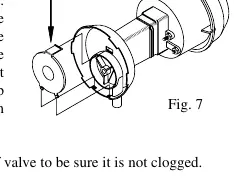
- Check the bleed-off valve to ensure it is not clogged.
Winter Shut Down
- Drain all water from the cooler and supply line.
- Disconnect the water line to prevent freezing.
- Disconnect from the power supply.
- Cover the unit to protect the finish.
Troubleshooting
If the unit fails to start, check for blown fuses, tripped breakers, or loose belts. If there is an unpleasant odor, drain the pan and clean the pads. If the motor cycles on and off, check for low voltage, excessive belt tension, or dry bearings. Refer to the troubleshooting guide in the manual for specific remedies for noisy operation or inadequate cooling.
Specifications
The manual includes detailed specifications for motor HP, phase, speed, voltage, shaft size, drive belt, and motor sheave for all supported models. Cabinet dimensions and duct opening sizes are also provided for each model variant.
Manufacturer information
Champion Power Equipment
Practical help
Common problems
Failure to start or no air delivery
Check electrical power, fuse, and circuit breaker. Ensure belt is not too loose or tight. Check for motor overheating or locked motor.
Inadequate air delivery
Ensure sufficient air exhaust (open windows/doors). Adjust belt tension. Clean pads and check for sufficient water flow.
Musty or unpleasant odor
Drain pan and clean pads. Check water distribution system and clean pump.
Motor cycles on and off
Check for low voltage, excessive belt tension, dry bearings, or motor overload.
Noisy operation
Lubricate bearings, inspect for wheel rubbing against housing, and tighten loose parts.
Before use
- Ensure mounting surface is strong enough to support operating weight.
- Verify all bolts are securely tightened.
- Ensure unit is properly grounded.
- Check that water supply line is connected (do not use water softener).
- Pre-wet pads before starting the blower.
- Verify electrical supply matches motor specification plate.
Specs in practice
- Operating Weight
- The total weight of the unit when filled with water; critical for mounting surface support.
- Duct Opening
- Dimensions required for proper airflow connection; varies by model.
- Static Pressure
- Used to determine the correct pulley and belt setup for specific installation conditions.
Images and diagrams
- Wiring Diagrams: Detailed electrical schematics for 120V and 240V configurations.
- Parts Diagrams: Exploded views of the cooler assembly for identifying replacement parts.
- Motor Installation: Shows carriage bolt alignment and pulley adjustment steps.
- Water Connection: Illustrates overflow assembly and float valve installation.
Model compatibility
- Do not use water supplied from a water softener.
- Curbs are not provided; the installer is responsible for providing support.
- Electrical hookup must be performed by a qualified electrician.
- 14/21SD and 14/21DD models require 2 belts.

Manual page author
David Miller
Documentation analyst
Organizes user manual content into clear summaries, with attention to model details, product context, and everyday usability.