Electronics / Projectors
Installation Instructions for Chief 051VCMU Heavy Duty Universal Projector Mount
A comprehensive installation guide for the Chief 051VCMU projector mount, covering hardware assembly, ceiling installation, projector attachment, and fine-tuning adjustments.
Table of contents
Manual images
Jump to the sectionQuick guide from the manual
This document provides installation instructions for the Chief 051VCMU Universal HB Interface and the VCM HD Projector Mount. The system is designed for professional projector mounting. Important: The structure to which this mount is attached must support five times the combined weight of all equipment. The maximum weight capacity for the projector is 250 lbs (113.4 kg). Do not use this product outdoors.
Safety instructions
- Ensure the ceiling structure is reinforced to support the total weight.
- Never operate the mounting system if it is damaged.
- Installation requires at least two persons; a third assistant is recommended.
- Use only the hardware provided by the manufacturer.
Installing HBU Bracket
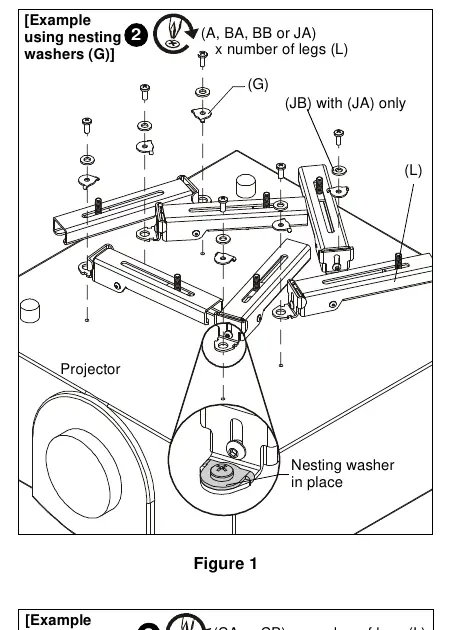
- Select the correct screws and washers based on the projector's mounting holes (refer to Table 1 in the manual).
- Attach the HBU legs (L) to the projector using the selected fasteners. A minimum of three legs must be used for M5 or larger fasteners; four legs are required for M4 fasteners.
- Lower the HB plate (K) onto the legs and secure each leg using one 5/16" lock nut (FA) and one 5/16" flat washer (FB).
Installing VCM Mount
The VCM mount is designed for 1-1/2" NPT/NPSM threaded extension columns or the Chief LPK-1 low profile kit.
- Thread the VCM mount onto the existing 1-1/2" NPT pipe until tight (minimum four threads engaged).
- Ensure the long edge of the VCM mount is parallel to the screen.
- Tighten the 5/16-18 x 3/8" set screw (C) to prevent movement.
Installing Projector to VCM
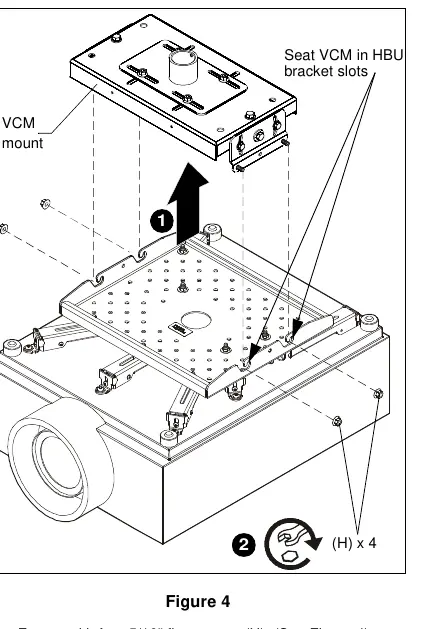
- Lift the projector with the attached HBU bracket and install it onto the four studs extending from the VCM housing.
- Ensure the VCM housing is properly seated in the slots on the HB bracket.
- Fasten securely using four 5/16" flange nuts (H).
Adjustments
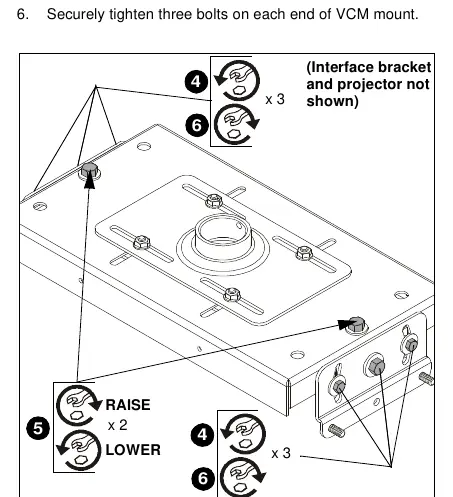
- Horizontal: Loosen the four nuts on the top slide bracket, adjust up to 1-1/2" in any direction, and re-tighten.
- Roll (Horizontal Tilt): Loosen three bolts on each end of the VCM mount. Turn adjustment bolts clockwise to raise or counter-clockwise to lower. Re-tighten bolts.
- Pitch (Vertical Elevation): Loosen the two outside bolts on each end, tilt the projector to the desired angle, and re-tighten.
Manufacturer information
Chief
Practical help
Common problems
Projector is not level or tilted incorrectly.
Use the Roll (Horizontal Tilt) adjustment bolts on the ends of the VCM mount to raise or lower sides, or the Pitch adjustment for vertical elevation.
Mount moves or shifts after installation.
Ensure the 5/16-18 x 3/8" set screw (C) is tightened into the VCM threaded collar and all flange nuts are securely fastened.
Before use
- Verify ceiling structure can support 5x the total weight of the mount and projector.
- Confirm projector weight does not exceed 250 lbs (113.4 kg).
- Ensure 1-1/2" NPT pipe is properly installed and secure.
- Check that all required legs (minimum 3 or 4 depending on screw size) are attached.
- Ensure all fasteners are tightened securely.
Specs in practice
- Weight Capacity
- Maximum 250 lbs (113.4 kg) for the projector and all components.
- NPT/NPSM Compatibility
- Requires 1-1/2" threaded extension column (Schedule 40, 0.154" minimum thickness).
- Horizontal Adjustment
- Allows for up to 1-1/2" of movement in any direction.
Images and diagrams
- Figure 1 (HBU): Shows attachment of HBU legs to the projector using nesting washers.
- Figure 4 (HBU): Illustrates seating the VCM mount into the HBU bracket slots.
- Figure 5 (VCM): Details the Roll adjustment procedure using bolts on the ends of the mount.
Model compatibility
- VCM mount is compatible with Chief 'HB' Series interface brackets.
- Designed for 1-1/2" NPT/NPSM pipes or Chief LPK-1 low profile kits.

Manual page author
David Miller
Documentation analyst
Organizes user manual content into clear summaries, with attention to model details, product context, and everyday usability.