Electronics / Projectors
Laserworld BeamBar 10R MK3 User Manual
Comprehensive user manual for the Laserworld BeamBar 10R MK3 laser projector, covering safety, installation, operation, DMX control, and maintenance.
Table of contents
Manual images
Jump to the sectionProduct Overview
The Laserworld BeamBar 10R MK3 is a professional show laser system designed for indoor commercial use. It features multiple laser outputs and is capable of sound-to-light, automatic, and DMX-controlled operation. The device is intended for professional applications such as stage shows, visual effects, and 3D projections.
Safety Instructions
Warning: This is a Class 3B laser device. Never look directly into the laser beam, as it can cause permanent eye damage or blindness. The device must only be operated by qualified personnel in accordance with local safety regulations.
- Ensure the device is not permanently connected to the mains; use the power switch or disconnect when not in use.
- Do not operate in high humidity, rain, or dusty environments.
- Maintain a minimum distance of 15 cm from walls and objects to ensure proper ventilation.
- Always use a safety cord when mounting the device on walls or ceilings.
- If the device is exposed to significant temperature changes, allow it to acclimate before switching it on to prevent condensation damage.
Installation and Operation
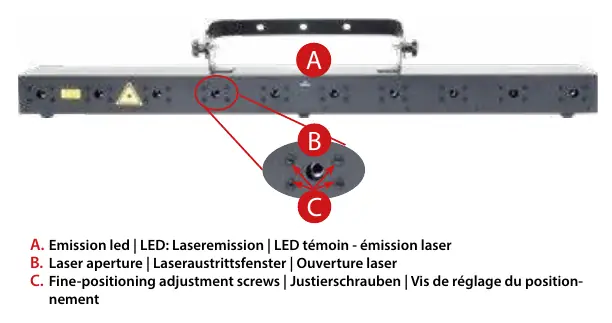
To start the device, connect the interlock bridge, insert the key into the rear key switch, and turn it to the 'ON' position. The 'Emission - Laser on' LED on the front panel will light up when the device is ready.
Operation Modes
- Sound-to-Light: Patterns are triggered by the beat of music. Microphone sensitivity can be adjusted in the 'SEnS' menu (1-100).
- Auto: Random playback of internal patterns.
- Master-Slave: Allows one master unit to control multiple slave units via DMX cables.
- DMX 512: Provides full control over laser output, patterns, and brightness using 13 DMX channels.
Maintenance
To ensure longevity, keep the fans and heatsinks free of dust and debris. Clean the exit window periodically with glass cleaner. Avoid quick on/off switching, as this significantly reduces the lifespan of the laser diodes. Do not remove the warranty label, as this will void all warranty claims.
Manufacturer information
Laserworld (Switzerland) AG
Practical help
Common problems
No laser output
Check if the key switch is in the 'ON' position, the interlock bridge is connected, and the device is not in 'Laser off' mode (DMX channel 1, value 0-49).
Device overheating
Ensure ventilation openings are not covered, keep the device away from heat-radiating spotlights, and clean dust from fans and heatsinks.
Condensation damage
If the device was exposed to temperature changes, wait for it to reach room temperature before switching it on.
Before use
- Verify the power supply voltage matches the device specifications.
- Ensure the interlock bridge is securely connected.
- Check the housing, power cords, and connectors for visible damage.
- Ensure the laser is not directed at people or flammable objects.
- Verify that the safety key is inserted and turned to 'ON'.
- Confirm that the device is placed in a well-ventilated area.
Specs in practice
- Laser Class 3B
- High-power laser; requires strict adherence to safety protocols to prevent eye injury.
- 13 DMX Channels
- The number of channels required for full control of the unit's features via a DMX controller.
- Analog Modulation
- Allows for smooth brightness control of the laser output.
- Power Consumption: 50 W
- The electrical power required for operation.
Images and diagrams
- Front Panel: Features the emission LED, laser aperture, and fine-positioning adjustment screws.
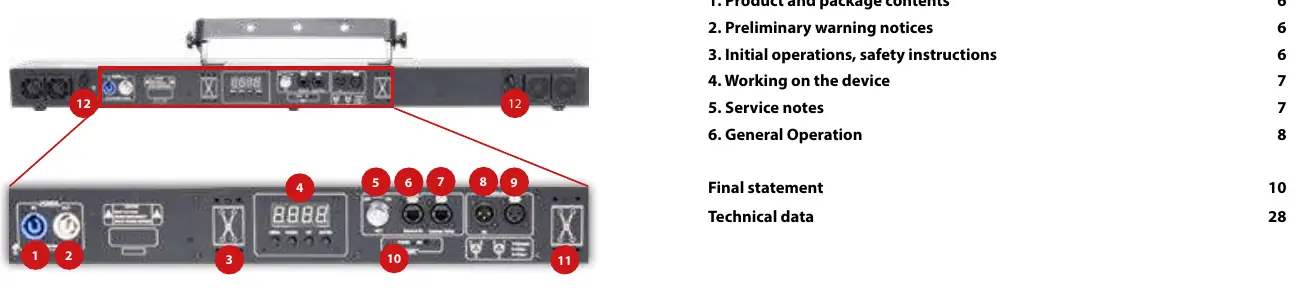
- Back Panel: Contains power in/out, DMX in/out, interlock ports, key switch, and the settings display with navigation buttons.
Model compatibility
- Master-Slave operation is only possible between lasers of the same product series and generation.
- The device is intended for indoor use only.
- Do not use with dimmer or electronically switched sockets.

Manual page author
David Miller
Documentation analyst
Organizes user manual content into clear summaries, with attention to model details, product context, and everyday usability.