Electronics / Routers
Cisco 17.X NAT Configuration Guide
A comprehensive guide to configuring Network Address Translation (NAT) on Cisco 17.X devices. Learn how to set up static and dynamic NAT, PAT (overloading), TCP load balancing, and rate limiting for IP address conservation.
Table of contents
Manual images
Click an image to enlargeQuick guide from the manual
This document provides instructions for configuring Network Address Translation (NAT) on Cisco devices to conserve IP addresses. NAT allows private networks to connect to the internet by translating internal, non-registered IP addresses into globally unique addresses.
Understanding NAT
NAT operates on a router connecting two networks. It translates private (inside local) addresses into public (inside global) addresses. Key concepts include:
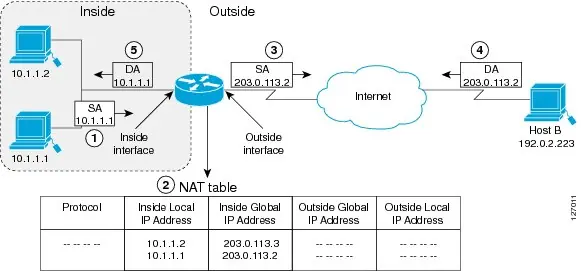
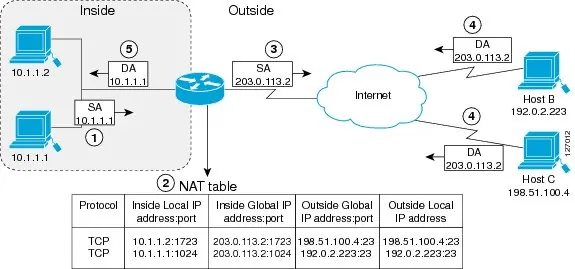
- Inside Local Address: IP address assigned to a host on the inside network.
- Inside Global Address: Legitimate IP address representing inside hosts to the outside world.
- Static NAT: One-to-one mapping between local and global addresses.
- Dynamic NAT: Maps unregistered IP addresses to a pool of registered addresses.
- Overloading (PAT): Maps multiple local addresses to a single global address using different ports.
Configuration Procedures
Configuring Static Translation
- Enter privileged EXEC mode: enable
- Enter global configuration mode: configure terminal
- Define static translation: ip nat inside source static [local-ip] [global-ip]
- Configure inside interface: interface [type] [number], then ip nat inside
- Configure outside interface: interface [type] [number], then ip nat outside
Configuring Dynamic Translation
- Define address pool: ip nat pool [name] [start-ip] [end-ip] [netmask/prefix-length]
- Define access list: access-list [number] permit [source]
- Enable translation: ip nat inside source list [number] pool [name]
Advanced NAT Features
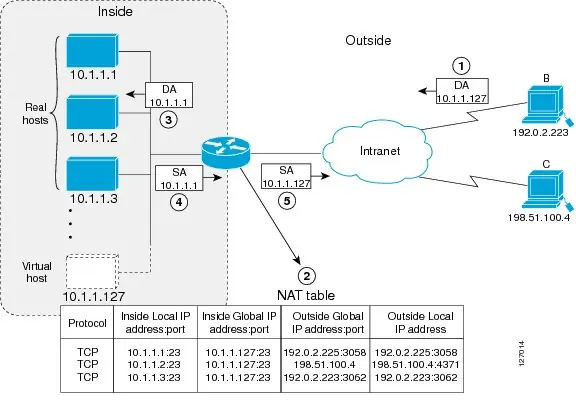
TCP Load Distribution
Used to coordinate load sharing among real hosts. Configure a rotary pool using ip nat pool [name] [start-ip] [end-ip] type rotary and map it using ip nat inside destination-list [number] pool [name].
Rate Limiting
To limit NAT entries, use ip nat translation max-entries [number]. This helps protect against malicious attacks by limiting the number of NAT entries allowed from a specific source.
Monitoring and Troubleshooting
Use the show ip nat translations command to view active NAT translations. Use show ip nat statistics to verify NAT usage and rate limit settings.
Manufacturer information
Cisco Systems, Inc.
Practical help
Common problems
NAT interface latency
Ensure NAT interface is used only for NAT-only traffic; separate non-NAT traffic using Policy-Based Routing (PBR).
Connection failure from outside
Explicitly deny the outside interface within the NAT ACL using the deny command.
Packet corruption on port 5060
NAT interprets port 5060 as SIP; ensure other applications do not use this port.
Before use
- Identify inside and outside interfaces.
- Define NAT objectives (e.g., internet access, load sharing).
- Configure necessary access lists.
- Verify VRF requirements.
- Ensure route maps are configured before use.
Specs in practice
- Overloading (PAT)
- Maps multiple local addresses to a single global address using different ports.
Images and diagrams
- NAT Inside Source Translation: Shows how a device translates a source address inside a network to a source address outside.
- NAT Overloading: Illustrates how TCP port numbers differentiate multiple inside hosts sharing one global IP.
- NAT TCP Load Distribution: Demonstrates how a virtual host coordinates load sharing among real hosts.
Model compatibility
- NAT, Zone-Based Policy Firewall, and WCCP cannot coexist.
- NAT outside interface is not supported on a VRF.
- NAT is not practical if large numbers of hosts in the stub domain communicate outside the domain.

Manual page author
David Miller
Documentation analyst
Organizes user manual content into clear summaries, with attention to model details, product context, and everyday usability.