Electronics / Routers
User Guide for Cisco CSR 1000v Router
A comprehensive guide for deploying the Cisco CSR 1000v router on Google Cloud Platform (GCP) using a solution template. Includes instructions for SSH key generation, VPC network configuration, and deployment steps.
Table of contents
Manual images
Click an image to enlargeQuick guide from the manual
This document outlines the process for deploying a Cisco CSR 1000v router on the Google Cloud Platform (GCP) using a solution template. The CSR 1000v is a Bring Your Own License (BYOL) solution, meaning you are responsible for managing your own licenses. The deployment process involves three main phases: generating an SSH key, configuring the VPC network, and executing the deployment via the Google Marketplace.
Generating an SSH Key
An SSH key is required to access the Cisco CSR 1000v VM instance. Perform these steps in a terminal server:
- Execute the command: ssh-keygen -t rsa -f ~/.ssh/keyfile [-C username]. Replace ~/.ssh/keyfile with your desired path and filename.
- The system creates two files: a private key and a public key (e.g., mykey and mykey.pub).
- Display the public key content using: cat ~/.ssh/[keyfile_pub]. You will need this content during the VM instance creation.
Creating a VPC Network
Before deploying the router, you must configure the network in the GCP console:
- Navigate to VPC network and select VPC networks.
- Click Create VPC Network.
- Enter a Name and Description for the network.
- Select Subnets > Add Subnet.
- In the dialog box, enter a name for the subnet (e.g., csrnet1), select the Region, and enter an IP address range (e.g., 10.10.1.0/24).
- Click Done to create the subnet.
- Click Create to finalize the VPC network.
Deploying the CSR Solution Template
Once the network is ready, proceed with the deployment:
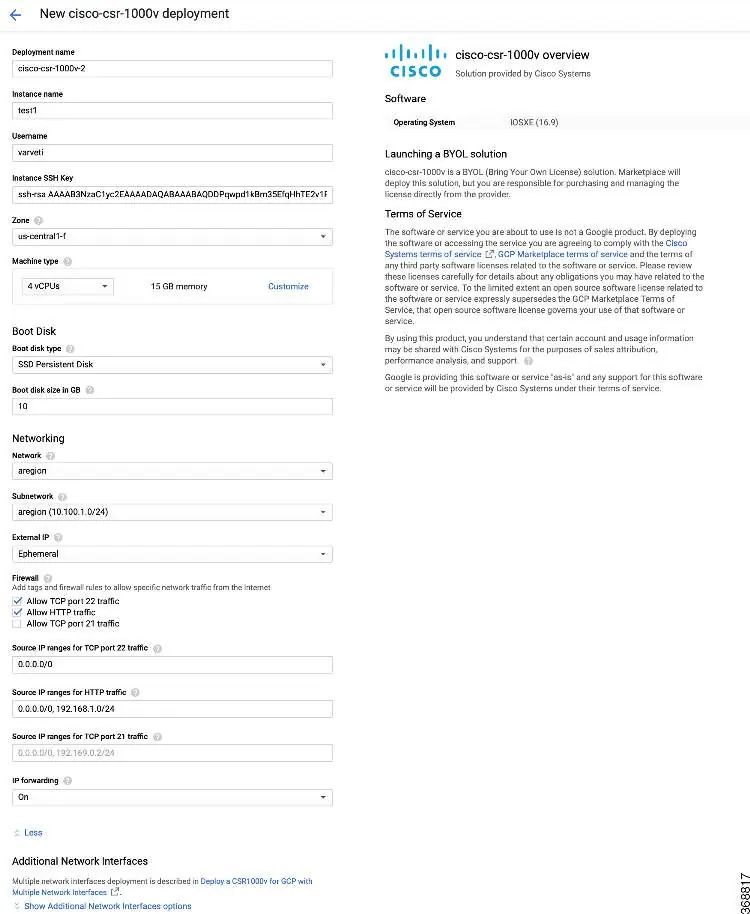
- Go to the Google Marketplace and search for Cisco CSR1000v.
- Select the CSR Template and click Launch On Compute Engine.
- Provide the required details in the deployment screen:
- Deployment name: Auto-filled.
- Instance Name: Follow GCP naming patterns.
- Username: The username for accessing the instance.
- Instance SSH Key: Paste the public key generated earlier.
- Zone: Select the deployment zone.
- Machine Type: Choose the appropriate size for your needs.
- Bootdisk: Cisco recommends using the default SSD Persistent disk and 10 GB size.
- Networking: Select the VPC network and subnetwork created previously.
- IP Forwarding: Enabled by default to allow traffic between interfaces.
Note: Even if you do not require additional interfaces, you must select the Additional Network Interfaces option during deployment to avoid configuration issues with Google Cloud.
Verifying Deployment
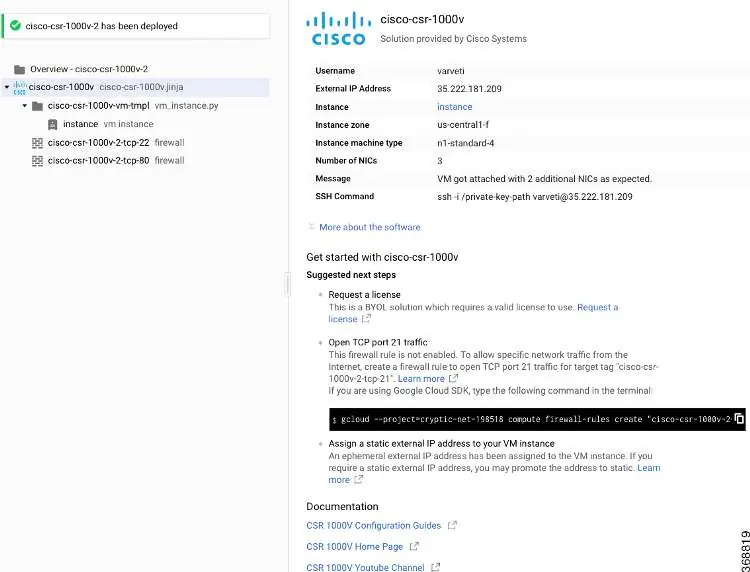
After the deployment process completes, the system will display a confirmation message. You can view the instance details, including the External IP address and the SSH command required to access the router, in the deployment summary screen.
Official resources from the manual
Manufacturer information
Cisco Systems, Inc.
Practical help
Common problems
Deployment fails or interfaces are not configured correctly.
Even if you do not require additional interfaces, you must select the 'Additional Network Interfaces' option during deployment due to a known issue where Google brings up to 8 interfaces.
Before use
- Ensure you have access to the Google Cloud Platform (GCP) console.
- Generate an SSH key pair using your terminal.
- Define the VPC network and subnets in GCP before starting the deployment.
- Ensure you have a valid license for the BYOL (Bring Your Own License) model.
Specs in practice
- IP Forwarding
- Allows traffic between interfaces on the CSR 1000v instance; enabled by default.
- Boot disk size
- Default is 10 GB; Cisco recommends using the default boot disk type and size.
Images and diagrams
- The deployment screen allows configuration of instance name, machine type, boot disk, and networking settings.
- The verification screen confirms successful deployment and provides the SSH command for access.
Model compatibility
- Requires Google Cloud Platform (GCP).
- Supports BYOL licensing model.

Manual page author
Michael Turner
Technical manual editor
Reviews PDF manuals for structure, safety notes, and practical product details so readers can find the right information quickly.