Electronics / Collaboration Devices
Deployment Guide for FlexPod Datacenter
A comprehensive deployment guide for FlexPod Datacenter, covering hardware configuration, Ansible automation, Cisco Intersight Managed Mode, VMware vSphere 7.0U3 setup, and NetApp ONTAP storage integration.
Table of contents
Manual images
Click an image to enlargeQuick guide from the manual
This guide provides instructions for deploying the FlexPod Datacenter solution. You can choose between manual configuration or using the provided Ansible playbooks. The deployment process involves configuring Cisco Nexus switches, NetApp ONTAP storage, Cisco UCS fabric interconnects via Intersight Managed Mode (IMM), and VMware vSphere 7.0U3. Ensure all hardware is physically racked and cabled according to the provided topology diagrams before beginning the software configuration.
Solution Overview
The FlexPod Datacenter solution integrates Cisco and NetApp technologies to build a shared cloud infrastructure. It utilizes Cisco Intersight for cloud-based management and Infrastructure as Code (IaC) for deployment automation.
Deployment Hardware and Software
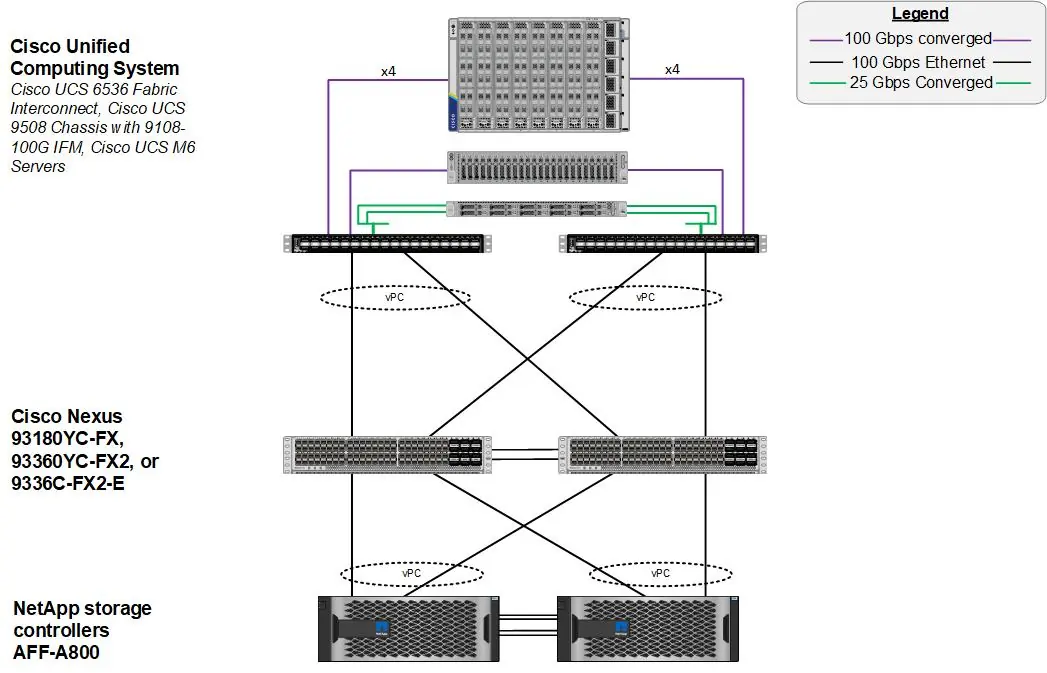
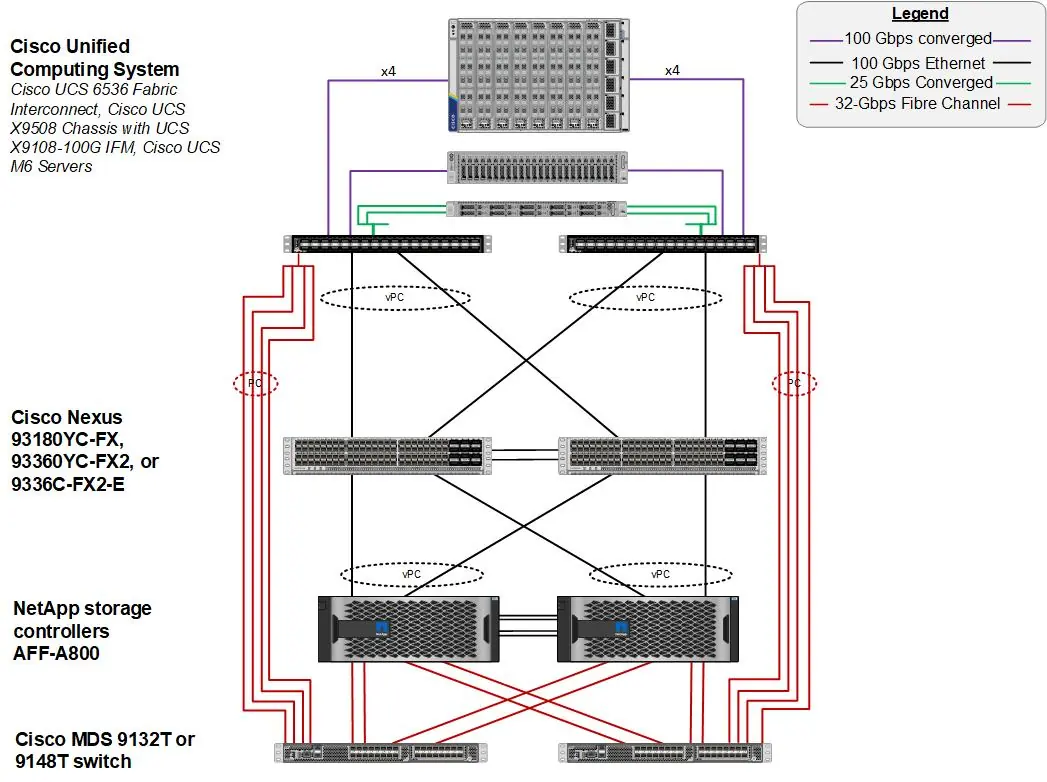
The solution requires specific hardware components, including Cisco UCS X9508 Chassis, Cisco UCS 6536 Fabric Interconnects, Cisco Nexus 93360YC-FX2 switches, and NetApp AFF A800/A400 storage. The physical topology must be established to support 100Gbps Ethernet and 32Gbps Fibre Channel connectivity.
Ansible Automation Workflow
The Ansible automated solution uses a management workstation to configure the infrastructure layers. Prerequisites include a Linux/MacOS workstation with Ansible, Git, and access to the Cisco DevNet public GitHub repository. The deployment follows a specific order: Network, Storage, Cisco UCS, and VMware ESXi.
Network Switch Configuration
This section details the configuration of Cisco Nexus 93360YC-FX2 switches. Procedures include initial setup from a serial console, setting up NTP, and configuring virtual port channels (vPC). If using these switches for SAN switching, additional steps for TCAM carving and unified port configuration are required.
NetApp ONTAP Storage Configuration
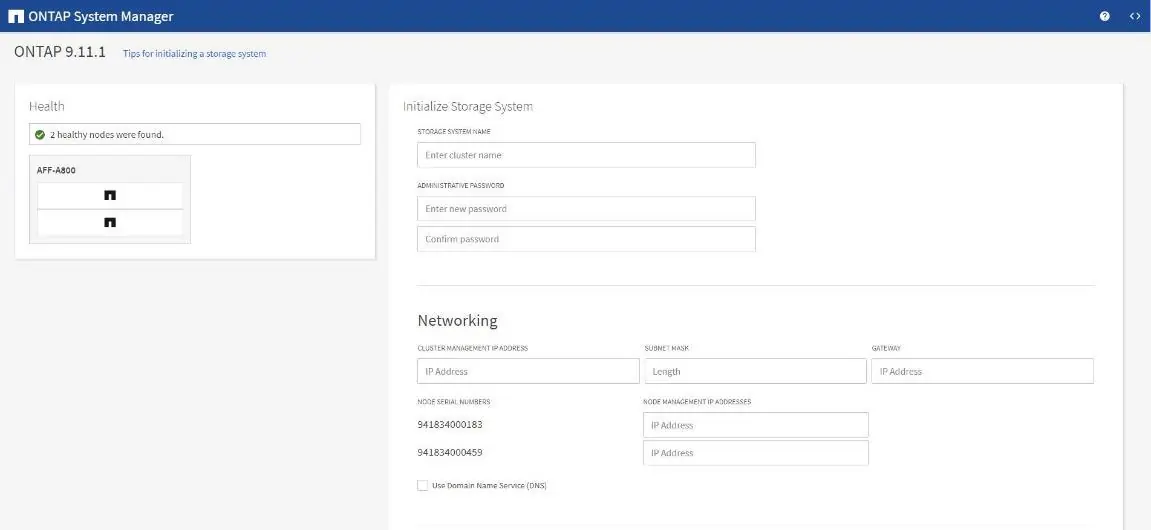
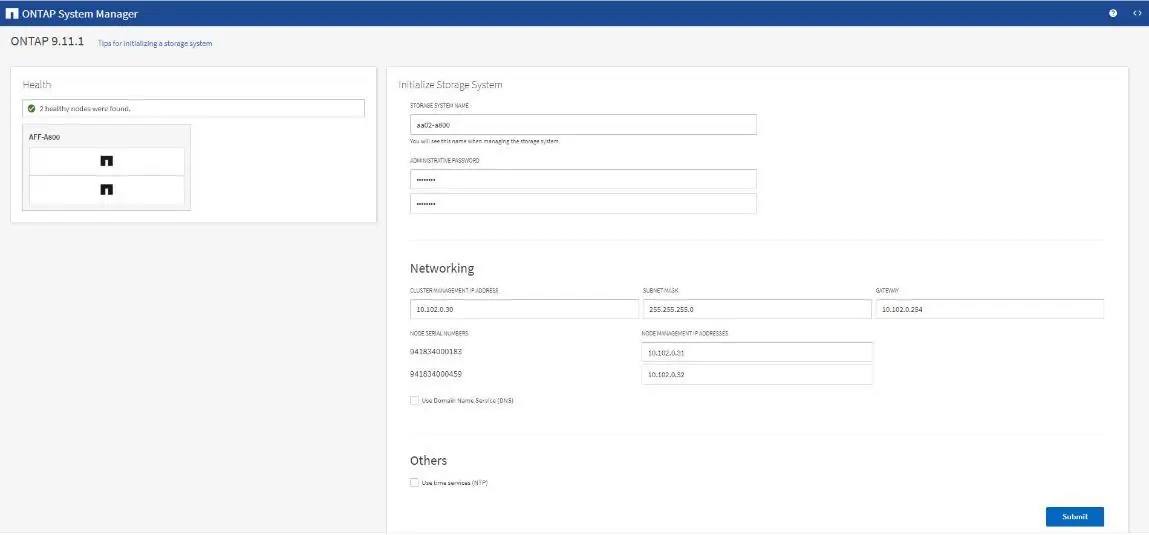
Configuration involves confirming hardware compatibility, setting up controllers, and configuring disk shelves. The ONTAP storage setup is automated via Ansible playbooks, which are split into three parts to execute at appropriate stages of the deployment.
Cisco Intersight Managed Mode Configuration
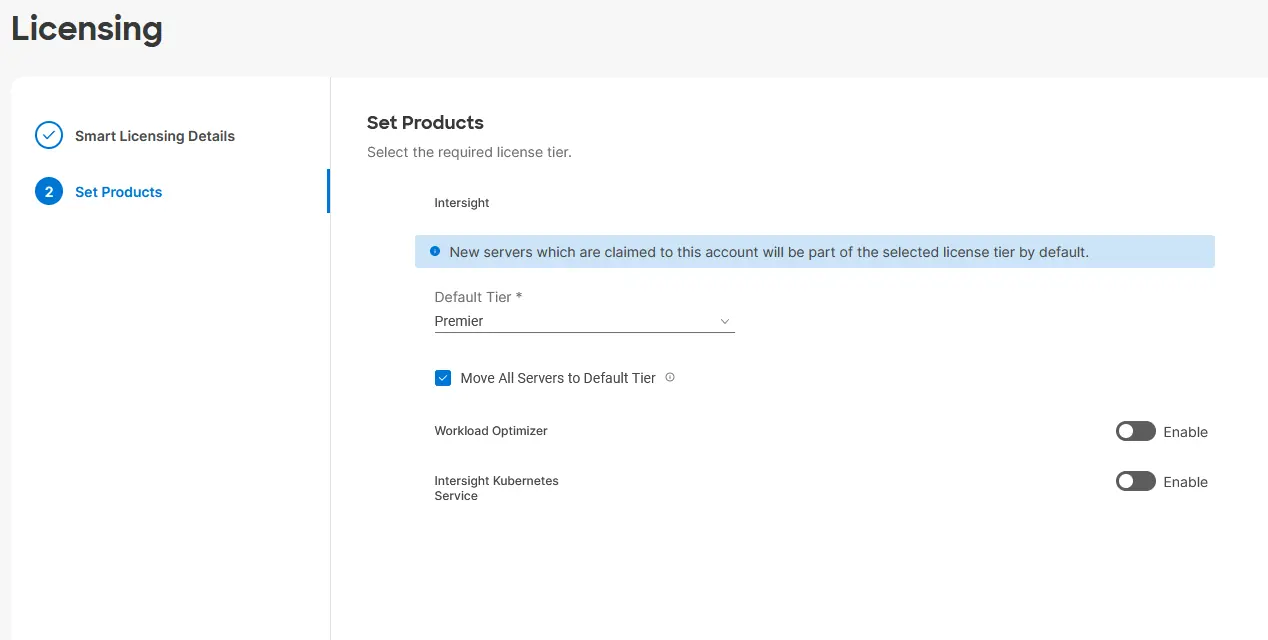
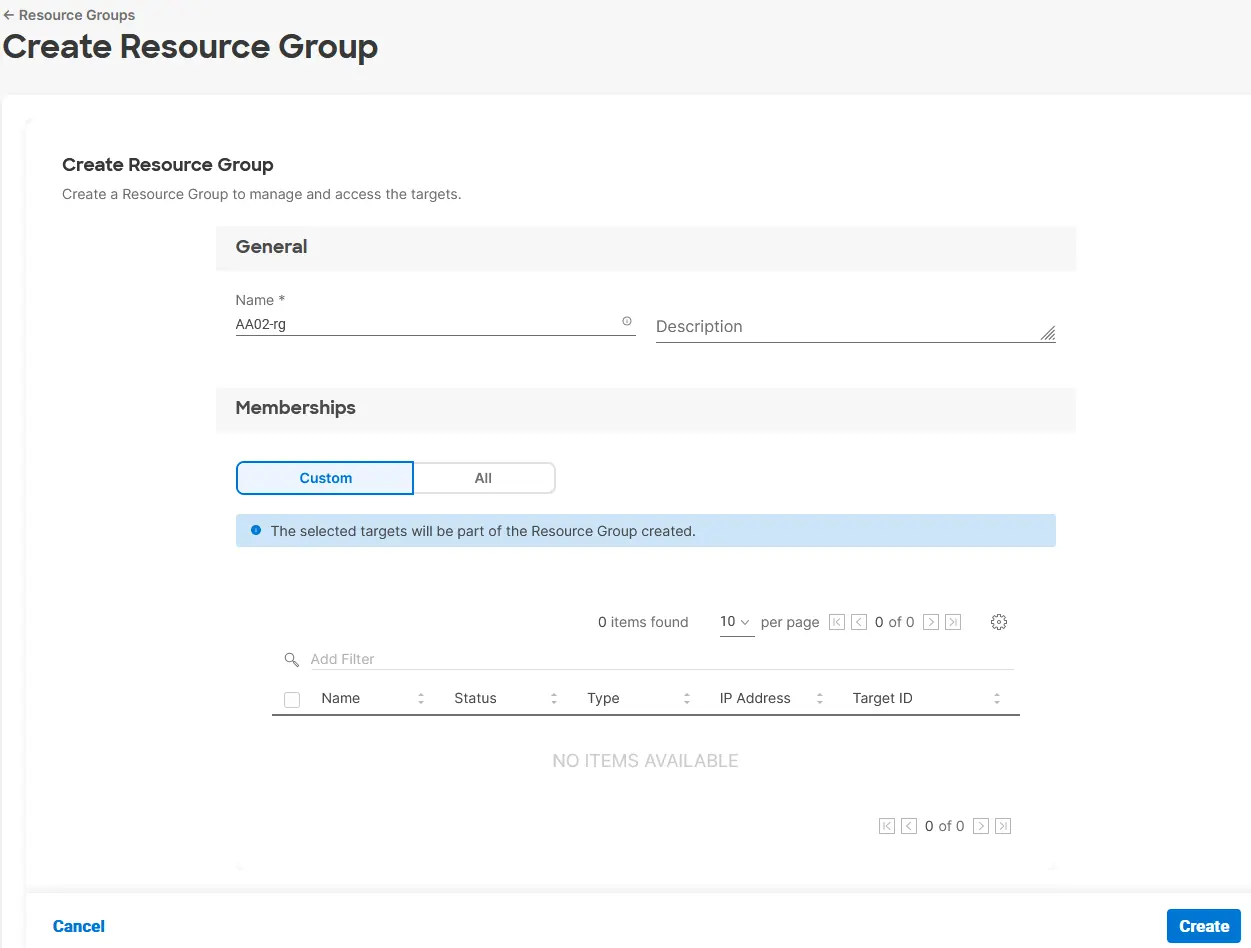
Cisco Intersight Managed Mode (IMM) manages Cisco UCS fabric interconnects. The process includes setting up the Intersight account, licensing, resource groups, and organizations. Fabric interconnects must be claimed in Intersight, and firmware upgrades can be performed through the Intersight portal.
VMware vSphere 7.0U3 Setup
This section covers installing VMware ESXi 7.0U3 using the KVM console and virtual media. It also details configuring management networking for ESXi hosts and installing/configuring the VMware vCenter Server Appliance (VCSA).
FlexPod Management Tools Setup
The guide includes procedures for setting up additional management tools: NetApp ONTAP Tools for VMware vSphere, NetApp SnapCenter, Active IQ Unified Manager, and Cisco Data Center Network Manager (DCNM-SAN) for monitoring and analytics.
Manufacturer information
Cisco Systems, Inc.
Practical help
Common problems
Boot failure when moving server profiles with UEFI Secure Boot
If a security violation occurs, log into the host via SSH, gather the recovery key using 'esxcli system settings encryption recovery list', and add the key using the 'encryptionRecoveryKey=recovery_key' boot option.
vCenter CPU settings mismatch
If the VCSA CPU setup does not match the Cisco UCS server configuration, shut down the vCenter VM, edit settings to adjust Cores per Socket to match the server configuration, and power on.
Ansible playbook failure during ESXi configuration
Ensure vmnic1 is not selected as the second adapter in vSwitch0 during management network configuration, as this will cause the Ansible playbook to fail.
Before use
- Verify all hardware is physically racked and cabled according to the topology diagrams.
- Ensure management IP connectivity is established for all devices.
- Prepare a management workstation with a working installation of Ansible.
- Download the required ISO images (ESXi, vCenter, DCNM, etc.).
- Ensure all required licenses (e.g., SAN_ENTERPRISE_PKG) are installed on switches.
- Create an API key in Cisco Intersight for Ansible automation.
Specs in practice
- 100Gbps Ethernet
- High-speed network connectivity utilized from the server through the network to the storage.
- 32Gbps Fibre Channel
- High-speed storage connectivity used for SAN configurations.
Images and diagrams
- Figure 1: Physical Topology for IP-based storage access.
- Figure 2: Physical Topology for FC-based storage access.
- Figure 3: Cabling diagram for the FlexPod topology based on Cisco UCS 6536 fabric interconnect.
- Figure 4: Ansible automation workflow illustrating the configuration order.
- Figure 6: Cisco Nexus SAN switching cabling with FCoE fabric interconnect uplinks.
Model compatibility
- Cisco MDS 9132T and FC connectivity are not needed when implementing IP-based connectivity.
- SAN Analytics is not supported on Cisco Nexus 93180YC-FX, 93360YC-FX2, or 9336C-FX2-E switches.
- SnapCenter Plug-in for VMware vSphere requires a Linux-based virtual appliance.

Manual page author
Michael Turner
Technical manual editor
Reviews PDF manuals for structure, safety notes, and practical product details so readers can find the right information quickly.