Electronics / Routers
User Guide for Cisco ISR 1100 and ISR 1100X Series Routers
A comprehensive user guide for the Cisco ISR 1100 and ISR 1100X series routers. This guide covers chassis layouts, LED indicator status meanings, port configurations, technical specifications, power supply requirements, and wireless LTE...
Table of contents
Manual images
Click an image to enlargeQuick Guide
This document provides an overview and technical specifications for the Cisco ISR 1100 and ISR 1100X series routers. These devices are designed for WAN, security, and multi-cloud connectivity in small business, home, and branch offices. The series includes various models with different port densities and LTE capabilities.
Chassis Overview
The routers feature a fixed form factor with front, side, and back panels. Key components include:
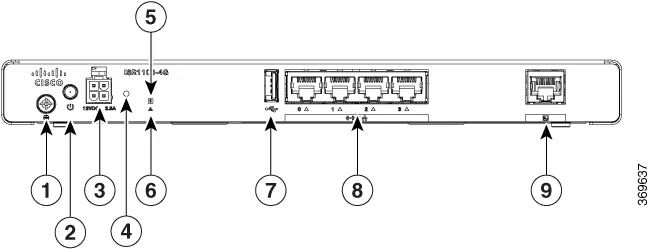
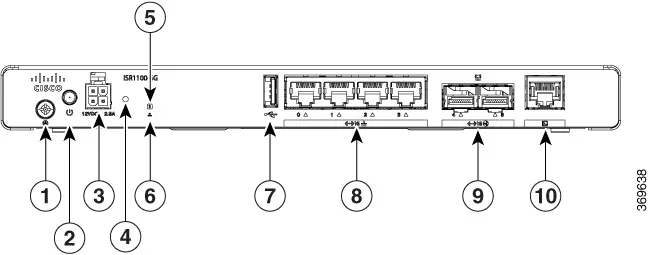
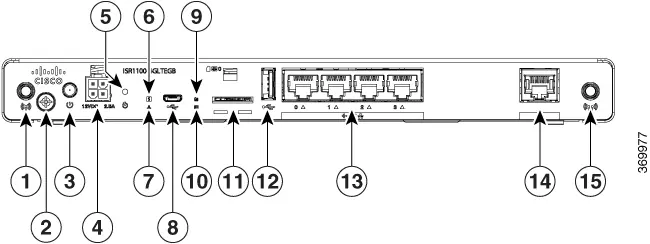
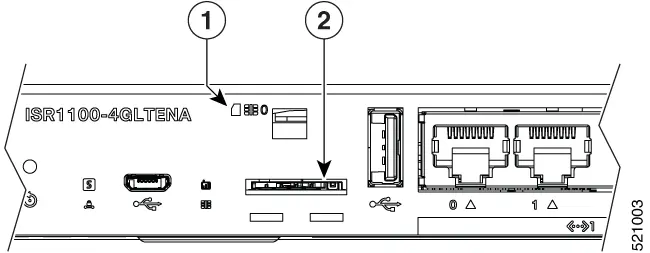
- Front Panel: Houses the power input, reset button, system and status LEDs, USB ports, Ethernet ports, SFP ports (on specific models), and SIM slots (on LTE models).
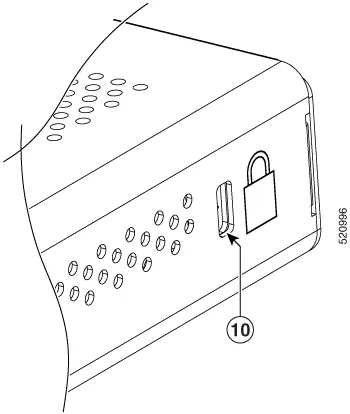
- Side Panel: Contains the Kensington lock slot for security.
- Back Panel: Provides structural design and branding.
Always ensure the router is placed on a flat surface and not hanging from the power socket.
LED Indicators
The routers utilize several LEDs to indicate system status:
- SYS LED: OFF (System off), Amber blinking (Boot up), Green steady (Normal operation), Amber steady (Fault/Shutting down).
- STATUS LED: Green (OMP connection up), OFF (System down or OMP connection down).
- RJ-45 Ethernet Port LEDs: Green solid (Link established), Green blinking (Data transmission), OFF (Link down).
- RSSI LED (LTE models): Indicates signal strength; Green (Excellent/Good), Orange (Poor/Error).
- SIM LED (LTE models): Indicates SIM status, including roaming and data activity.
Technical Specifications
Key hardware specifications across the series include:
- CPU: Intel 2.2 GHz 4-core.
- Memory: 4 GB or 8 GB DDR4 ECC DRAM (model dependent).
- Storage: 8 GB or 16 GB eMMC pSLC.
- Operating Temperature: 0 to 40°C (32 to 104°F) at sea level.
- Altitude: Maximum 3000 m (10,000 ft).
- Humidity: 10 to 85% RH non-condensing.
Power Supply
The routers use an external Power Supply Unit (PSU) with the following specifications:
- AC Input Voltage: 100-240 VAC nominal.
- AC Input Frequency: 50-60 Hz.
- Output Voltage: 12 VDC.
- Maximum Output Power: 30 Watts.
Wireless Specifications
LTE models (ISR1100-4GLTENA and ISR1100-4GLTEGB) include built-in Category-4 modems. The variants differ primarily in the supported LTE bands, with the TENA model optimized for North America and the TEGB model for global use.
Manufacturer information
Cisco Systems, Inc.
Practical help
Common problems
SYS LED is steady Amber
The system is either shutting down or experiencing a fault.
STATUS LED is OFF
The system is down or the OMP connection is not established.
RJ-45 Ethernet LED is OFF
The link is not connected or is down. Check the cable connection.
RSSI LED is blinking Orange
LTE is enabled but there is an error, such as lack of signal or no connectivity with the BTS.
Before use
- Verify the power source is 100-240 VAC.
- Ensure the router is placed on a flat surface; do not hang the PSU from the power socket.
- Check that the operating environment is between 0 and 40°C.
- Ensure the installation altitude is below 3000m.
- For LTE models, ensure the SIM card is correctly inserted.
Images and diagrams
- Front Panel: Contains power input, reset button, LEDs, and network ports.
- Side Panel: Features the Kensington lock slot.
- SIM Slot: Located on the front panel, requires cover removal to access.
Model compatibility
- Console port supports a baud rate of 115,200.
- LTE variants (4GLTENA vs 4GLTEGB) support different LTE bands based on region.

Manual page author
David Miller
Documentation analyst
Organizes user manual content into clear summaries, with attention to model details, product context, and everyday usability.