Electronics / Routers
Cisco Business 143AC Mesh Extender
Expand your existing Cisco Business Wireless Network coverage with the 143AC Mesh Extender. Easy setup via app or web interface.
Table of contents
Product Overview
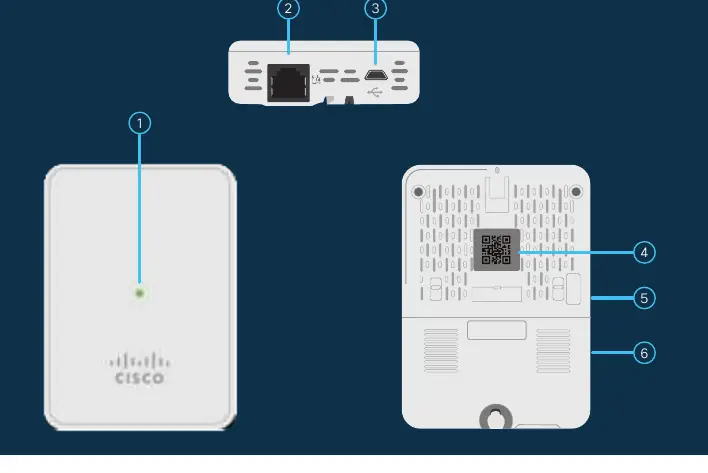
The Cisco Business 143AC Mesh Extender is designed to expand the coverage of your existing Cisco Business Wireless Network. It features a status LED, a PoE-In port, a Type B USB port for power, a mode button, and a Kensington lock slot for security.
Getting Started
Before beginning, ensure you have an active internet connection, an operational Cisco Business Master Access Point (140AC, 145AC, or 240AC) with Mesh enabled, and a router acting as a DHCP server. You can simplify the setup process by downloading the Cisco Business app, which includes a built-in QR code reader.
Preparing Your Product
Connect the provided power adapter to the mesh extender and plug it into a power source. The device will begin its initial boot-up process, during which the LED will cycle through red, amber, and green. This is normal behavior. If you are not using the mobile app, you will need to obtain the device's MAC address by scanning the QR code located on the back of the unit.
Configuration
You can configure the mesh extender using either the Cisco Business app or a web browser. To use the web interface, connect to the SSID of your Master AP, launch a browser, and navigate to https://ciscobusiness.cisco. Log in with your Master AP credentials, navigate to Wireless Settings, and add the mesh extender's MAC address under the Local MAC Addresses section. Ensure the device type is set to Whitelist and save your configuration.
Monitoring and Maintenance
Once configured, the mesh extender will upload firmware and join the network, which may take ten minutes or more. A solid or blinking green LED indicates a successful connection. You can manage the device through the Master AP web interface. For detailed information on LED status indicators, advanced configurations, and mounting instructions, please refer to the Cisco Business Wireless Access Point Administration Guide.
Related manuals
Related manuals from the same brand or category.
Electronics / Routers
Cisco Business 142AC Mesh Extender Quick Start Guide
CiscoElectronics / Routers
Cisco Business 141AC Mesh Extender User Guide
CiscoElectronics / Routers
Cisco Business 140AC Access Point User Guide
CiscoSoftware / Apps Services
Cisco Unity Connection 12.x Server Maintenance Guide
CiscoDocuments / Warranty Safety