Software / Apps Services
Release Notes for Cisco Catalyst 9800 Series Wireless Controller, Cisco IOS XE Dublin 17.11.x
Official release notes for Cisco Catalyst 9800 Series Wireless Controllers running Cisco IOS XE Dublin 17.11.x, covering new features, hardware support, upgrade paths, and known issues.
Table of contents
Product Overview
The Cisco Catalyst 9800 Series Wireless Controllers are next-generation controllers built for intent-based networking. They integrate radio frequency (RF) capabilities from Cisco Aironet with the intent-based networking features of Cisco IOS XE. These controllers are designed for enterprise-grade performance, offering high availability (HA), seamless software updates, and built-in security features such as secure boot, run-time defenses, and image signing.
Deployment Options
The controllers are available in multiple form factors to suit various deployment needs:
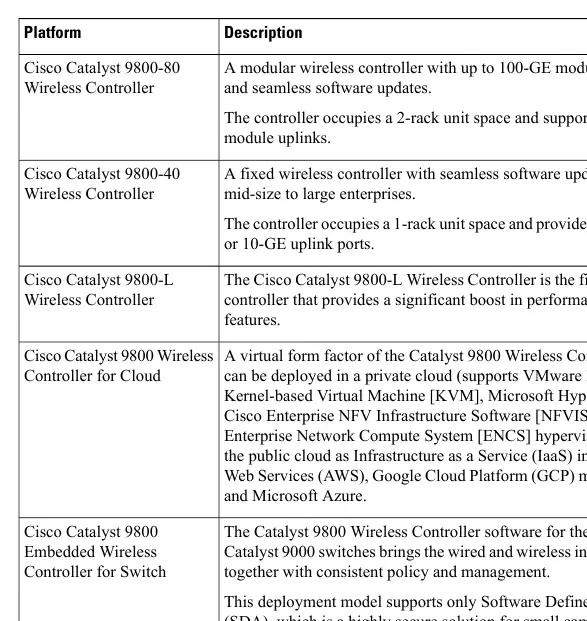
- Appliance: Dedicated hardware for on-premise deployments.
- Cloud: Virtual form factor for private or public cloud environments.
- Embedded: Integrated into Cisco Catalyst switches for Software Defined-Access (SDA) deployments.
Key Features in 17.11.1
This release introduces several enhancements, including:
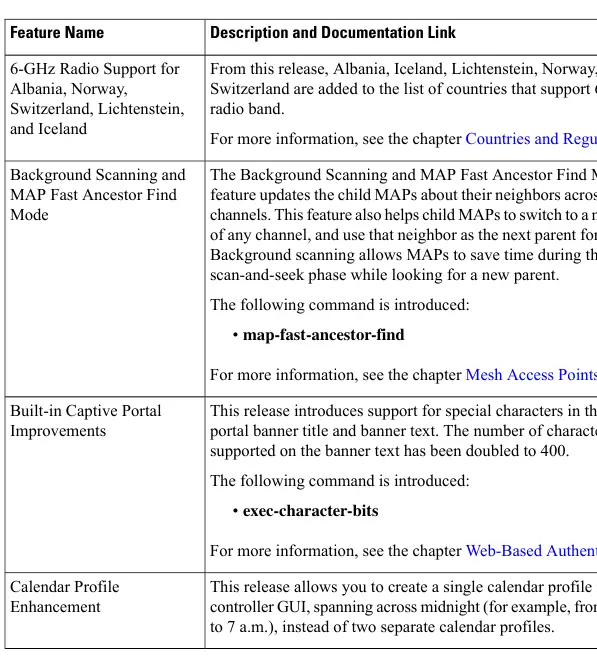
- 6-GHz Radio Support: Expanded support for Albania, Iceland, Lichtenstein, Norway, and Switzerland.
- Background Scanning: Improved Mesh Access Point (MAP) neighbor discovery and parent switching.
- Client Debug Bundle: Simplified troubleshooting by collating logs and packet captures into a single tar file.
- Out-of-Band AP Image Download: Enhanced methods for faster and more flexible AP upgrades.
- Product Analytics: Collection of non-personal usage data to drive continuous product improvements.
Security and Maintenance
Cisco strongly recommends using strong cryptographic algorithms. Weak algorithms like RSA keys under 2048 bits, MD5, DES, and 3DES are being phased out. Users are advised to migrate to stronger alternatives to maintain management access. The system includes built-in security mechanisms, and administrators should follow best practices for password encryption and trustpoint management.
Upgrade and Compatibility
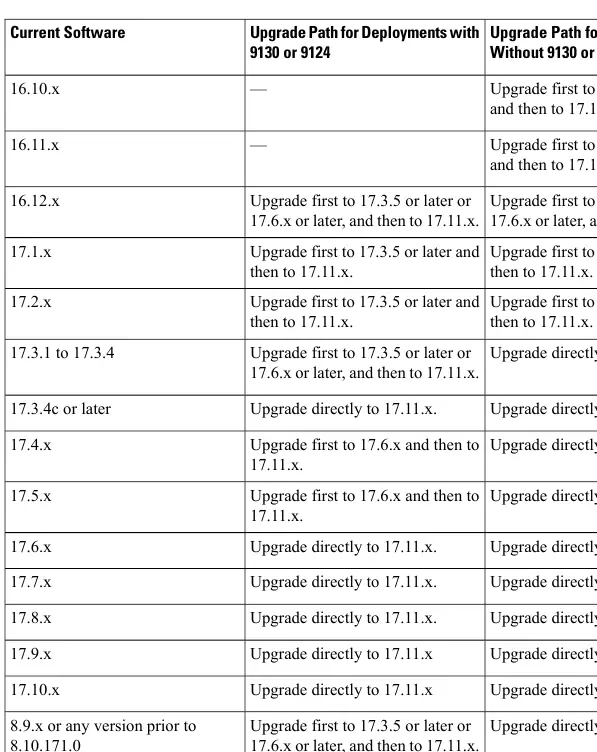
Before upgrading, ensure you review the specific upgrade path for your current software version. The controllers support a wide range of Cisco Access Points and hardware modules. Always verify compatibility with the Cisco Wireless Solutions Software Compatibility Matrix before proceeding. During upgrades, ensure route processor ports are not flapped to avoid potential kernel crashes.
Troubleshooting
For troubleshooting, utilize the Cisco Bug Search Tool to identify known issues. The release notes provide detailed information on open and resolved caveats. If you encounter issues, refer to the official Cisco documentation for log collection and debugging procedures.
Related manuals
Related manuals from the same brand or category.
Software / Apps Services
Release Notes for Cisco Prime Collaboration Deployment, Release 15SU3
CiscoSoftware / Apps Services
Cisco Unity Connection 12.x Server Maintenance Guide
CiscoSoftware / Apps Services
Verified Scalability Guide for Cisco Nexus Dashboard Fabric Controller, Release 12.0.2f
CiscoGeneral / Other Manuals
Cisco IOS XE 17.x Ethernet Operations, Administration, and Maintenance (OAM) Guide
CiscoGeneral / Other Manuals
Cisco IOS XE 17.x Routing Information Protocol (RIP) Configuration Guide
CiscoGeneral / Other Manuals
Preserve 802.1Q Tagging with 802.1P Marking over ATM PVCs for xDSL Uplinks
CiscoGeneral / Other Manuals
Cisco 17.X NAT IP Address Conservation User Guide
CiscoElectronics / Monitors
Cisco IOS XE IP SLAs HTTPS Operations Configuration Guide
CiscoDocuments / Warranty Safety
Programmability Configuration Guide for Cisco IOS XE Cupertino 17.9.x
Cisco
Manual page author
David Miller
Documentation analyst
Organizes user manual content into clear summaries, with attention to model details, product context, and everyday usability.