Documents / Warranty Safety
Design Guide for Cisco Unity Connection 10.x
Comprehensive design and configuration guide for Cisco Unity Connection 10.x, covering system architecture, networking, integration, and scalability.
Table of contents
Manual images
Jump to the sectionProduct Overview
Cisco Unity Connection 10.x is a feature-rich voice messaging platform built on the Linux-based Cisco Unified Communications Operating System. It is designed to scale to support enterprise organizations with up to 100,000 users. The system offers a wide range of end-user features, including flexible user interfaces, automated attendant functionality, speech-enabled directory access, and video greetings. It also provides robust system administration tools, including support for LDAP directory synchronization, comprehensive security features, and various APIs for integration.
Networking and Integration
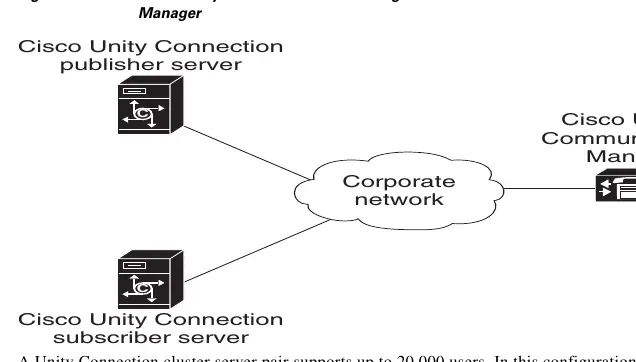
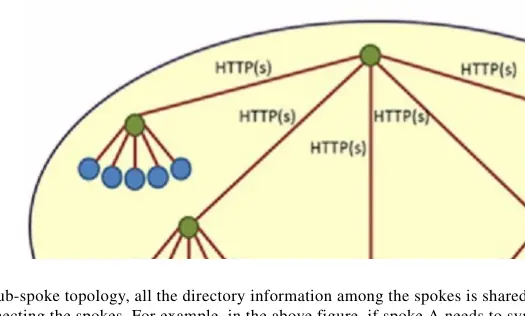
Unity Connection supports multiple networking models, including HTTPS, legacy SMTP, and VPIM networking, allowing for flexible deployment across single or multiple sites. It integrates natively with Cisco Unified Communications Manager and Cisco Unified Communications Manager Express using SCCP or SIP protocols. For circuit-switched phone systems, integration is supported via PIMG or TIMG media gateways. The system also supports high availability through active/active clustering, ensuring service continuity.
Scalability and Sizing
Proper sizing is critical for optimal performance. Guidelines are provided for audio codec selection, voice messaging port configuration, and storage capacity planning. Administrators must consider the impact of various clients, such as IMAP, Web Inbox, and mobile applications, on system resources. The guide details how to calculate the number of synchronization threads for Single Inbox deployments and provides recommendations for load balancing in clustered environments.
Security and Disaster Recovery
Security is a core component, with features such as Security-Enhanced Linux (SELinux), signaling authentication, and media encryption. The system supports Single Sign-On (SSO) via OpenAM and SAML. For disaster recovery, the platform includes the Disaster Recovery System (DRS) for full system backups and the Cisco Object Backup and Restore Application Suite (COBRAS) for granular object-level backup and restoration.
Migration and Maintenance
The guide outlines strategies for migrating from legacy voice-messaging systems to Cisco Unity Connection, including both flash-cut and gradual migration approaches. It provides detailed considerations for maintaining system integrity, managing distribution lists, and ensuring smooth transitions for end users.
Manufacturer information
Cisco Systems, Inc.
Practical help
Common problems
Synchronization delays in Single Inbox
Adjust the number of synchronization threads (connections) based on latency and user count using the provided CLI command.
Voice messaging ports not registering quickly after failover
Configure port groups to list Cisco Unified CM servers in different orders for each group.
Video greeting window closing or freezing
Ensure a proper 'blanking' file is uploaded to the MediaSense server.
Before use
- Verify platform requirements in the Supported Platforms List.
- Ensure network latency meets requirements (e.g., <80ms for LDAP, <250ms for Single Inbox).
- Plan for required voice messaging ports and storage capacity.
- Configure DNS and DHCP if required for network settings.
- Ensure all servers in a cluster are in the same time zone.
- Verify that the required firewall ports are open.
Specs in practice
- Recording Codec
- The system-level audio codec used to store voice messages.
Images and diagrams
- Hub-spoke topology for HTTPS networking showing directory information flow.
- Cisco Voicemail Organization showing site gateways and intersite links.
- Connections for PIMG/TIMG integrations with Cisco Unified Communications Manager.
- Topology for Cisco Unity Connection SRSV in branch offices.
Model compatibility
- Single Inbox over IPv6 is supported only for Exchange 2007, 2010, and 2013.
- Intrasite networking is not supported for Cisco Business Edition 5000.
- Video greetings require MediaSense 10.0 or later.
- Cisco Unity Connection 10.x is required for SRSV branches.

Manual page author
David Miller
Documentation analyst
Organizes user manual content into clear summaries, with attention to model details, product context, and everyday usability.