Documents / Warranty Safety
Cisco TrustSec Configuration Guide for Cisco IOS Release 15M&T
Comprehensive configuration guide for Cisco TrustSec (CTS) on Cisco IOS Release 15M&T, covering device enrollment, SGT exchange protocols (SXP), interface-to-SGT mapping, and Flexible NetFlow integration.
Table of contents
Product Overview
Cisco TrustSec (CTS) is a security system that provides authentication, authorization, and traffic filtering for CTS-enabled network devices at each routing hop. By utilizing group tagging and role-based access control lists (ACLs), it secures traffic between devices. This guide covers key features including Secure RADIUS authentication, EAP-FAST, and SGT propagation.
Key Features and Configuration
Cisco TrustSec Support for IOS
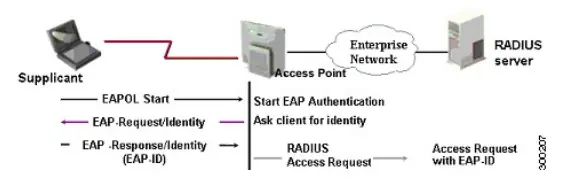
CTS requires a security license for operation. Authentication is typically handled via Cisco Identity Services Engine (ISE) or Secure Access Control Server (ACS). Devices use EAP-FAST Phase 0 for dynamic Protected Access Credential (PAC) provisioning to establish secure tunnels for credential verification.
SGT Exchange Protocol (SXP)
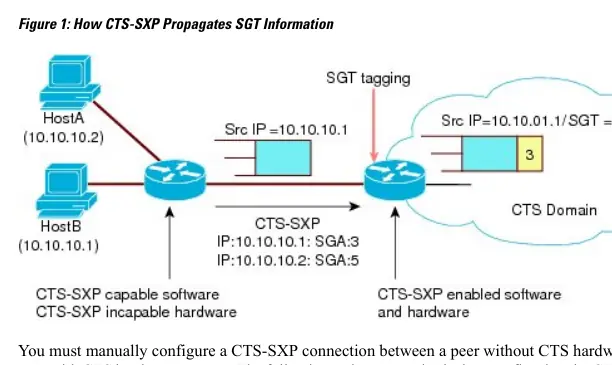
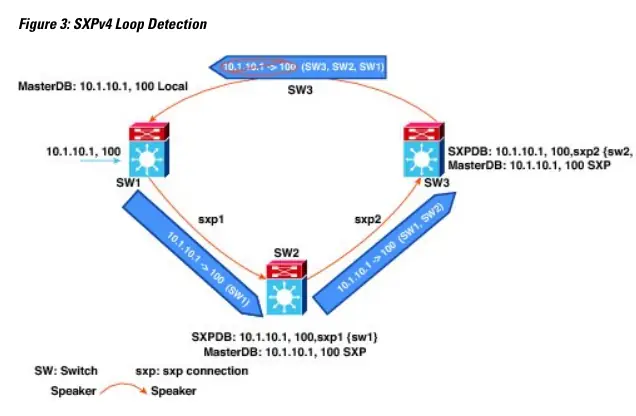
The Security Group Tag (SGT) Exchange Protocol (SXP) propagates IP-to-SGT binding information across network devices that lack hardware support for tagging. SXPv4 introduces loop detection and prevention mechanisms to ensure network stability. Bidirectional SXP support allows propagation in both directions over a single connection.
Interface and Subnet Mapping
CTS allows binding traffic on specific Layer 3 interfaces or subnets to a security group tag. This ensures that all traffic originating from these sources is appropriately tagged for policy enforcement. The system uses a strict priority scheme to resolve conflicts among different binding sources.
Flexible NetFlow Export
Cisco TrustSec fields, including source and destination SGTs, can be exported using Flexible NetFlow (FNF). This enables administrators to monitor and troubleshoot traffic flows with identity information, facilitating better resource planning and security policy enforcement.
Maintenance and Troubleshooting
Configuration verification is performed using various show commands, such as show cts credentials, show cts sxp connections, and show cts interface. These commands provide visibility into the operational status of CTS features, SXP peer connections, and SGT mapping databases. If issues arise, ensure that licenses are correctly installed and that peer devices are configured with consistent credentials and SXP parameters.
Related manuals
Related manuals from the same brand or category.
Electronics / Monitors
Cisco IOS XE Gibraltar 16.10.x: Managing Configuration Files
CiscoHome / Security
Cisco Emergency Responder 15SU3 Release Notes
CiscoSoftware / Apps Services
Release Notes for Cisco Prime Collaboration Deployment, Release 15SU3
CiscoElectronics / Routers
Cisco Aironet 1532I-E Access Point Secure Data Wipe Guide
CiscoElectronics / Routers
Cisco IOS Release 15.1M&T: Key Updates and Supported Platforms
CiscoElectronics / Routers
Cisco Business 143AC Mesh Extender
CiscoElectronics / Routers
Cisco Business 142AC Mesh Extender Quick Start Guide
CiscoElectronics / Routers
Cisco Business 141AC Mesh Extender User Guide
CiscoElectronics / Routers