HVAC / Parts & Accessories
User Manual for Coleman SaluSpa S100105 Hot Tub
Comprehensive user guide for the Coleman SaluSpa S100105 hot tub. Includes setup instructions, winter operation, control panel usage, maintenance, and troubleshooting error codes.
Table of contents
Manual images
Click an image to enlargeQuick Guide
This manual provides essential instructions for the safe operation and maintenance of your Coleman SaluSpa. Always test the GFCI plug before each use. If setting up in winter, ensure the ambient temperature is above 59°F (15°C) before inflation, and keep the heater on if the outdoor temperature drops below 42.8°F (6°C) to utilize the Freeze Shield™ system.
Safety Instructions
Warning: To reduce the risk of electric shock, drowning, or injury, follow these precautions:
- Do not permit children to use the spa without close supervision.
- Install at least 5 feet (1.5 m) away from all metal surfaces.
- Do not use extension cords; connect directly to a grounded outlet.
- Test the GFCI plug before every use.
- Water temperature should never exceed 104°F (40°C).
- Do not use the spa while it is raining.
- Always attach the spa cover after use.
Installation and Setup
Ensure the surface is smooth, flat, level, and capable of supporting the weight of the filled spa. Avoid placing the spa on carpet or similar materials.
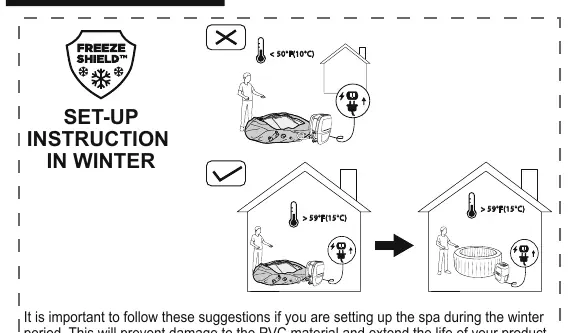
- Winter Setup: If the ambient temperature is below 50°F (10°C), keep the package indoors (above 59°F) for at least 2 hours before inflation.
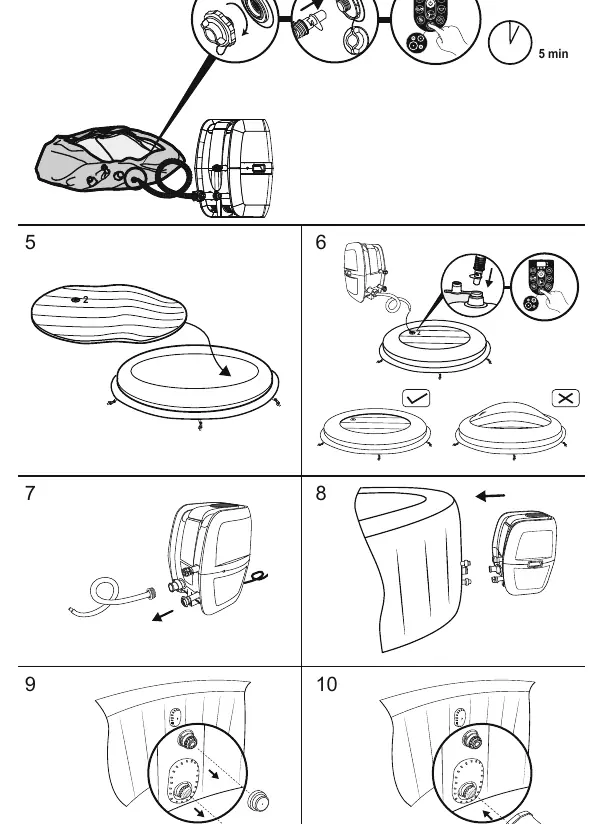
- Inflation: Use the spa heater to inflate the liner. Do not use an air compressor.
- Filling: Ensure the water temperature used to fill the spa is above 42.8°F (6°C) to avoid E03 error codes.
Using the Spa
The control panel allows you to manage all spa functions:
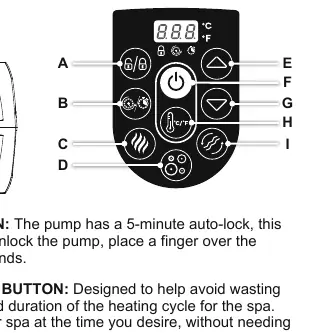
- Lock/Unlock: Hold for 3 seconds to lock/unlock the panel.
- Power-Saving Timer: Set the heating duration and activation time to save energy.
- Heat Button: Activates the heating system. The light turns red when heating and green when the set temperature is reached.
- Massage System: Activates the massage jets. Features a 30-minute auto-shutoff. Do not run with the cover attached.
- Temperature Adjustment: Range is 68°F (20°C) to 104°F (40°C).
Maintenance
Regular maintenance is required to keep the water safe and the equipment in good condition.
- Filter Cartridges: Check and clean daily. Replace weekly or when soiled.
- Water Chemistry: Maintain pH between 7.4-7.6, Total Alkalinity 80-120ppm, and Free Chlorine 2-4ppm. Use a test kit regularly.
- Cleaning: Use soap and water for the walls. Do not use abrasive cleaners.
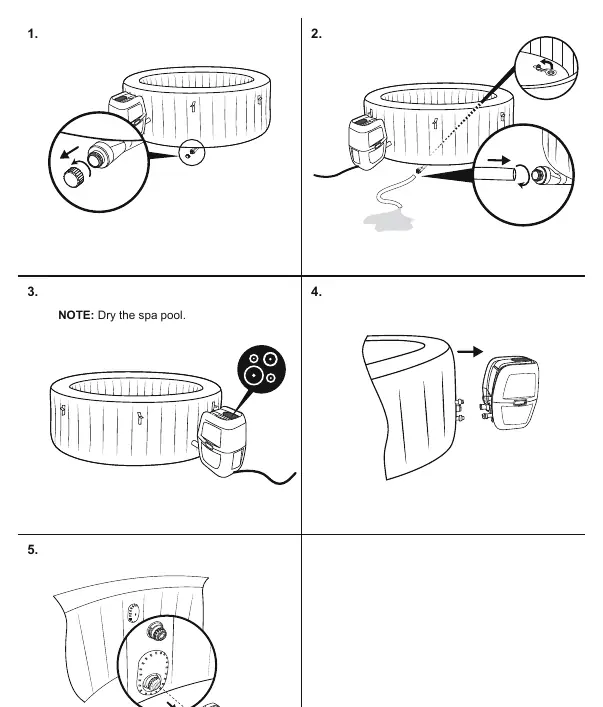
- Storage: Ensure the spa and pump are completely dry before storage. Store in a warm, dry place.
Troubleshooting and Error Codes
If you encounter issues, check the following:
- Pump does not operate: Check power source and GFCI.
- Pump does not heat: Check filter, temperature setting, and ensure the cover is on.
- Massage system stops: Pump may be overheating; wait 2 hours for it to cool.
- Water leaks: Check seals in the adapters between the pump and spa.
- Error Codes: Common codes like E01 (flow sensor), E03 (temperature too low), and E08 (thermal cut-out) require specific actions like cleaning filters, checking water flow, or allowing the pump to cool.
Manufacturer information
The Coleman Company, Inc.
Practical help
Common problems
Pump does not operate
Check power source and test the GFCI plug.
Pump does not heat properly
Check if the filter is dirty, the temperature is set too low, or the spa is not covered.
Massage system stops automatically
The pump may be overheating. Unplug and wait 2 hours for it to cool down.
Water leaks from adapters
Check if seals are missing, damaged, or not in the correct position. Tighten adapters.
Before use
- Check for damaged or missing parts.
- Ensure the installation surface is smooth, flat, and level.
- Test the GFCI plug before each use.
- Remove stopper caps from inside the pool before heating.
- Ensure water temperature is above 42.8°F (6°C) for winter setup.
Specs in practice
- Freeze Shield™
- Automatically keeps water between 42.8°F and 50°F to prevent freezing in pipes.
Images and diagrams
- Control Panel: Buttons for Lock, Timer, Heat, Massage, Filter, and Temp adjustment.
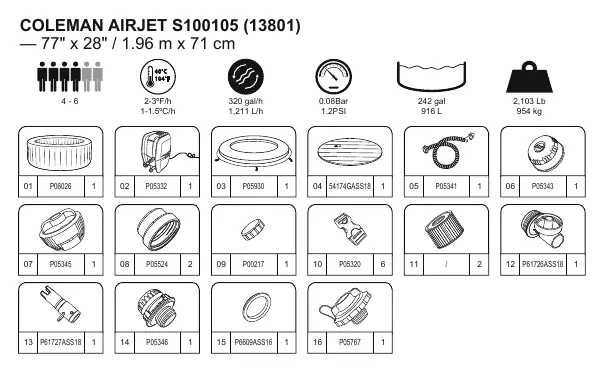
- Parts List: Diagram on page 9 showing all included components.
Model compatibility
- Do not use extension leads or multi-plug adaptors.
- Use only with a grounded socket resistant to humidity.

Manual page author
David Miller
Documentation analyst
Organizes user manual content into clear summaries, with attention to model details, product context, and everyday usability.