Home Appliances / Hair Dryers
User Manual for Conair 225RX Hair Dryer
Quick guide for the Conair 225RX hair dryer. Learn how to use the ALCI safety plug, styling techniques, maintenance tips, and safety precautions.
Quick answers from the manual
Quick answer
- The Conair 225RX is an 1875-watt ionic ceramic hair dryer. Always test the ALCI safety plug before use and keep air intake vents clean to prevent overheating. p. 1, 2
Key actions
- Test ALCI plug p. 1
- Clean air intake p. 2
Problems and fixes
Dryer overheats/shuts off
Unplug and let cool for 10-15 minutes.
p. 2Show 3 more answers Show less
Maintenance and reset
- Reset ALCI plug p. 1
Technical specifications
| Parameter | Value | Meaning | Pages |
|---|---|---|---|
| Power | 1875 Watts | Standard operating power. | p. 1 |
Where to find it in the PDF
- Safety and Operating Instructions p. 1
- Maintenance and Warranty p. 2
Table of contents
Manual images
Click an image to enlargeQuick guide from the manual
The Conair 225RX is an 1875-watt ionic ceramic hair dryer designed for household use. Before using the device, it is critical to test the ALCI safety plug to ensure protection against electric shock. Always keep the air intake vents clear of hair and lint to prevent the unit from overheating and shutting down automatically.
Getting to know your dryer
The dryer features several components to assist with styling:
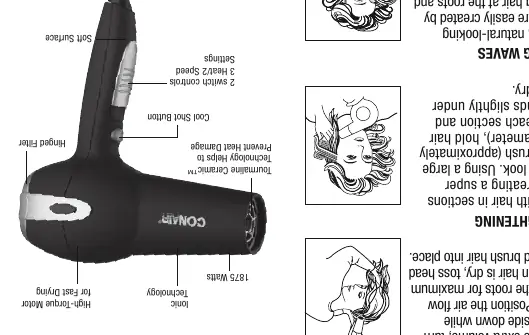
- Tourmaline Ceramic Technology: Helps prevent heat damage and promotes healthy, shiny hair.
- Ionic Technology: Generates negative ions to neutralize positive charges, reducing frizz and static.
- High-Torque Motor: Increases airflow velocity for faster drying.
- Cool Shot Button: Used to lock in styles.
- Hinged Filter: Allows for easy cleaning of the air intake.
Operating instructions
The appliance is equipped with an Appliance Leakage Circuit Interrupter (ALCI) safety feature. You must test this feature every time you use the appliance:
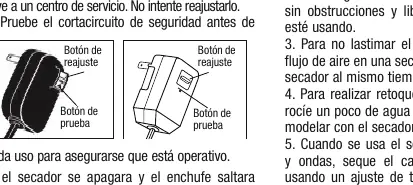
- Plug in the appliance and press the Test button on the plug.
- The appliance should stop working, and you will hear an audible click as the reset button pops out.
- To reset, unplug the unit, push the reset button in, and reinsert the plug into the outlet.
- If the ALCI is not functioning properly, do not use the dryer and return it to a service center.
Styling guide
For best results, use the following techniques:
- Drying Basics: Towel dry hair to remove excess moisture. Direct airflow at the hair, not the scalp. Keep the dryer moving to avoid over-drying.
- Body & Volume: Turn your head upside down while drying and direct airflow toward the roots.
- Straightening: Use a large round brush (approx. 2 inches in diameter), hold hair taut, and bend ends slightly under while drying.
- Waves: Grasp hair at the roots and scrunch between fingertips while drying. Use the diffuser attachment for curlier or wavier hair.
Maintenance
The dryer is virtually maintenance-free. To ensure proper performance:
- Keep the air intake vents clean. Use a small brush or the brush attachment of a vacuum cleaner to remove dust and lint.
- Wipe the outer surface of the dryer with a clean cloth only.
- Do not wrap the power cord tightly around the dryer, as this can damage the flex point of entry.
- If the dryer overheats and shuts off, unplug it and allow it to cool for 10 to 15 minutes before restarting.
Safety warnings
- Keep the dryer away from water. Never use it while bathing or in a shower.
- If the appliance falls into water, unplug it immediately. Do not reach into the water.
- Never block the air openings or place the dryer on a soft surface like a bed or couch.
- Do not use an extension cord with this dryer.
- Attachments may be hot during use; allow them to cool before handling.
Manufacturer information
Conair LLC
Practical help
Common problems
Dryer shuts off during use
The unit may have overheated or the ALCI plug tripped. Unplug the unit, let it cool for 10-15 minutes, and ensure air vents are clean.
ALCI plug does not reset
Ensure the unit is unplugged before pressing the reset button. If it still fails to function, return the unit to a service center.
Before use
- Ensure air intake vents are free of lint and hair.
- Check that the power cord is not damaged or twisted.
- Test the ALCI safety plug by pressing the 'Test' button.
- Verify the voltage is compatible (110-125V AC).
Show more Show less
Images and diagrams
- The ALCI plug contains a 'Test' button to verify safety and a 'Reset' button to restore power.
- The dryer includes a hinged filter at the back that must be kept clear of debris.
Model compatibility
- Designed for household use on Alternating Current (60 hertz) only.
- Standard operation is 110 to 125 volts AC.
- Do not use with a voltage converter.

Manual page author
Michael Turner
Technical manual editor