Home Appliances / Hair Dryers
User Manual for Conair 209BCN Hair Dryer
Get the most out of your Conair 209BCN hair dryer. This guide covers safe operation, cord retraction, styling tips, maintenance, and troubleshooting.
Quick answers from the manual
Quick answer
- The Conair 209BCN is a 1875-watt hair dryer with a retractable cord, ionic conditioning, 3 heat settings, 2 speeds, and a cool shot button. p. 1
Key actions
- Test the ALCI safety plug before every use. p. 1
- Retract the cord by holding the dryer vertically and pressing the retract button. p. 1
First start
- Plug in the dryer, select heat/speed settings, and use the cool shot button to lock in your style. p. 1
Problems and fixes
ALCI safety plug trips or unit stops working
Unplug the unit, allow it to cool, ensure vents are clean, and press the reset button on the plug.
p. 1Maintenance and reset
- Clean air intake vents regularly with a small brush or vacuum attachment. p. 2
Technical specifications
| Parameter | Value | Meaning | Pages |
|---|---|---|---|
| Power | 1875 Watts | Drying power | p. 1 |
| Voltage | 110-125V AC | Operating voltage | p. 1 |
Where to find it in the PDF
- Safety and Operating Instructions p. 1
- Maintenance and Warranty p. 2
Table of contents
Quick Guide from the Manual
The Conair 209BCN is a 1875-watt hair dryer featuring a retractable cord, ionic conditioning, and multiple heat/speed settings. Before using, always test the ALCI safety plug. Ensure the air intake vents remain unobstructed during use to prevent overheating.
Getting to Know Your Dryer
The dryer includes the following features:
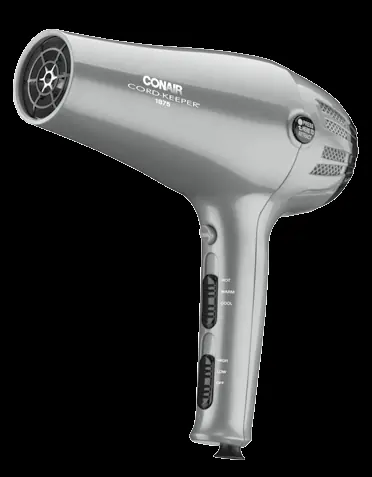
- Retractable Cord: Controlled by a button on the handle.
- Ionic Conditioning: Helps reduce static and frizz.
- Settings: 2 speed settings and 3 heat settings.
- Cool Shot Button: Locks in your style.
- Attachments: Includes a diffuser for waves/curls and a concentrator for precise styling.
Operating Instructions
Cord Retraction:
- Pull the cord out slowly until you see the red mark. Do not jerk the cord.
- To retract, hold the dryer vertically away from your face.
- Grasp the plug with one hand and press the retract button with the other.
- Guide the cord to ensure it does not twist.
Settings: Use the switches on the handle to select your desired heat and speed. Use the cool shot button to set your hairstyle.
Styling Guide
- Drying Basics: Use a lower setting to start. Direct airflow at the hair, not the scalp. Keep the dryer moving to avoid over-drying.
- Volume: Turn your head upside down while drying and direct airflow toward the roots.
- Straightening: Use a large round brush (approx. 2 inches in diameter) to smooth hair while drying.
- Waves: Scrunch hair with your fingertips while drying. Use the diffuser attachment for curlier or wavier hair.
Maintenance and Cleaning
The dryer is virtually maintenance-free. To ensure proper performance:
- Unplug the unit and allow it to cool before cleaning.
- Clean dust and lint from the air intake vents using a small brush or vacuum attachment.
- Wipe the outer surface with a cloth only.
- Overheating: If the dryer overheats, an automatic safety device will shut it off. Unplug the unit and allow it to cool for 10-15 minutes before restarting. Ensure vents are clean.
Safety and ALCI
This appliance is equipped with an Appliance Leakage Circuit Interrupter (ALCI). Test the ALCI before every use:
- Plug in the appliance and press the 'Test' button on the plug.
- The appliance should stop working, and the 'Reset' button should pop out.
- To reset, unplug the unit, push the 'Reset' button in, and reinsert the plug into the outlet.
If the ALCI does not function properly, return the appliance to a service center. Do not use the dryer near water or with a voltage converter.
Manufacturer information
Conair LLC
Practical help
Common problems
Dryer stops working or won't turn on
Check the ALCI plug. Press the 'Reset' button. If it still does not work, return to a service center.
Cord will not retract
Ensure the cord is not twisted. Pull it out slightly and try retracting again while guiding it into the reel.
Dryer overheats
Clean the air intake vents of lint and hair. Allow the unit to cool for 10-15 minutes.
Before use
- Ensure air intake vents are free of lint and hair.
- Check that the power cord is not damaged or twisted.
- Test the ALCI safety plug before every use.
- Ensure the voltage of the outlet is 110-125V AC.
Specs in practice
- Ionic Conditioning
- Emits negative ions to reduce static and frizz.
Images and diagrams
- Retractable cord button: Located on the side of the handle.
- ALCI plug: Features 'Test' and 'Reset' buttons.
Model compatibility
- Designed for 110-125V AC outlets only.
- Do not use with a voltage converter.

Manual page author
David Miller
Documentation analyst
Organizes user manual content into clear summaries, with attention to model details, product context, and everyday usability.