Home Appliances / Personal Care
User Manual for Conair Infiniti Pro 1875W Hair Dryer
Comprehensive user guide for the Conair Infiniti Pro 1875W Hair Dryer. Includes safety instructions, ALCI safety plug testing procedures, styling techniques, maintenance tips, and troubleshooting for overheating.
Quick answers from the manual
Quick answer
- The Conair Infiniti Pro 1875W is a professional-grade hair dryer featuring ionic and ceramic technology. It includes an ALCI safety plug that must be tested before every use to ensure protection against electric shock. p. 1
Key actions
- Test the ALCI safety feature before every use. p. 1
- Clean air intake vents regularly to prevent overheating. p. 1
First start
- Plug in the appliance, press the 'Test' button on the plug, then unplug and press the 'Reset' button to prepare for use. p. 1
Problems and fixes
Dryer overheats or shuts off during use
Unplug the cord and allow the dryer to cool for 10 to 15 minutes before restarting.
p. 1Maintenance and reset
- Clean dust and lint from air intake openings with a small brush or vacuum attachment. p. 1
Technical specifications
| Parameter | Value | Meaning | Pages |
|---|---|---|---|
| Power | 1875 Watts | Standard power rating for the dryer. | p. 1 |
Where to find it in the PDF
- Safety and Operating Instructions p. 1
Table of contents
Manual images
Click an image to enlargeQuick Guide: ALCI Safety Test
Before every use, you must test the Appliance Leakage Circuit Interrupter (ALCI) to ensure it is functioning properly:
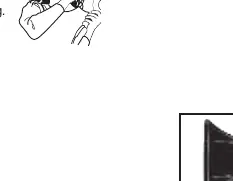
- Plug the appliance into an outlet.
- Press the 'Test' button on the plug.
- The appliance should stop working, and the 'Reset' button should pop out.
- To reset, unplug the appliance, push the 'Reset' button in, and reinsert the plug into the outlet.
- If the ALCI is not functioning properly, do not use the dryer and return it to an authorized service center.
Getting to Know Your Dryer
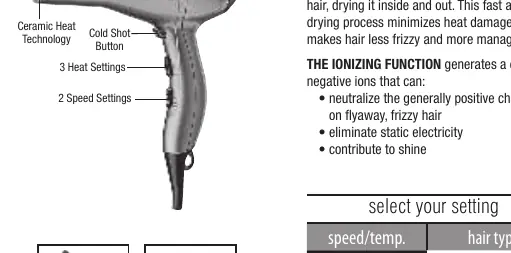
The Conair Infiniti Pro features a powerful AC motor designed for longer life and faster airflow. It utilizes Ceramic Heat Technology to provide infrared heat for even drying and Ionic Technology to reduce static, frizz, and enhance shine.
Settings
- 3 Heat Settings: Low/Cool, Low/Warm, High/Hot.
- 2 Speed Settings: Adjustable for different hair types.
- Cold Shot Button: Used to set styles in place for all hair types.
Operating Instructions
This appliance is intended for household use only and operates on 110-125 volts A.C. It features a polarized plug; if it does not fit, reverse it. Do not attempt to defeat this safety feature.
Styling Guide
- Drying Basics: Towel dry hair first. Use a styling brush and move the dryer steadily across sections. Direct airflow at hair, not the scalp.
- Body & Volume: Turn head upside down while drying and direct airflow toward the roots.
- Straightening: Work in sections using a large round brush (approx. 2" diameter), holding hair taut and bending ends slightly under.
- Making Waves: Scrunch hair with fingertips while drying.
Maintenance
The dryer is virtually maintenance-free. To ensure proper performance:
- Keep the air intake vents unobstructed and free of lint, hair, and dust.
- Use a small brush or vacuum cleaner attachment to clean the air intake openings.
- Wipe the outer surface of the dryer clean with a cloth only.
- If the dryer overheats, an automatic safety device will shut it off. Unplug the cord and allow it to cool for 10 to 15 minutes before restarting.
Safety Warnings
- Keep away from water: Never use while bathing or in a shower. Do not place or store where it can fall into a tub or sink.
- If the appliance falls into water, unplug it immediately. Do not reach into the water.
- Never leave the appliance unattended when plugged in.
- Do not use an extension cord.
- Keep the cord away from heated surfaces. Do not wrap the cord around the dryer.
Manufacturer information
Conair LLC
Practical help
Common problems
Dryer stops working or overheats
Unplug the cord and allow the dryer to cool for 10 to 15 minutes. Ensure air intake vents are clean and unobstructed.
ALCI test fails (Reset button does not pop out)
Do not use the appliance. Return it to an authorized Conair service center for evaluation and repair.
Before use
- Check the power cord for damage or visible wear.
- Ensure air intake vents are free of lint, hair, and dust.
- Perform the ALCI safety test before every use.
- Ensure the outlet is compatible with the polarized plug.
Specs in practice
- Ionic Technology
- Generates negative ions to neutralize positive charges in hair, reducing frizz and static.
- Ceramic Heat
- Provides infrared heat to dry hair from the inside out, minimizing heat damage.
Images and diagrams
- The ALCI plug test involves pressing the 'Test' button to verify the safety mechanism and the 'Reset' button to restore power.
- The air intake filter is located at the back of the dryer and must be kept clean to prevent overheating.
Model compatibility
- Intended for household use only.
- Operates on 110-125 volts A.C. (60 Hz).
- Do not use with a voltage converter.

Manual page author
Emily Carter
User documentation editor
Prepares concise manual descriptions and highlights the most useful setup, operation, and maintenance information for readers.