Home Appliances / Personal Care
User Guide for Conair InfinitiPRO Straightening Comb 2017NR
Quick guide for the Conair InfinitiPRO Straightening Comb 2017NR. Learn how to use temperature settings, styling tips, maintenance, and safety precautions.
Quick answers from the manual
Quick answer
- The Conair 2017NR is a shea butter-infused ceramic straightening comb with 30 temperature settings and a Turbo Heat feature for efficient styling. p. 1
Key actions
- Straightening hair p. 1
- Using Turbo Heat p. 1
First start
- Plug in, turn on, and wait 30 seconds for the unit to heat up. p. 1
Maintenance and reset
- Keep vents clear and wipe exterior with a cloth after cooling. p. 1
Technical specifications
| Parameter | Value | Meaning | Pages |
|---|---|---|---|
| Voltage | 120V AC | Standard household voltage | p. 1 |
| Auto-Off | 60 minutes | Safety shut-off timer | p. 1 |
Where to find it in the PDF
- Operating Instructions p. 1
Table of contents
Important Information
This guide covers the operation of the Conair InfinitiPRO Straightening Comb (Model 2017NR). Always read safety instructions before use. This appliance is for household use only and must be kept away from water. The unit features a shea butter-infused ceramic coating to help protect hair and add shine.
Safety Precautions
- Always unplug the appliance immediately after use.
- Do not use while bathing or in the shower.
- Do not use on hair extensions.
- Keep the cord away from heated surfaces.
- Never leave the appliance unattended while plugged in.
- If the appliance falls into water, unplug it immediately; do not reach into the water.
Getting Started
Plug the comb into a 120V AC electrical outlet and turn the unit on. The power indicator light will illuminate. Allow the unit to heat up for 30 seconds before use.
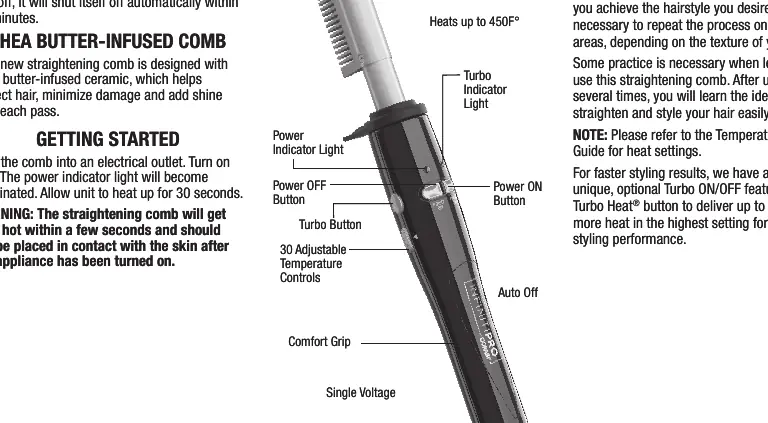
Temperature Settings
The device features 30 adjustable temperature settings to suit different hair types:
- Low (1-5): Fragile hair
- Medium (6-10): Fine hair
- Medium-High (11-15): Medium/Normal hair
- High (16-20): Wavy/Curly hair
- Maximum (21-30): Coarse/Thick hair
Turbo Heat: Press the Turbo button to deliver an 18°F/10°C burst of heat for difficult styling spots. The temperature will hold for 30 seconds before returning to the original setting.
How to Straighten Hair
- Ensure hair is clean and completely dry.
- Take a hair section that is 2 inches wide and no more than 1/2 inch thick.
- While maintaining tension, slowly pull the unit down along the hair section toward the ends.
- Repeat on additional sections until the desired style is achieved.
Maintenance
The styling tool is virtually maintenance-free. No lubrication is needed. Keep all vents and openings clear of dirt and dust. If cleaning is necessary, disconnect the appliance, allow it to cool, and wipe the exterior with a cloth. If the unit stops working or operates intermittently, stop use immediately and return to an authorized service center.
Manufacturer information
Conair LLC
Practical help
Common problems
Unit not heating
Ensure the unit is plugged into a 120V AC outlet and the power button is turned on.
Hair not straightening effectively
Ensure hair is clean and dry. Use smaller sections (max 2 inches wide, 1/2 inch thick) and maintain tension while pulling the comb through.
Cord damage
Inspect the cord frequently. If damage is visible, stop using the appliance immediately.
Before use
- Ensure hair is clean and completely dry.
- Check that the cord is not damaged or twisted.
- Plug into a 120V AC outlet.
- Select the appropriate temperature setting for your hair type.
- Wait 30 seconds for the unit to heat up.
Specs in practice
- 30 Temperature Settings
- Allows customization for different hair types, ranging from fragile to coarse.
Images and diagrams
- The diagram identifies the power buttons, temperature controls, Turbo button, and the ceramic comb surface.
Model compatibility
- Do not use on hair extensions.
- Designed for 120V AC operation only.

Manual page author
Michael Turner
Technical manual editor
Reviews PDF manuals for structure, safety notes, and practical product details so readers can find the right information quickly.