Home Appliances / Personal Care
User Manual for Conair 121ND Hair Dryer
Quick guide for the Conair 121ND hair dryer. Learn how to use the ALCI safety feature, styling techniques, maintenance, and safety precautions.
Table of contents
Quick guide from the manual
Before using your Conair 121ND hair dryer, it is essential to test the ALCI (Appliance Leakage Circuit Interrupter) safety feature. Plug the appliance into an outlet and press the test button on the plug. The dryer should stop working, and the reset button should pop out. To reset, unplug the unit, push the reset button in, and reinsert the plug. Repeat this test every time you use the unit to ensure it is operational.
Important safety instructions
Keep away from water. Even when the switch is off, the hair dryer is electrically live. To reduce the risk of electric shock:
- Always unplug the dryer immediately after use.
- Do not use while bathing or in the shower.
- Do not place or store the dryer where it can fall into a tub or sink.
- If the dryer falls into water, unplug it immediately. Do not reach into the water.
General safety: Never leave the appliance unattended when plugged in. Do not use the dryer if the cord or plug is damaged, if it is not working properly, or if it has been dropped in water. Keep the cord away from heated surfaces and do not wrap it tightly around the dryer.
Operating instructions
This dryer is intended for household use on 110-125V AC (60 Hz) circuits. It features a polarized plug that fits into an outlet only one way. If it does not fit, reverse the plug; if it still does not fit, contact a qualified electrician.
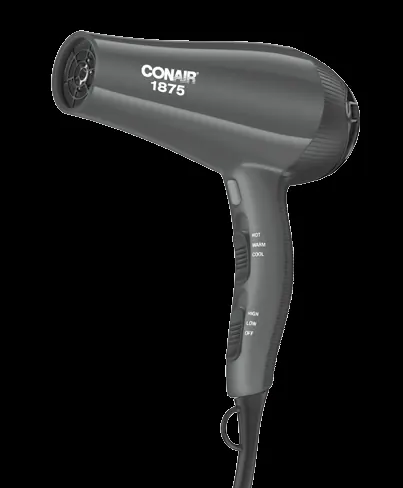
Settings: The dryer features 3 heat settings and 2 speed settings. Use the lower settings for delicate or thin hair and higher settings for thick or hard-to-style hair. Use the cool shot button to lock in your style.
Styling guide
- Drying basics: Towel dry hair to remove excess moisture. Use the dryer with a styling brush, starting at a lower setting and moving the dryer steadily across sections of hair. Direct airflow at the hair, not the scalp.
- Body & Volume: Turn your head upside down while drying and direct airflow toward the roots for maximum lift.
- Straightening: Work in sections using a large, round brush (approx. 2 inches in diameter) to smooth out hair while drying.
- Making Waves: Grasp hair at the roots and scrunch between fingertips while drying.
Maintenance
The dryer is virtually maintenance-free. To ensure proper performance, keep the air intake vents clean. If cleaning is needed, unplug the dryer, allow it to cool, and remove dust and lint from the air intake openings using a small brush or the brush attachment of a vacuum cleaner. Wipe the outer surface with a cloth only.
Overheating: If the air intake vents are blocked, the dryer may overheat and shut off automatically. If this occurs, unplug the unit and allow it to cool for 10 to 15 minutes before restarting.
Manufacturer information
Conair LLC
Practical help
Common problems
Dryer stops working or overheats
Unplug the unit, allow it to cool for 10-15 minutes, and ensure the air intake vents are free of lint and hair.
ALCI plug trips or fails to reset
Unplug the unit, press the reset button, and reinsert the plug. If it still does not function, return it to a Conair Service Center.
Plug does not fit into the outlet
The dryer has a polarized plug. Ensure you are inserting it the correct way. If it still does not fit, contact a qualified electrician.
Before use
- Check that air intake vents are free of lint and hair.
- Test the ALCI safety feature before every use.
- Ensure the power source is 110-125V AC.
- Do not use an extension cord.
- Ensure the cord is not twisted or wrapped tightly around the dryer.
Specs in practice
- Ionic Conditioning
- Generates negative ions to reduce static, minimize frizz, and increase shine.
Images and diagrams
- The ALCI plug features a 'Test' button to verify the safety mechanism and a 'Reset' button to restore power after a test or trip.
Model compatibility
- For household use only.
- Do not use with a voltage converter.
- Not intended for use by children or individuals with certain disabilities.

Manual page author
Michael Turner
Technical manual editor
Reviews PDF manuals for structure, safety notes, and practical product details so readers can find the right information quickly.