Power / Batteries & Chargers
User Manual for CTEK NXT 5 12V Battery Charger
Quick guide and user manual for the CTEK NXT 5 12V battery charger. Learn how to connect, select charging modes, and maintain your lead-acid or lithium batteries.
Table of contents
Manual images
Click an image to enlargeQuick guide from the manual
The CTEK NXT 5 is a fully automatic 8-step battery charger. To start charging, connect the battery clamps to your 12V battery, plug the charger into a wall socket, and press the MODE button to select the appropriate program for your battery type. The charger will automatically proceed through the charging cycle. The battery is fully charged when the CARE lamp is illuminated.
Interface and Indicators
The charger interface features several indicators to guide you through the process:
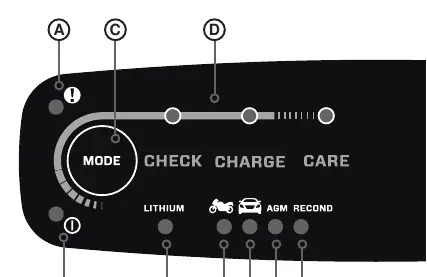
- A. Error Indicator: Illuminates RED when an issue is detected.
- B. Power Indicator: Illuminates GREEN when connected to a power outlet.
- C. Mode Button: Used to cycle through charging programs.
- D. Status Indicators: Shows the progress of the 8-step charging cycle.
- E-I: Indicators for Lithium, Motorcycle, Car, AGM, and Recond modes.
Getting Started
Follow these steps to safely charge your battery:
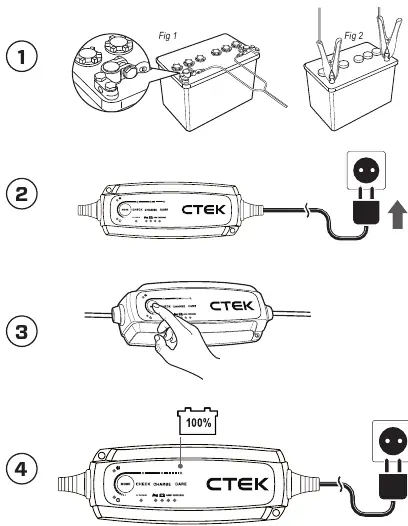
- Connect the battery clamps to the 12V battery. Refer to your vehicle or battery manufacturer's guide for terminal connection points.
- Connect the charger to the wall socket. The power indicator will illuminate green.
- Press the MODE button to select the desired charging program.
- Follow the display through the automatic charging process.
- Stop charging at any time by disconnecting the mains cable from the wall socket.
Charging Modes
- Lithium: Use for Lithium (LiFePO4) batteries.
- Motorcycle: Suitable for smaller batteries.
- Car: For lead-acid batteries.
- AGM: Suitable for AGM batteries.
- Recond: Option to restore and recondition lead-acid batteries. Warning: Do not use RECOND mode on Lithium, GEL, or AGM batteries.
Safety and Maintenance
Always follow battery manufacturer safety recommendations. Ensure good ventilation during charging and prevent sparks near the battery. Never charge frozen or damaged batteries. If the charger does not switch to 'CARE' within 50 hours, this indicates an error; disconnect the charger manually. For flooded batteries, check water levels regularly and add distilled water if low.
Technical Specifications
- Input: 220–240 VAC, 50-60 Hz
- Charge Voltage: 14.4V (Normal), 14.2V (Lithium), 14.7V (AGM), 15.8V (Recond)
- Charge Current: 5A Max
- Ingress Protection: IP65
- Operating Temperature: -20°C to +50°C
Manufacturer information
CTEK
Practical help
Common problems
Error indicator illuminates RED
A problem has been detected. Refer to the troubleshooting section or check connections.
Charger does not switch to 'CARE' within 50 hours
This indicates an error. Manually disconnect the charger.
Battery clamps connected incorrectly
The reverse polarity protection will prevent damage to the battery and charger. Reconnect correctly.
Before use
- Ensure the mains cable is disconnected before connecting or disconnecting battery clamps.
- Check battery manufacturer's user and safety recommendations.
- Ensure the area is well-ventilated.
- Verify the battery type (Lead-acid or Lithium).
- Check that cables are not damaged by hot surfaces or sharp edges.
Specs in practice
- Charge Current
- 5A Max, suitable for various battery capacities.
- Ingress Protection (IP65)
- The charger is dust-tight and protected against water jets.
- Operating Temperature
- -20°C to +50°C; output power reduces automatically at high temperatures.
Images and diagrams
- Fig 1: Shows U-terminal connection, which may be required for vehicles with positively grounded batteries.
- Fig 2: Shows standard battery clamp connection.
Model compatibility
- Compatible with 12V lead-acid (WET, EFB, MF, Ca/Ca, AGM, GEL) and Lithium (LiFePO4) batteries.
- Do not use RECOND mode on Lithium, GEL, or AGM batteries.

Manual page author
Michael Turner
Technical manual editor
Reviews PDF manuals for structure, safety notes, and practical product details so readers can find the right information quickly.