Power / Batteries & Chargers
User Manual for CTEK PRO25 CIC Battery Charger
Comprehensive user guide for the CTEK PRO25 CIC battery charger. Includes instructions for connecting, selecting charging modes, troubleshooting LED indicators, and technical specifications for lead-acid and lithium batteries.
Table of contents
Manual images
Click an image to enlargeQuick Guide from the Manual
The CTEK PRO25 CIC is a fully automatic battery charger designed for 12V lead-acid and lithium batteries. To begin charging, connect the charger to the battery terminals (red to positive, black to negative), then plug the power cable into a wall outlet. Use the MODE button to select the appropriate charging program. The charger will automatically detect the battery type and manage the charging process.
Charging Instructions
For batteries installed in a vehicle:
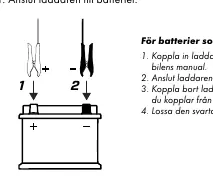
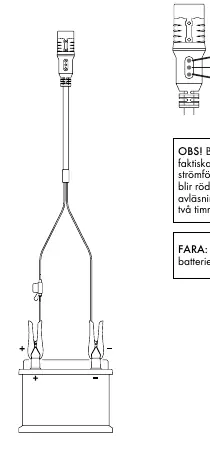
- Connect the charger according to the vehicle's manual.
- Connect the charger to the wall outlet.
- Disconnect the charger from the wall outlet before disconnecting from the battery.
- Always disconnect the black clamp before the red clamp.
For batteries outside the vehicle:
- Connect the red clamp to the positive (+) terminal.
- Connect the black clamp to the negative (-) terminal.
- Connect the charger to the wall outlet.
Charging Modes
Press the MODE button to cycle through the available programs. The charger will remember the selected mode for the next time it is connected.
- NORMAL: For standard lead-acid batteries (14.4V / 25A).
- RECOND: For restoring energy in deeply discharged wet/Ca/Ca batteries (15.8V / 1.5A). Recommended once a year.
- SUPPLY: Provides a 12V power source or float maintenance (13.6V / 25A). Spark protection is disabled in this mode.
- LITHIUM: For lithium batteries (LiFePO4, Li-Fe, Li-iron, LFP) (13.8V / 25A).
Lithium Battery Undervoltage Protection (UVP)
Some lithium batteries have built-in UVP that disconnects the battery if it is deeply discharged, preventing the charger from detecting it. If the charger fails to start, use the manual wake-up feature: press and hold the MODE button for approximately 10 seconds. The LED will blink during the wake-up period until the charging program starts.
Troubleshooting & LED Indicators
Warning Light: If the warning light is on, check the following:
- Ensure the red clamp is connected to the positive terminal.
- Verify the battery is a 12V battery.
- Check for short-circuited clamps.
- If the process is interrupted, restart the charger using the MODE button. If it continues to fail, the battery may be sulfated, non-rechargeable, or unable to hold a charge.
Power Light:
- Fast Light: Charger is connected to the wall outlet.
- Blinking Light: Charger is in energy-save mode. This occurs if the charger is not connected to a battery within 2 minutes or if the battery voltage is below 2V. Check clamp connections and the inline fuse.
Technical Specifications
The charger is rated IP44 and operates in temperatures from -20°C to +50°C. It is compatible with 12V batteries (WET, MF, Ca/Ca, AGM, EFB, GEL, LiFePO4). Lead-acid capacity: 40–500Ah. Lithium capacity: 30–450Ah.
Manufacturer information
CTEK
Practical help
Common problems
Warning light is illuminated
Check for reversed polarity, short circuits, or a battery voltage that is too low. If the battery is damaged or sulfated, it may need replacement.
Power light is blinking
The charger is in energy-save mode. Ensure clamps are securely attached to the battery terminals and the power cable is plugged in.
Lithium battery not charging
The battery may have triggered its undervoltage protection (UVP). Perform a manual wake-up by holding the MODE button for 10 seconds.
Before use
- Verify the battery is a 12V type.
- Ensure the battery capacity is within the supported range (40-500Ah for lead-acid, 30-450Ah for lithium).
- Check that clamps are clean and securely attached to the correct terminals.
- Ensure the ambient temperature is between -20°C and +50°C.
- Check the inline fuse if the charger does not power on.
Images and diagrams
- The connection diagram shows the red clamp on the positive (+) terminal and the black clamp on the negative (-) terminal.
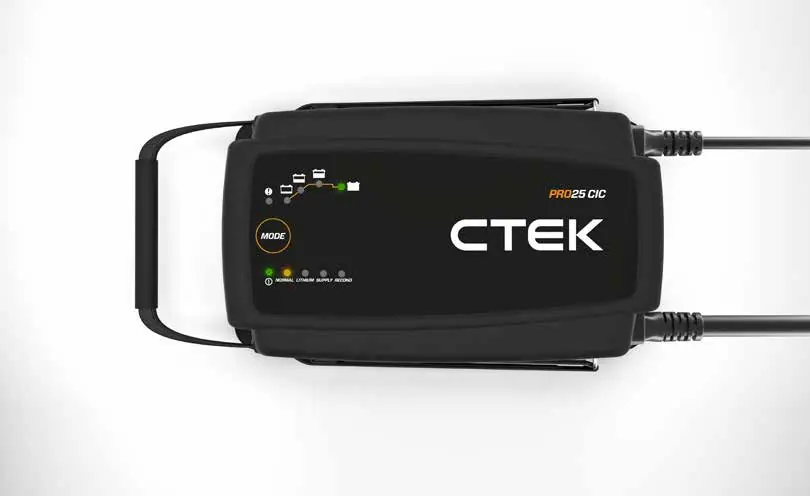
- The LED indicators on the front panel show the current charging stage and selected mode.
Model compatibility
- Compatible with WET, MF, Ca/Ca, AGM, EFB, GEL, and LiFePO4 batteries.
- Not suitable for batteries with voltage below 2V (lead-acid) or 8V (lithium) unless using the wake-up feature.

Manual page author
Emily Carter
User documentation editor
Prepares concise manual descriptions and highlights the most useful setup, operation, and maintenance information for readers.