Power / Batteries & Chargers
User Manual for CTEK CS FREE Portable Charger
Access the official user manual for the CTEK CS FREE portable charger. This guide covers step-by-step instructions for charging your vehicle battery, using the device as a power bank, solar charging, safety warnings, and technical...
Table of contents
Manual images
Click an image to enlargeQuick Guide from the Manual
The CTEK CS FREE is a versatile portable charger designed for 12V batteries. It functions as a battery charger, a power bank for mobile devices, and can be charged via mains, solar, or external power sources. Always ensure the device is charged before use and follow the safety guidelines provided in this manual.
What's in the Box
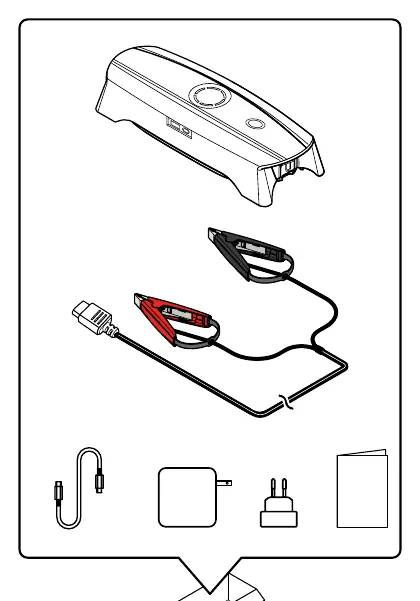
- CTEK CS FREE unit
- Charging cable (USB-C)
- Battery clamps
- Mains adapter
Charging the CS FREE
To charge the internal battery of the CS FREE:
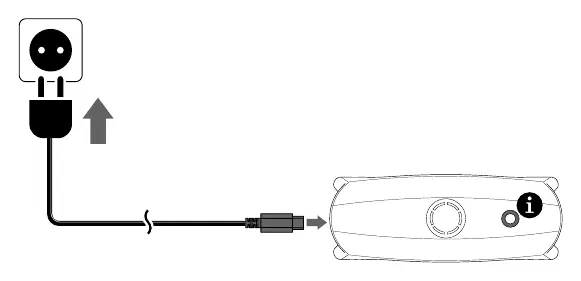
- Connect the mains adapter to a wall socket.
- Connect the USB-C cable to the CS FREE.
- The LED ring on the device will indicate the charge level (0-25%, 25-50%, 50-75%, 75-100%, 100%).
Charging a Vehicle Battery
To charge a 12V vehicle battery:
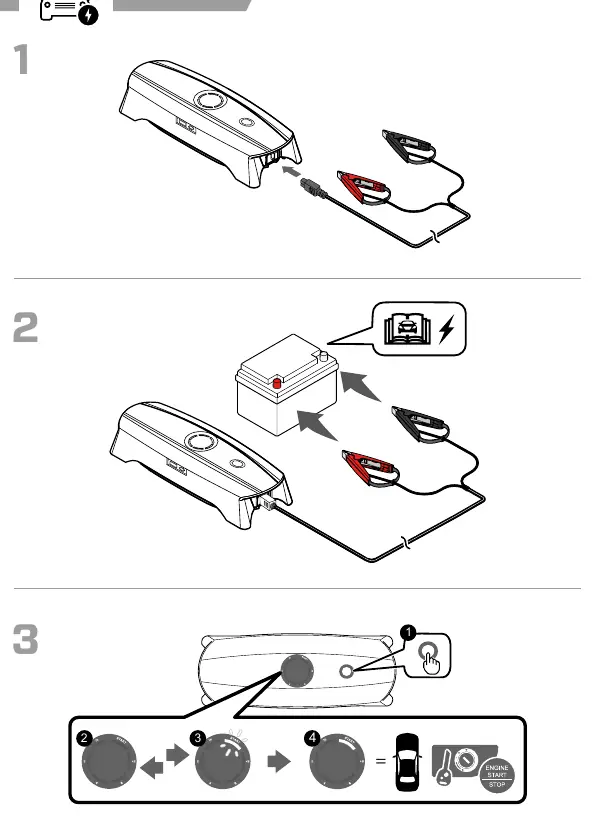
- Connect the battery clamps to the CS FREE.
- Connect the red clamp to the positive (+) terminal of the battery.
- Connect the black clamp to the negative (-) terminal or the vehicle chassis (remote from the fuel pipe).
- Press the start button on the CS FREE to begin the charging process.
- The LED ring will show the charging progress.
- Once finished, disconnect the clamps in reverse order (negative first, then positive).
Power Bank Functionality
The CS FREE can charge mobile devices like phones, tablets, and cameras:
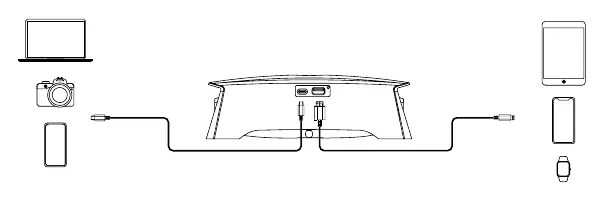
- Connect your device's charging cable to the USB-A or USB-C port on the CS FREE.
- The device will automatically begin charging your connected electronics.
Solar and External Power
The CS FREE can be charged using solar panels or other external power sources (12V-25V) via the input port. Ensure the external power source meets the technical specifications provided in the manual.
Safety and Maintenance
- Liquid: Do not allow the product to come into contact with liquid. Keep it dry.
- Temperature: Use only between -20°C and +50°C. Do not charge if the temperature is outside 0°C to 45°C.
- Damage: Never use a swollen, leaky, or damaged product.
- Handling: Do not disassemble or pierce the unit.
- Storage: If storing for long periods, ensure the battery is charged. Do not leave in a vehicle on hot days.
- Ventilation: Ensure good ventilation during charging, especially for lead-acid batteries which may emit explosive gases.
Technical Specifications
- Model Number: 2005
- Input: USB-C, 5VDC-25VDC, 60W Max
- Output: 12VDC, 20A/240W Max
- Battery Types: 12V WET, MF, Ca/Ca, AGM, EFB, GEL, LiFePO4
- Battery Capacity: 10Ah–130Ah
- Ingress Protection: IP54
- Internal Battery: 66Wh, Polymer Lithium-ion
Manufacturer information
CTEK
Practical help
Common problems
Device not charging
Check cable connections and ensure the ambient temperature is between 0°C and 45°C.
Error indicator flashing
Disconnect the device, check battery voltage, and ensure the battery is a 12V type. Verify connections.
Battery not charging
Ensure the battery is not frozen or damaged. Check for proper polarity connection (Red to +, Black to -).
Before use
- Ensure the CS FREE internal battery is charged.
- Verify the vehicle battery is 12V.
- Check that battery terminals are clean and free of corrosion.
- Ensure the environment is well-ventilated.
- Check that all cables are undamaged.
Images and diagrams
- The LED ring indicates the charge level of the internal battery (0-100%).
- Red clamp connects to the positive (+) terminal, black clamp to the negative (-) terminal or chassis.
Model compatibility
- Compatible with 12V lead-acid and LiFePO4 batteries.
- Not for use with non-rechargeable batteries.

Manual page author
David Miller
Documentation analyst
Organizes user manual content into clear summaries, with attention to model details, product context, and everyday usability.