Home Appliances / Food Processing Equipment
User Manual for Cuisinart 2-in-1 Meat Trimmer CGK-300
Quick guide for the Cuisinart 2-in-1 Meat Trimmer CGK-300. Learn how to trim meat, remove silver skin, replace blades, and maintain your tool safely.
Quick answers from the manual
Quick answer
- The Cuisinart 2-in-1 Meat Trimmer is designed to trim fat from large cuts of meat and remove silver skin. Always keep meat cool (below 45 degrees) for best results. p. 1
Key actions
- Replace blade p. 1
First start
- Prepare meat p. 1
Problems and fixes
Blade replacement
Use a flat-head screwdriver to loosen screws, replace blade with sharp edge facing downward, and tighten.
p. 1Maintenance and reset
- Dishwasher safe p. 1
Where to find it in the PDF
- Usage and Maintenance p. 1
Table of contents
Manual images
Click an image to enlargeQuick Guide
The Cuisinart 2-in-1 Meat Trimmer is designed for trimming fat from large cuts of meat, such as beef and pork, and for removing silver skin or salmon skin. For optimal performance, ensure the meat is kept cool (below 45 degrees) before trimming, as warmer meat becomes pliable and difficult to trim.
Using the Meat Trimmer
To trim fat from meat:
- Place the meat horizontally on a cutting board.
- Hold one end of the meat and work the trimmer in a slow, firm shaving motion towards the other end.
- Always cut away from your body.
- For thick or dense pieces, use a sawing method with the blade.
- Do not pull the trimmer in an upward or downward motion.
- Caution: Always retract the silver skin lifter when using the trimmer blade.
Removing Silver Skin
To remove silver skin from ribs or other cuts:
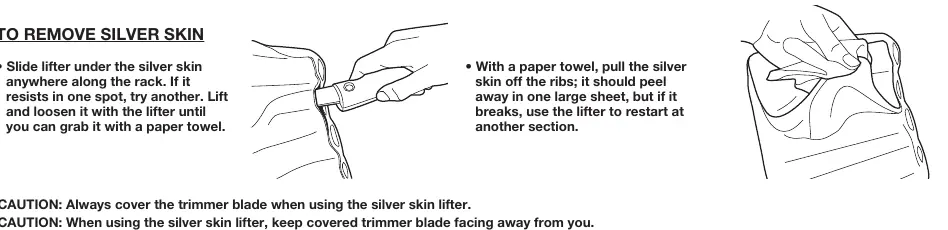
- Slide the lifter under the silver skin anywhere along the rack.
- If it resists, try a different spot.
- Lift and loosen the skin with the lifter until you can grasp it with a paper towel.
- Pull the silver skin off using a paper towel; it should peel away in a large sheet.
- If the skin breaks, use the lifter to restart at another section.
Replacing the Blade
When the blade becomes dull, follow these steps to replace it:
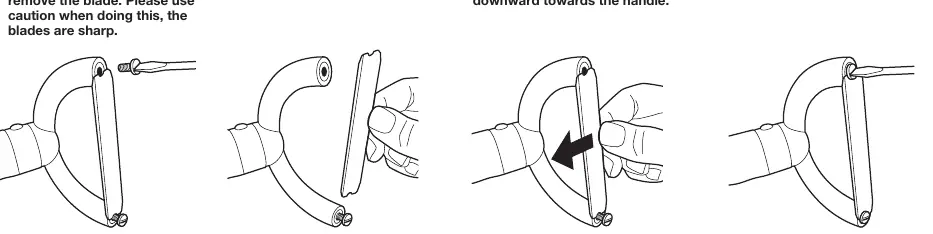
- Use a flat-head screwdriver to unscrew one screw completely and loosen the other.
- Remove the dull blade and discard it safely, as you would a razor blade.
- Align the new blade in place. Note: The sharp edge must point downward towards the handle.
- Secure the blade with the screws.
- Ensure both screws are tightened before the next use.
- Always cover the blade with the blade guard when not in use.
Care and Maintenance
The meat trimmer is dishwasher safe. Always use the safety guard to protect the blade during storage.
Manufacturer information
Cuisinart
Practical help
Common problems
Meat is difficult to trim
Ensure the meat temperature is below 45 degrees. Keep the meat cool to maintain firmness.
Silver skin is hard to remove
Use the lifter to loosen the skin until you can grab it with a paper towel, then pull firmly.
Before use
- Ensure meat is cool (below 45 degrees)
- Check that the blade is sharp
- Retract the silver skin lifter when using the trimmer blade
- Ensure the blade guard is removed before use
Specs in practice
- Dishwasher safe
- The tool can be cleaned in a dishwasher.
Images and diagrams
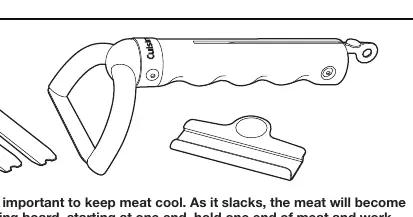
- The trimmer features a blade for fat trimming and a silver skin lifter for removing membranes.
Model compatibility
- Suitable for fat cap laden meats, large cuts of beef and pork, and salmon skin.

Manual page author
Michael Turner
Technical manual editor
Reviews PDF manuals for structure, safety notes, and practical product details so readers can find the right information quickly.