Home Appliances / Small Kitchen Appliances
User Manual for Cuisinart CPT525E and CPT545E Motorized Digital Toaster
Quick guide for the Cuisinart CPT525E and CPT545E Motorized Digital Toaster. Includes operating instructions, MemorySet feature, cleaning, and troubleshooting.
Quick answers from the manual
Quick answer
- The Cuisinart CPT525E/CPT545E is a motorized digital toaster. To toast, insert bread, select your settings, and press the activation bar down. You can save up to 4 custom settings using the MemorySet feature. p. 6, 7
Key actions
- To program MemorySet: Select settings, hold Memory button, select number, confirm. p. 7
- To reset memory settings: Unplug, hold BREAD TYPE and MEMORY buttons, plug in. p. 7
First start
- Wipe the unit with a damp cloth to remove shipping dust. p. 5
Problems and fixes
Bread stuck or Error E
Unplug, let cool, check for thick bread, run cycle without bread.
p. 10Maintenance and reset
- Reset memory settings by holding BREAD TYPE and MEMORY buttons while plugging in. p. 7
Where to find it in the PDF
- Parts & Features p. 6
- Operating Instructions p. 7
Table of contents
Manual images
Click an image to enlargeQuick guide from the manual
This manual provides instructions for the Cuisinart CPT525E and CPT545E Motorized Digital Toaster. Always read the safety instructions before use. The toaster features a motorized carriage, digital display, and MemorySet functionality for saving your preferred settings.
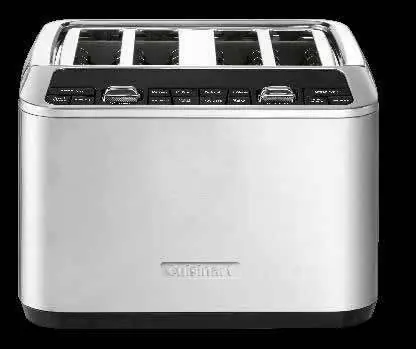
Parts and Features
The toaster includes dual toasting slots, a digital display, and various control buttons:
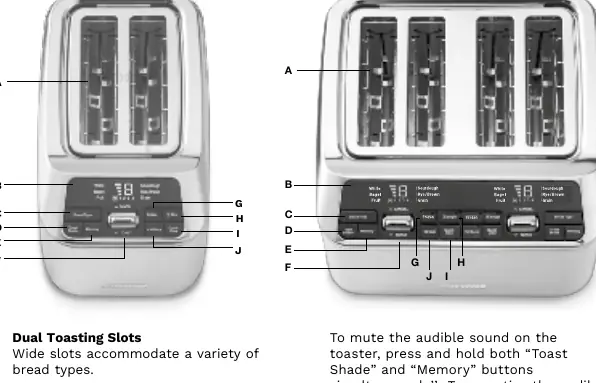
- Bread Type Button: Selects bread type (white, bagel, fruit bread, sourdough, rye/brown, grain).
- Toast Shade Button: Adjusts browning level (1-7).
- Memory Button: Saves up to 4 favorite settings.
- Toast/Cancel Activation Bar: Lowers bread to start or lifts to cancel.
- QuickView Button: Momentarily lifts bread to check progress.
- +30 Secs Button: Extends toasting time.
- Frozen Button: Defrosts and toasts.
- Slice Button: Adjusts heat for single-slice toasting.
Operating Instructions
Toasting:
- Insert bread into the slots.
- Select bread type and functions (e.g., Frozen, Slice).
- Use the Toast Shade button to set the browning level (1-2 light, 3-5 medium, 6-7 dark).
- Press the Activation Bar down to start. The motorized carriage will lower the bread.
- Press the bar up to cancel at any time.
MemorySet Feature
You can save up to 4 custom settings:
- Select your desired bread options and shade.
- Press and hold the Memory button until 'M' lights up and '1' flashes.
- Select the memory number (1-4) by pressing the Memory button.
- Confirm by pressing and holding the Memory button again until flashing stops.
Cleaning and Maintenance
Always allow the toaster to cool completely and unplug it before cleaning. Wipe the exterior with a clean, damp cloth. Slide out the crumb tray at the back to discard crumbs. Never operate the toaster without the crumb tray in place. Do not use abrasive cleaners or insert hard/sharp instruments into the slots.
Troubleshooting
If the unit does not turn on, ensure it is plugged into a functional outlet. If the bread goes up and down repeatedly or an 'E' appears on the display, the bread may be stuck; unplug the unit, let it cool, and check the slots. To reset memory settings, hold the BREAD TYPE and MEMORY buttons while plugging the unit into the outlet.
Manufacturer information
Cuisinart
Practical help
Common problems
Unit will not turn on
Ensure the unit is plugged into a functional power outlet.
Bread goes up and down repeatedly or 'E' appears
The bread may be stuck. Unplug the toaster, let it cool, check for obstructions, and try running a cycle without bread.
Memory settings will not reset
Hold the BREAD TYPE and MEMORY buttons simultaneously while plugging the unit back into the power outlet.
Before use
- Remove all packaging materials
- Wipe the unit with a clean, damp cloth to remove shipping dust
- Ensure the crumb tray is properly inserted
Images and diagrams
- The toaster features a motorized carriage that lowers bread automatically when the activation bar is pressed.
- The crumb tray is located at the back of the unit for easy access.
Model compatibility
- Do not use with external timers or remote control systems.
- Do not place buttered bread in the toaster as it creates a fire hazard.
- Do not use the 'Slice' setting for bagels or sourdough.

Manual page author
Emily Carter
User documentation editor
Prepares concise manual descriptions and highlights the most useful setup, operation, and maintenance information for readers.