Home Appliances / Air Fryers
User Manual for Cuisinart 2.6-Quart Basket Air Fryer AIR-80
Get the most out of your Cuisinart AIR-80 2.6-Quart Basket Air Fryer with this comprehensive user guide. Includes setup instructions, cooking tips, troubleshooting, and recipes.
Quick answers from the manual
Quick answer
- The Cuisinart AIR-80 is a 2.6-Quart Basket Air Fryer. To operate, place food in the basket with the crisper plate, select a function (Air Fry, Roast, or Bake), adjust time/temperature, and press Start/Stop. p. 4, 6
Key actions
- To start cooking p. 6
- To clean the basket p. 9
First start
- Remove all packaging, place on a flat surface with 2-4 inches of clearance, and ensure the crisper plate is in the basket. p. 5, 6
Problems and fixes
Unit won't turn on
Check power connection and basket placement.
p. 8Maintenance and reset
- Unplug and allow to cool before cleaning. Hand-wash basket and crisper plate with hot, sudsy water and a soft sponge. p. 9
Where to find it in the PDF
- Control Panel p. 4, 5
- Cooking Chart p. 7
Table of contents
Manual images
Click an image to enlargeQuick Guide
The Cuisinart AIR-80 2.6-Quart Basket Air Fryer is designed for household use. Before first use, remove all packaging, place the unit on a flat, heat-resistant surface with 2-4 inches of clearance, and ensure the crisper plate is inserted into the basket. Always unplug the unit when not in use and allow it to cool before cleaning.
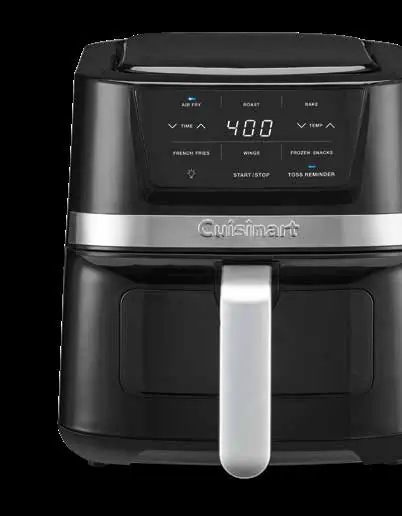
Features and Benefits
- Digital Control Panel: Touch controls for time, temperature, cooking functions (Air Fry, Roast, Bake), and presets (French Fries, Wings, Frozen Snacks).
- Air Fry Basket: Includes a cool-touch handle and a 6.25 x 6.25-inch surface area.
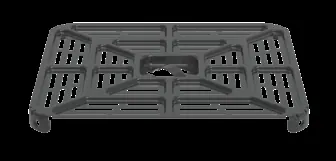
- Crisper Plate: Must be inserted into the basket for even cooking.
- Viewing Window: Allows you to check food progress without opening the basket.
- Toss Reminder: An optional feature that alerts you halfway through cooking to toss or flip food.
Operation
- Place the appliance on a stable, flat, heat-resistant surface and plug it in.
- Remove the basket and ensure the crisper plate is inserted.
- Add food to the basket and insert it into the unit.
- Use the digital controls to select the desired cooking function or preset, and adjust time/temperature as needed.
- Press the Toss Reminder button if you wish to activate the audio alert for flipping food.
- Press Start/Stop to begin cooking.
- When the timer reaches 00, the unit will beep. If the basket remains inserted, the unit will automatically enter Keep Warm mode.
- Press Start/Stop or remove the basket to turn the unit off.
Cleaning and Maintenance
Always unplug the unit and allow it to cool completely before cleaning.
- Exterior: Wipe with a clean, damp cloth. Do not use abrasive cleaners.
- Interior: Use a damp cloth and mild liquid soap. Never use harsh abrasives or steel wool.
- Basket and Crisper Plate: These are dishwasher safe. Hand-washing with hot, sudsy water and a soft sponge or nylon brush is recommended to preserve the non-stick coating.
Troubleshooting
- Unit won't turn on: Ensure it is plugged into a functional outlet and the basket is securely in place.
- Food not crispy/evenly cooked: Ensure food is in a single layer without overlap. Use the Toss Reminder feature. Lightly spray with oil.
- Food undercooked: Cook in smaller batches. Ensure the temperature is appropriate (ideal is around 400°F).
Manufacturer information
Cuisinart
Practical help
Common problems
Unit won't turn on
Ensure it is plugged into a functional outlet and the basket is securely in place.
Food not crispy or evenly cooked
Ensure food is in a single layer without overlap. Use the Toss Reminder feature. Lightly spray with oil.
Food undercooked
Cook in smaller batches. Ensure temperature is appropriate (ideal is around 400°F).
Tough-to-remove residue
Soak in hot, sudsy water or use a nonabrasive cleaner. Hand-wash with a nylon brush.
Before use
- Remove all packaging materials.
- Place on a flat, level, heat-resistant surface.
- Ensure 2-4 inches of clearance from walls or objects.
- Check that the crisper plate is inserted in the basket.
Specs in practice
- Toss Reminder
- Audio alert halfway through cooking to remind you to flip or toss food.
Images and diagrams
- The control panel features touch controls for time, temperature, and cooking functions.
- The crisper plate must be inserted into the basket for cooking.
- The cord wrap is located on the back of the unit.
Model compatibility
- Not intended for commercial use.
- Use only in 120-volt outlets.
- Do not use on heat-sensitive surfaces.

Manual page author
Emily Carter
User documentation editor
Prepares concise manual descriptions and highlights the most useful setup, operation, and maintenance information for readers.