Home Appliances / Small Kitchen Appliances
User Manual for Cuisinart Soho 2-Slice Toaster CPT-7 Series
Get the most out of your Cuisinart Soho 2-Slice Toaster (CPT-7 Series) with this comprehensive user guide. Learn how to use the QuickView feature, bagel settings, cleaning tips, and safety precautions.
Quick answers from the manual
Quick answer
- The Cuisinart Soho 2-Slice Toaster features a QuickView™ lever to check browning progress, a Bagel setting, and a removable crumb tray. Always unplug before cleaning and never use sharp objects to remove stuck food. p. 4, 5, 6
Key actions
- To toast bread: Insert bread, select function (optional), set browning level, and press the carriage lever down. p. 5
First start
- Unwind the power cord, ensure the crumb tray is in place, and plug into a wall outlet. p. 5
Problems and fixes
Food stuck in slots
Unplug the unit, turn upside down, and gently shake. Do not use sharp tools.
p. 6Maintenance and reset
- Clean the exterior with a damp cloth. Slide out and empty the crumb tray regularly. p. 6
Technical specifications
| Parameter | Value | Meaning | Pages |
|---|---|---|---|
| Browning Levels | 1-7 | Adjustable shade settings from light to dark. | p. 5 |
Where to find it in the PDF
- Features and Benefits p. 4
- General Operation p. 5
- Cleaning and Maintenance p. 6
Table of contents
Quick Guide
The Cuisinart Soho 2-Slice Toaster is designed for household use. Before using, ensure the crumb tray is in place and the unit is plugged into a 120V outlet. Always unplug the toaster when not in use and before cleaning. Never leave the toaster unattended while in operation and avoid using it under wall cabinets or near combustible materials like curtains.
Features and Benefits
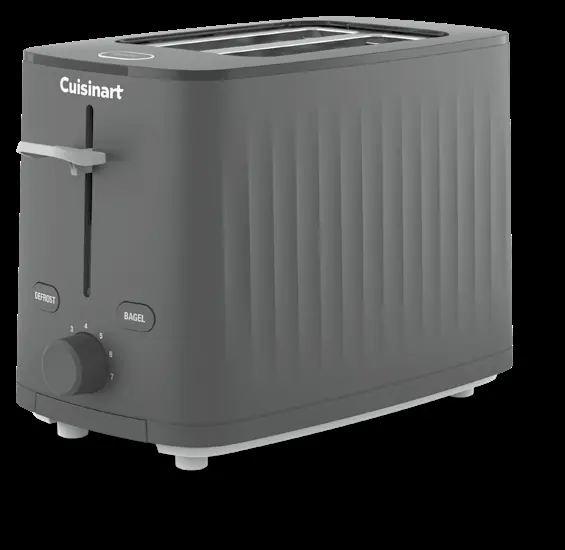
- Dual Toasting Slots: 1½-inch slots for various bread types.
- Cancel Button: Stops the toasting process and lifts the bread.
- High-Lift Lever with QuickView™: Allows you to check browning progress without interrupting the cycle.
- Bagel Button: Optimized setting for toasting bagels.
- Defrost Button: Defrosts and toasts frozen bread.
- Browning Shade Dial: Adjustable settings from 1 to 7.
- Reheat Setting: Reheats without browning.
- Rear Cord Stuff Box: Stores excess cord.
- Front Slide-Out Crumb Tray: Removable tray for easy cleaning.
Before First Use
Unwind the power cord and ensure the crumb tray is properly inserted. Check that the slots are empty before plugging the unit into a wall outlet.
General Operation
- Insert bread slices into the slots. Ensure the carriage lever is in the up position.
- Select a function if desired (Bagel, Defrost, or Reheat).
- Turn the browning dial to the desired setting (1–7). Settings 1–2 are light, 3–5 are medium, and 6–7 are dark.
- Press the carriage lever down until it locks to begin toasting.
- To stop the cycle early, press the Cancel button.
- Unplug the toaster after use.
Note: The toaster enters idle mode after 5 minutes of inactivity. Press any button or push the lever to wake it.
Functions
- QuickView™: Lift the high-lift lever to check progress, then release to continue.
- Bagel: Reduces heat on one side of the slot. Ensure the cut side faces away from the center of the pair of slots.
- Defrost: A longer cycle to defrost and toast.
- Reheat: Reheats without browning. Note: Defrost and Bagel cannot be selected while in Reheat mode.
Tips and Hints
- Uneven Toasting: Usually caused by slices of uneven thickness.
- Frozen Items: Use the Defrost function.
- Toaster Pastries: Use the lightest setting and never leave unattended.
- Single-Slice Toasting: Use a lighter setting than normal to avoid over-toasting.
Cleaning and Maintenance
Always allow the toaster to cool completely before cleaning.
- Exterior: Wipe with a clean, damp cloth and dry thoroughly. Do not use abrasive cleaners.
- Crumb Tray: Slide out, empty, and replace. Never operate without the tray.
- Stuck Food: Unplug the unit, turn it upside down, and gently shake. Never insert sharp instruments into the slots.
- Cord Storage: Use the rear cord stuff box for excess cord.
Manufacturer information
Cuisinart
Practical help
Common problems
Uneven toasting
Ensure bread slices are of even thickness. Use a higher setting for fresh or whole-wheat bread.
Food stuck in slots
Unplug the toaster, turn it upside down, and gently shake. Never use sharp instruments to remove food.
Toaster not working
Ensure the plug is fully inserted into the outlet and the carriage lever is locked in the down position.
Before use
- Unwind the power cord.
- Check that the crumb tray is in place.
- Ensure there is nothing in the toaster slots.
- Plug the power cord into a wall outlet.
Specs in practice
- Browning Shade Dial (1-7)
- 1-2: Light, 3-5: Medium, 6-7: Dark.
Images and diagrams
- 1. Dual Toasting Slots
- 2. Cancel Button
- 3. High-Lift Lever with QuickView™
- 4. Bagel Button
- 5. Defrost Button
Model compatibility
- Designed for 120-volt outlets only.
- Do not use with external timers or remote-control systems.
- Not intended for use with buttered breads (fire hazard).

Manual page author
Michael Turner
Technical manual editor
Reviews PDF manuals for structure, safety notes, and practical product details so readers can find the right information quickly.