Tools / Power Tools
Dremel 8260 Cordless Rotary Tool User Manual
Quick guide for the Dremel 8260 cordless rotary tool. Includes setup, operation, accessory changes, speed settings, and maintenance instructions.
Table of contents
Manual images
Click an image to enlargeQuick guide from the manual
This guide provides essential information for operating the Dremel 8260 cordless rotary tool. Always read the full safety warnings provided in the source PDF before use.
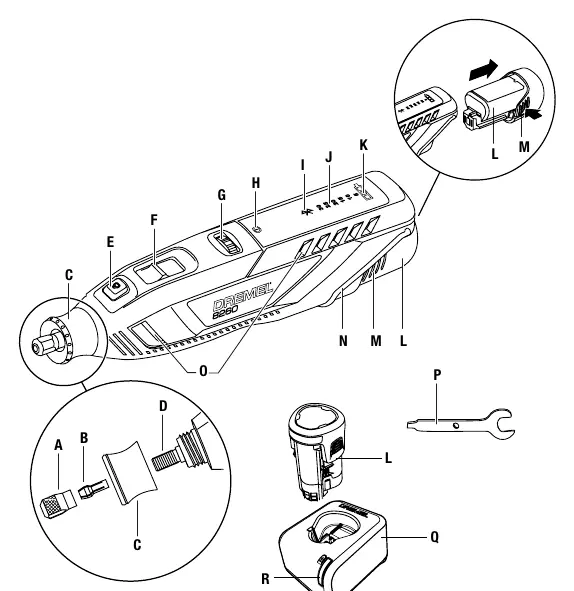
Product Description
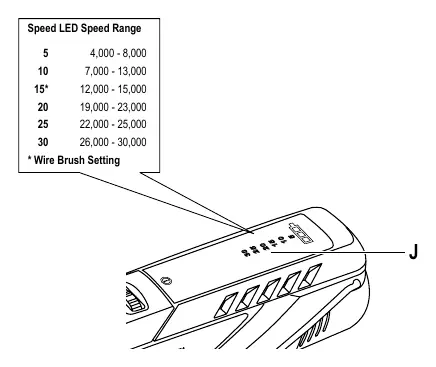
The Dremel 8260 is a variable speed cordless smart rotary tool. Key components include the collet nut, collet, nose cap (with integrated EZ Twist wrench), shaft, shaft lock button, on/off switch, variable speed dial, and LED indicators for warning, Bluetooth, speed, and battery level.
Getting Started
Practice on scrap material first to understand how the tool performs at high speeds. Allow the tool's speed and the correct accessory to do the work; do not apply excessive pressure. For precision work, hold the tool like a pen between your thumb and forefinger. For heavier tasks like grinding or cutting, use a golf-style grip.
Operation
On/Off: Slide the switch forward to turn the tool ON and backward to turn it OFF. Speed Control: Use the variable speed dial to adjust speed during operation. Refer to the speed chart on pages 17-18 for recommended settings based on the material and accessory.
Battery and Charging
Use only the specified Dremel charger (GAL 12V-20) and battery pack. The charger indicator light will blink green during fast charging and turn solid green when complete. Fast charging is only possible when the battery temperature is between 0°C and 45°C.
Accessories
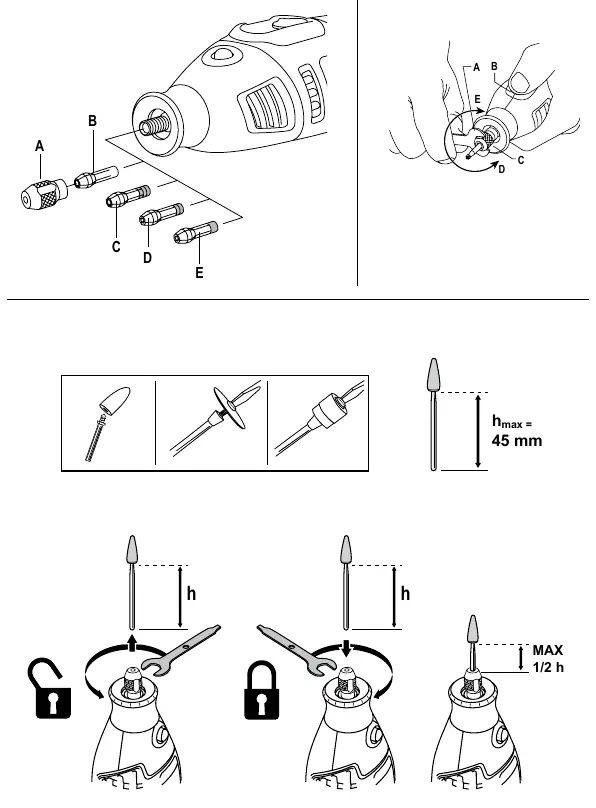
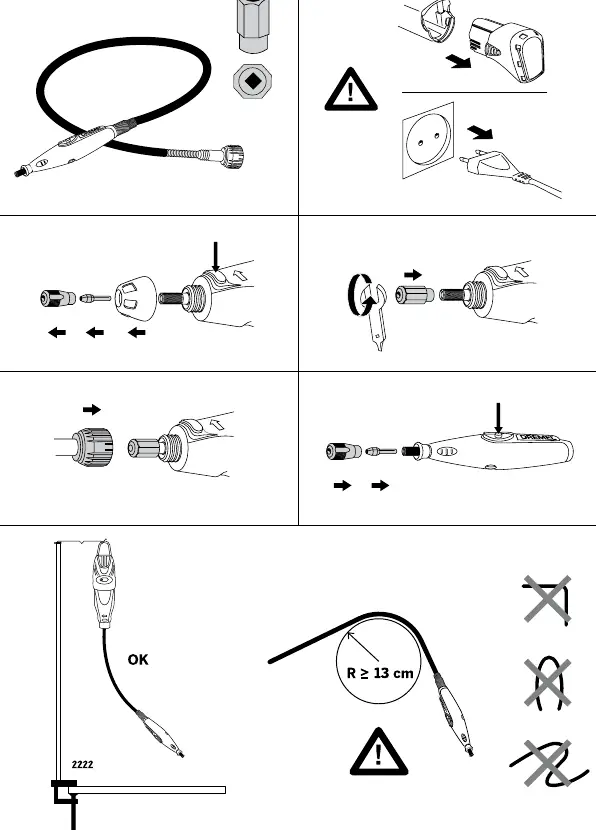
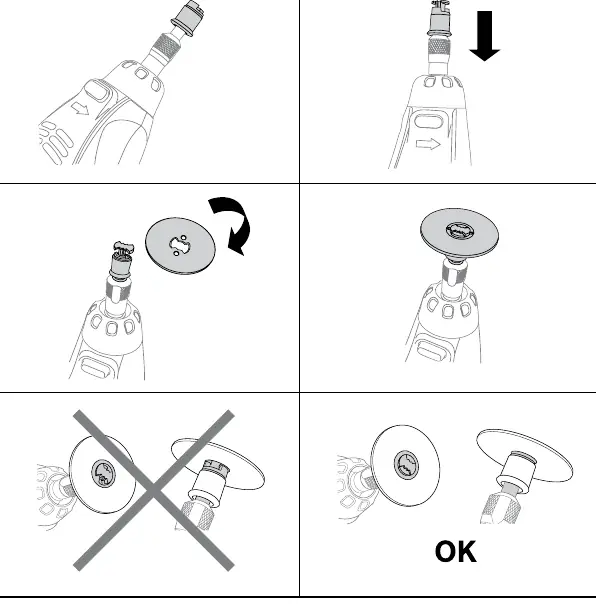
Changing Accessories: Press the shaft lock button and rotate the shaft until it engages. Loosen the collet nut or chuck. Insert the accessory shank fully and tighten securely. Dremel Chuck 4486: Allows for quick accessory changes without changing collets. EZ Twist: The nose cap features an integrated wrench for tightening/loosening the collet nut without a separate tool.
Maintenance and Cleaning
Always disconnect the tool from the power supply before cleaning. Clean the tool using compressed dry air. Keep ventilation openings and switch levers clean and free of foreign matter. Do not use harsh solvents like gasoline or ammonia-based cleaners, as they can damage plastic parts.
Safety
Always wear personal protective equipment, including eye protection, hearing protection, and a dust mask. Do not work with materials containing asbestos. Ensure the work area is clean and well-lit. Keep children and bystanders away while operating the tool.
Manufacturer information
Dremel
Practical help
Common problems
Tool stalls or stops during use
Reduce pressure on the tool. If the bit is bound in the workpiece, remove it and reset by turning the tool off and on.
Accessory slips in the chuck
Use the EZ Twist nose cap or a wrench to tighten the chuck around the bit. If slippage persists, switch to the collet and collet nut system.
Red warning LED is illuminated
Check for excessive tool temperature, excessive battery temperature, or tool overload/stall. Turn the tool off and allow it to cool or reduce pressure.
Before use
- Ensure the battery pack is fully charged
- Check that the accessory is securely installed
- Wear appropriate personal protective equipment (eye protection, dust mask, etc.)
- Ensure the work area is clean and well-lit
- Verify the tool is switched off before inserting the battery
Specs in practice
- Collet capacity
- 3.2 mm
- Max. accessory diameter
- 38.1 mm
Images and diagrams
- Page 4: Tool components overview (A-R)
- Page 5: Accessory changing procedure
- Page 6: Speed settings chart
- Page 8: Flexible shaft setup
Model compatibility
- Use only Dremel tested accessories
- Compatible with Dremel charger GAL 12V-20

Manual page author
Emily Carter
User documentation editor
Prepares concise manual descriptions and highlights the most useful setup, operation, and maintenance information for readers.